Your first factory order is ready to go. The supplier on Alibaba has sent a quote, your Shopify store has a product page waiting, and the only record of what you agreed is a chat thread and a PDF in your downloads folder. Three months from now, when you reorder, you will want to know the price, the lead time, and whether the last batch arrived in good shape.
I built an Amazon FBA and Shopify brand to $3M ARR, and the supplier mistakes that hurt most were the boring ones: a reorder placed at an old price, a lead time nobody wrote down, a deposit sent to bank details that had quietly changed. This guide shows how to set up supplier management inside Shopify with the tools it gives you today, and how to keep the few things Shopify doesn't store in a simple supplier file next to it.
TL;DR
- Shopify now has built-in suppliers. You create them under Products, then Purchase orders, and each supplier record shows contact details, an address, and the products you've ordered from them before.
- The Vendor field on a product is a separate label for sorting and reports. It isn't linked to the supplier records your purchase orders use.
- Send every order on a Shopify purchase order, then receive it on the linked transfer, where you can reject damaged units and add shipping and customs costs.
- Shopify doesn't keep default payment terms, lead times, MOQs, bank details, or supplier documents, and supplier payments happen outside Shopify. Keep those in a supplier file.
- For a first order with a new factory, pay through Alibaba Trade Assurance instead of wiring an unknown supplier directly, and score every supplier on real orders once a quarter.
What Shopify Gives You For Supplier Management
For years, Shopify sellers managed suppliers in the Stocky app or a spreadsheet. Stocky was retired on August 31, 2026, and the Shopify admin now has purchase orders with built-in supplier records. That covers the core loop for a small store: who you buy from, what you ordered, and what actually arrived.
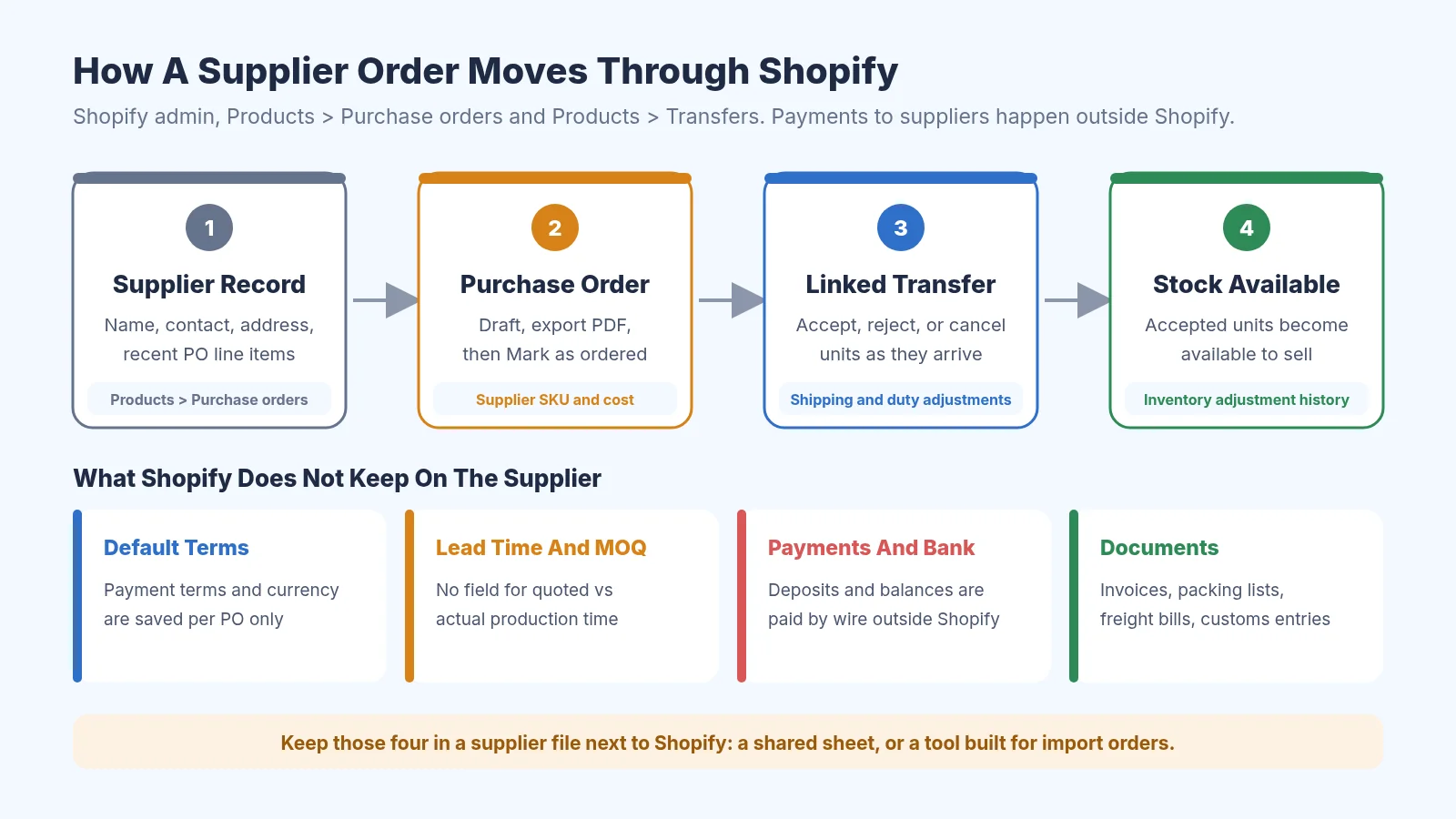
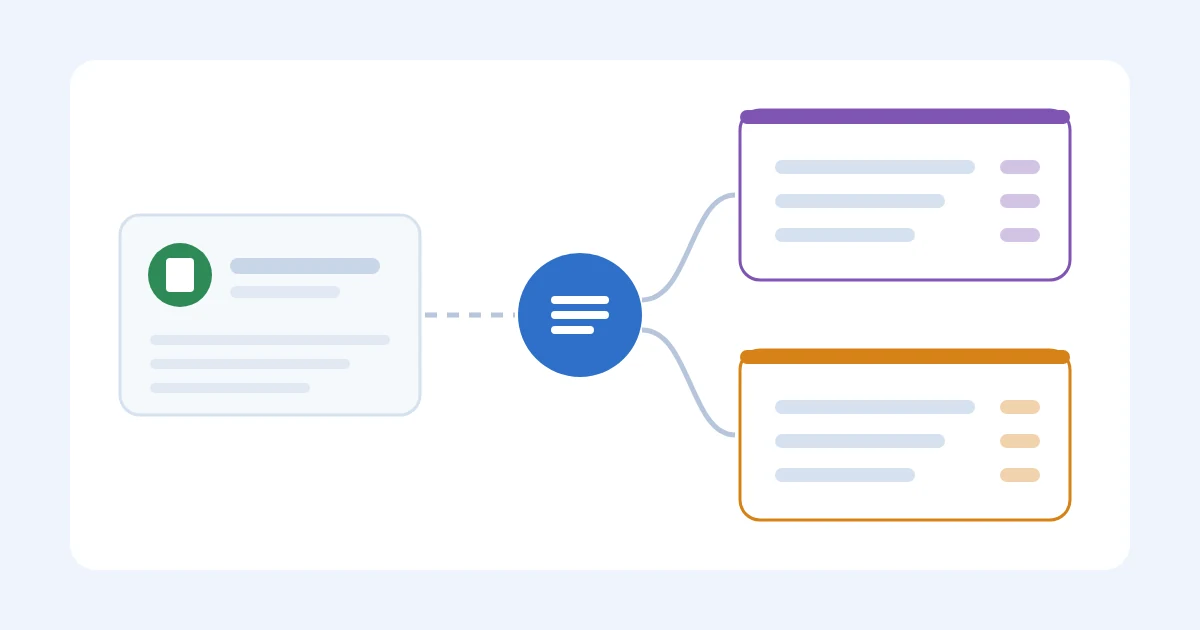
How a supplier order moves through Shopify, and what to keep in a supplier file
The supplier record itself is fairly light. It holds the supplier's name, contact details, and address, plus a list of recent purchase order line items so you can see what you've bought from them. Everything else about the relationship, like agreed terms, quality history, and how late they usually ship, still needs a home of its own.
Vendor Vs Supplier In Shopify
This trips up a lot of new sellers, because Shopify uses both words. The Vendor field sits in the Product organization section of every product, and Shopify's guide to vendor information explains that each product can have one vendor, which defaults to your store name if you leave it blank. You can sort and filter your product list and many reports by vendor.
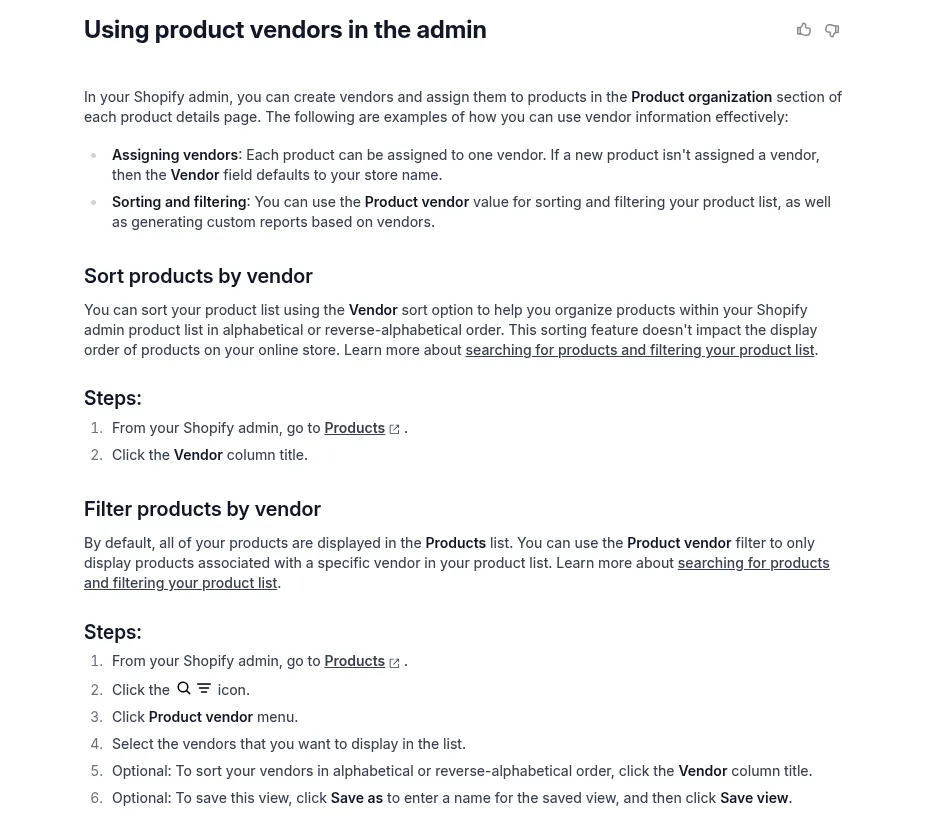
Shopify Help Center guide to the product Vendor field
Suppliers are a different thing. They're the businesses you place purchase orders with, and they live in the purchase orders area of the admin. Shopify doesn't link the two, so I'd set the Vendor field to the brand customers see (often your own) and use supplier records for the factories you pay.
Step 1: Create Each Supplier In Shopify
You add a supplier from inside a purchase order. Go to Products, then Purchase orders, click Create purchase order, open the Select supplier menu, and choose Create new supplier. Shopify's help page on creating and managing suppliers walks through each field.
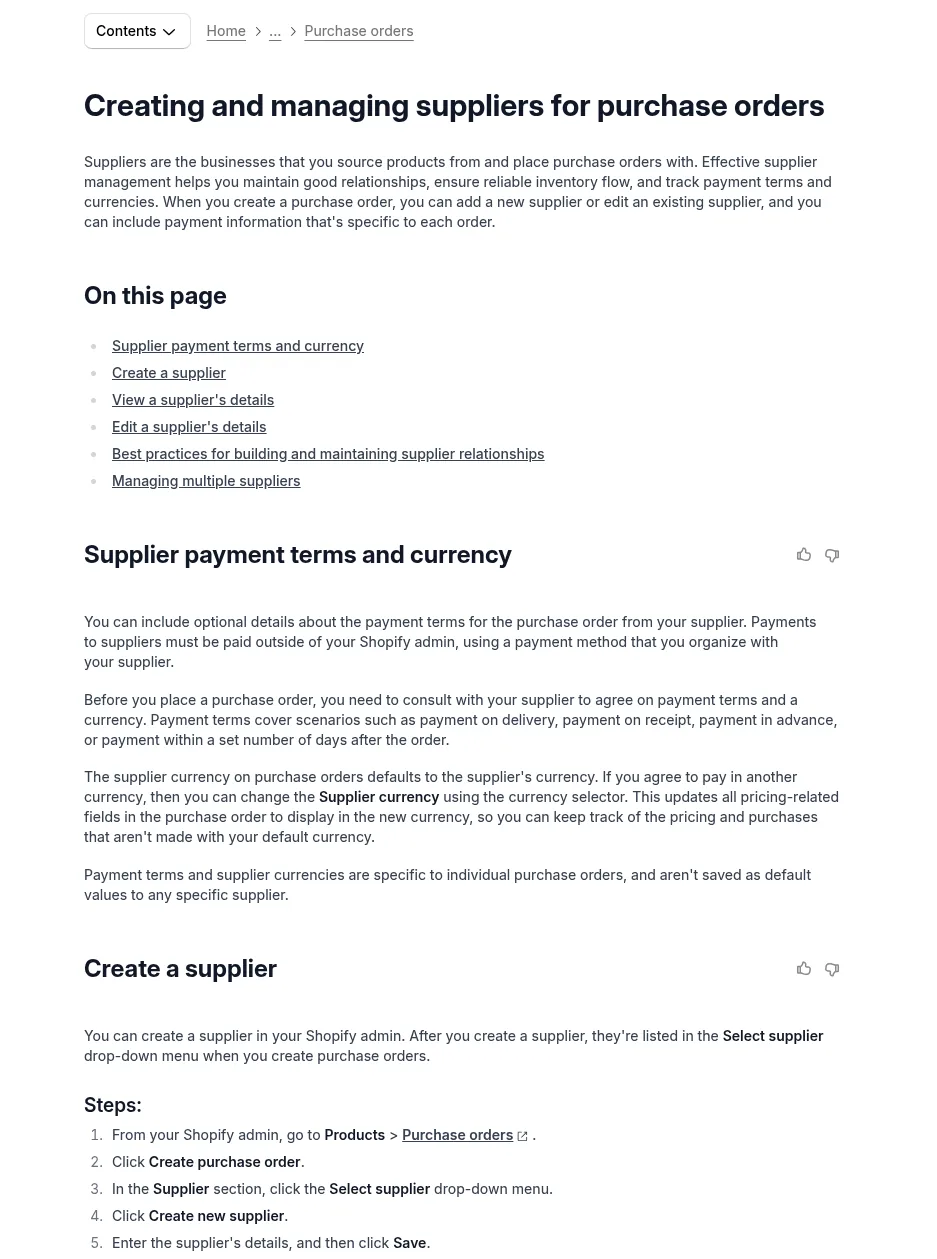
Shopify Help Center guide to creating suppliers for purchase orders
Use the supplier's legal company name as it appears on their invoices, since that's the name you'll be matching on bank transfers later. Add the email and phone of the person who actually answers you, and the factory address if it differs from the sales office. If you edit a supplier's details later, Shopify updates them on all existing purchase orders, so you only fix a typo once.
Step 2: Start A Supplier File For What Shopify Doesn't Store
Here is the gap you need to fill. Shopify says payment terms and supplier currency are set on each purchase order and aren't saved as defaults on the supplier, and payments to suppliers are made outside the Shopify admin. There is also no place on a supplier for lead time, MOQ, sample costs, or the invoices and packing lists that come with every order.
A one-tab spreadsheet is enough to start. I'd give each supplier one row with these columns:
- Legal company name and the main contact, plus how they prefer to talk (email, WhatsApp, or WeChat)
- Agreed payment terms, such as 30% deposit and 70% before shipping, and the currency
- Bank account details as first confirmed, and the date you confirmed them by phone or video call
- Quoted lead time and MOQ for each product, next to the actual lead time on your last order
- Sample costs paid and what the approved sample looked like
- Links to every invoice, packing list, freight bill, and customs entry for their orders
Write the bank details down on day one. The most expensive supplier mistake is paying a balance to an account that changed by email. If a supplier ever sends new bank details, call your contact on a number you already have before you send a cent.
If you'd rather start from a structure, the free SupplyAutomate supplier evaluation matrix and the lead time tracker template cover the scoring and lead time columns. You can also work out a realistic lead time with the free lead time calculator before you write it in.
Step 3: Vet A New Supplier Before You Pay Anything
For a first order with a factory you found online, the safest move is to order and pay through Alibaba Trade Assurance. It covers you if the goods don't ship on time or don't match what was agreed in the order, which is exactly the risk a first-time seller can't absorb. A direct wire or bank transfer to a supplier you've never worked with is very hard to get back if something goes wrong.

Alibaba Trade Assurance buyer protection page
Before the first payment, ask for a sample and pay for it, and record the cost in your supplier file because samples are part of your landed cost. Check that the company name on the proforma invoice matches the Alibaba storefront and the bank account. Our supplier onboarding process guide has a fuller checklist, and the 30/70 payment terms guide explains how deposits and balances usually work with Chinese factories.
Step 4: Send Every Order On A Purchase Order
Once a supplier is in Shopify, every order should start as a Shopify purchase order. Add the products, quantities, and agreed unit cost, put the payment terms and currency in the Purchasing information section, and save it as a draft. Shopify lets you export the draft as a PDF so the supplier can confirm the details in writing.
After the supplier confirms, click Mark as ordered. Shopify can't reverse that status, but you can still edit products, costs, and supplier details afterward. On your next order with the same supplier, Shopify fills in the supplier SKU and cost from your previous purchase orders, which is handy, but it means an old price will carry forward unless you check it against the new quote.
If you'd like to see the full PO flow first, our Shopify inventory management guide covers purchase orders, transfers, and stock counts step by step. If you need a standalone PO to send before your products exist in Shopify, the free purchase order creator and purchase order template work for that, since Shopify only lets you add products that already exist in your store.
Step 5: Receive The Goods And Record The Real Cost
Receiving happens on the inventory transfer linked to the purchase order. From the PO, click Create transfer, and when the cartons arrive, open the transfer and accept, reject, or cancel each line. Accepted units become available to sell, rejected units are recorded but don't add to stock, and you can receive a split shipment one delivery at a time.
The same transfer is where Shopify lets you add shipping costs and fees as cost adjustments, including customs duties. The transfer's cost summary then shows the agreed cost on the PO next to what the goods actually cost to receive.
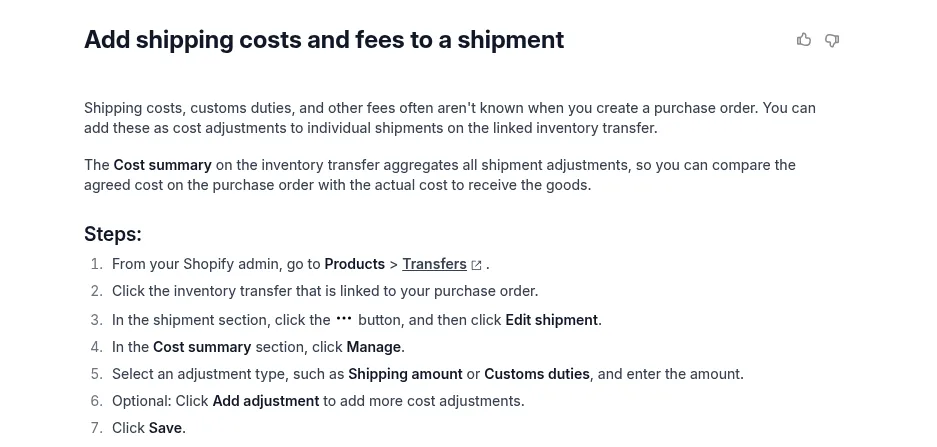
Shopify Help Center steps for adding shipping and customs costs to a transfer
That comparison is useful, but it isn't a per unit landed cost for each SKU. To get that, add the factory price, freight, duty, and samples together and spread them over the units you accepted. The free landed cost calculator does the math, and our guide to Shopify cost per item and landed cost explains which number to put back into Shopify.
Step 6: Score Your Suppliers Every Quarter
Supplier scoring sounds like a big company habit, but for a small store it takes about ten minutes a quarter. Pull up each supplier's orders from the last three months and write down whether they shipped on time, how many units you rejected at receiving, whether the invoice matched the PO, and how quickly they replied. Shopify's purchase order list can be filtered by supplier, which makes finding those orders quick.

SupplyAutomate free supplier evaluation matrix template
The point is to change the next order. A supplier who ships late gets a longer lead time in your reorder math, a supplier with damage problems gets a packing note on the next PO, and a supplier who ignores you for a week gets a backup quote. Our supplier evaluation matrix guide goes deeper on weighting the criteria.
A Worked Example With Two Suppliers
Say you sell insulated water bottles on Shopify. You buy the bottles from a factory you found on Alibaba and the printed gift boxes from a packaging supplier. Both get a supplier record in Shopify and a row in your supplier file.
The bottle order is 1,000 units at $3.10, so $3,100, paid 30% up front and 70% before shipping through Trade Assurance. The factory quoted 30 days and shipped on day 41. When the goods arrived, you accepted 976 bottles on the transfer and rejected 24 dented ones. The box printer quoted 14 days, shipped in 13, and invoiced $40 more than the PO for inserts nobody had agreed in writing.
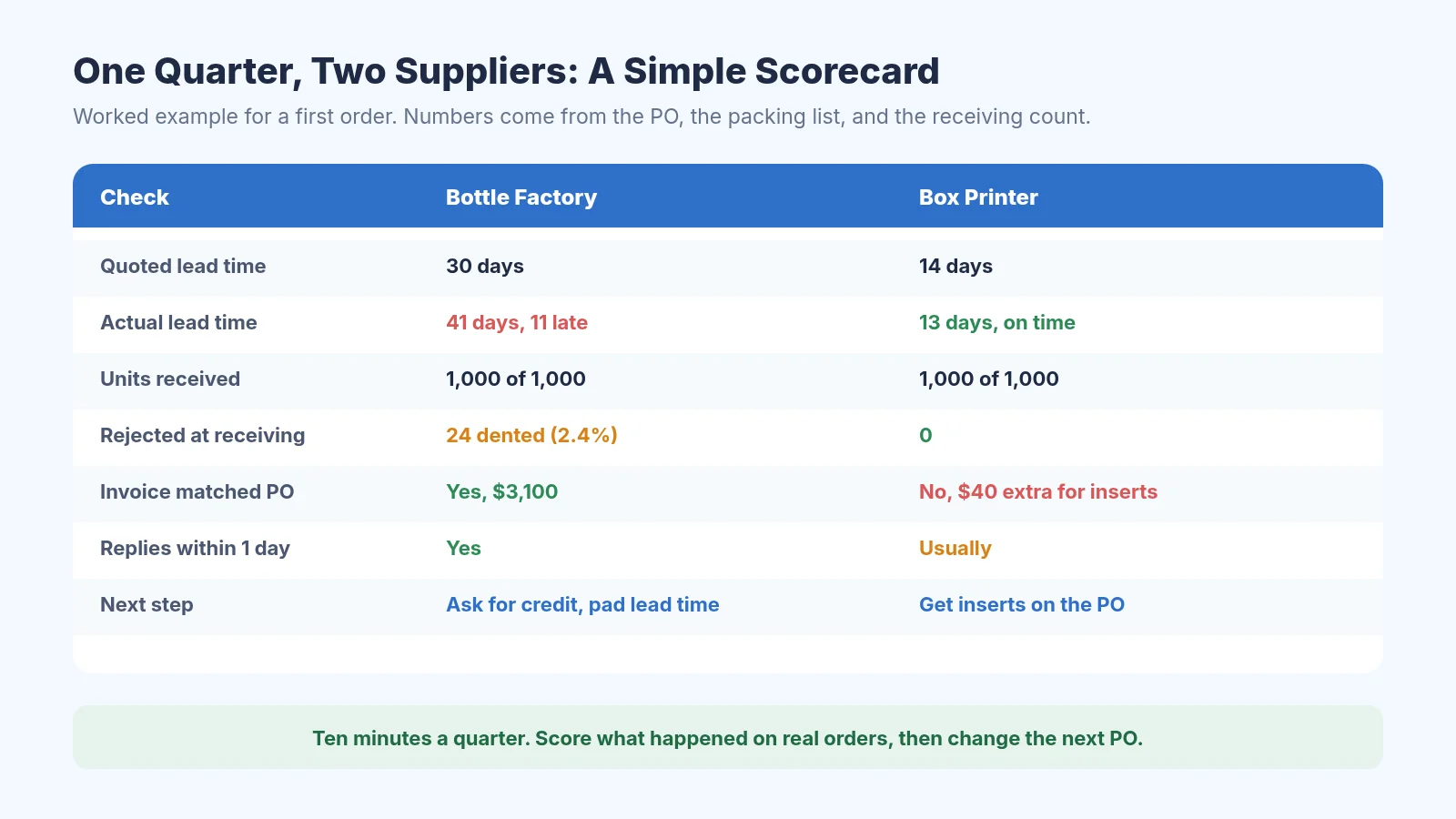
A worked example scorecard for two suppliers after one quarter
Now the landed cost. Freight came to $620, duty on the customs entry was $465, and you paid $85 for samples, so the bottles cost $3,100 + $620 + $465 + $85 = $4,270 to land. Spread over the 976 good units, that's about $4.38 per bottle, well above the $3.10 on the quote. For the next order, you'd ask the factory for a credit on the 24 dented units, pad its lead time to around 45 days, and put the inserts on the box printer's PO so the invoice matches.
If You Moved Over From Stocky
If you used Stocky before it shut down, your supplier list didn't come with you. Shopify's Stocky migration guide says suppliers can't be exported from Stocky, historical purchase orders can't be imported into Shopify, and read-only access to export other Stocky data lasts for at least 90 days after August 31, 2026.
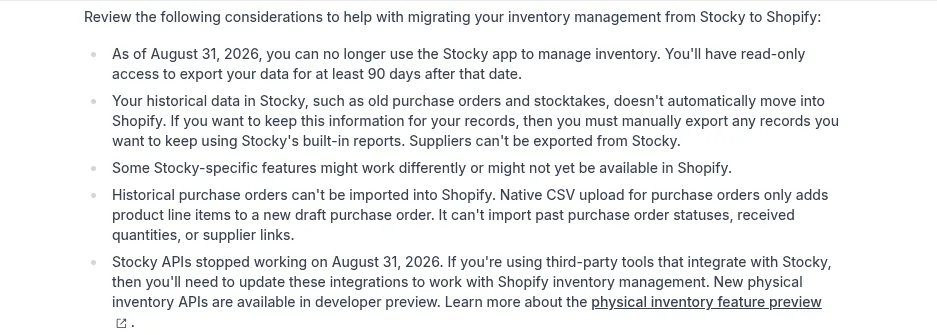
Shopify Help Center notes on migrating from Stocky
So export your completed purchase order reports and cost history while you still can, then recreate each supplier in Shopify by hand. Put the old PO exports in your supplier file so the price and lead time history isn't lost. Our Stocky alternatives guide covers what to use if Shopify's built-in tools don't cover your setup.
Where SupplyAutomate Fits
SupplyAutomate is a place to keep the supplier file and the order paperwork together once a spreadsheet gets messy. You upload the supplier invoices, packing lists, freight bills, and customs entries for each order, and it reads the key values and keeps them on the purchase order, alongside the supplier's terms and payments. It also tracks parcel and ocean container shipments and calculates landed cost from factory price, freight, duty, and samples.
SupplyAutomate does not connect to Shopify, Amazon, or WooCommerce, and it doesn't sync sales, orders, or stock levels. You still create your purchase orders and receive stock in Shopify yourself, and you can export the landed cost and order data to CSV or Excel to update your cost per item. It's built for sellers who import from factories, which is why we have separate pages for Shopify brands and Amazon FBA sellers, and plans are on the pricing page.
If you'd rather not run supplier follow ups yourself at all, we also offer an outsourced supply chain manager service. For a wider look at dedicated tools, our guides to supplier management software and supplier management software for e-commerce brands compare the main options, and the supply chain control tower guide covers tools that track every order in one view.
Common Shopify Supplier Mistakes
The first is trusting the auto filled cost. Shopify copies the last cost you used with a supplier onto the next PO, which saves typing but hides a price increase until the invoice arrives. Check every line against the new quote before you mark the PO as ordered.
The second is skipping the receiving step. If you just bump stock numbers when cartons arrive, you lose the record of rejected units and you have nothing to show the supplier when you ask for a credit. Receiving on the linked transfer takes a few minutes and gives you that evidence.
The third is keeping the supplier's details only in a chat app. Messages get buried, contacts leave the company, and bank details shared in a chat are easy to fake. Our guide to managing supplier orders over WeChat covers how to move the important parts into a record you control.
Frequently Asked Questions
Does Shopify Have Supplier Management Built In?
Yes, in a basic form. Shopify's admin lets you create suppliers, place purchase orders with them, and receive stock on linked transfers, and the supplier record lists recent purchase order line items. It doesn't store default payment terms, lead times, MOQs, bank details, or documents, so most sellers keep those in a separate file.
How Do I Add A Supplier In Shopify?
Go to Products, then Purchase orders, and click Create purchase order. In the Supplier section, open the Select supplier menu, click Create new supplier, enter the details, and save. The supplier then appears in the menu for every future purchase order.
What Is The Difference Between A Vendor And A Supplier In Shopify?
The vendor is a label on each product, used for sorting, filtering, and reports, and it defaults to your store name. A supplier is a business you place purchase orders with. The two aren't linked, so changing one doesn't change the other.
Can I Pay Suppliers Through Shopify?
No. Shopify says payments to suppliers must be made outside the admin, using whatever method you agree with the supplier. For a first order with a new factory, paying through Alibaba Trade Assurance gives you more protection than a direct wire or bank transfer.
Does SupplyAutomate Sync Suppliers Or Purchase Orders With Shopify?
No. SupplyAutomate has no Shopify connection and doesn't sync orders, stock, or suppliers. You upload your supplier documents to it, and you can export landed cost and order data to CSV or Excel to use in Shopify.
How I'd Set This Up As A New Seller
If I were placing my first Alibaba order this week, I'd keep it simple. I'd create the factory as a supplier in Shopify, start a one-tab supplier file with the terms, bank details, and quoted lead time, pay through Trade Assurance, and send the order on a Shopify purchase order so the agreed price is on record.
When the goods arrive, I'd receive them on the transfer, reject anything damaged, add freight and duty, and work out the real landed cost per unit. After a quarter of orders, a short scorecard will tell you which suppliers to keep and what to change on the next PO. That's most of supplier management for a small store, and none of it needs expensive software on day one.
Related Guides
- Shopify Inventory Management: A Step By Step Guide
- How To Turn Shopify Reorder Points Into Purchase Orders
- Stocky Shut Down: What Replaces It On Shopify
- Best Purchase Order Software For Shopify
- Supplier Management Software For FBA And Shopify Importers
- Best Supplier Management Software For E-Commerce
- Supplier Onboarding Process For Importers
- Supplier Evaluation Matrix Guide
- 30/70 Payment Terms With Chinese Suppliers Explained
- How To Reconcile A Supplier Invoice To A Purchase Order
- How To Calculate Shopify Landed Cost
- Best Supply Chain Control Tower Software For E-Commerce
SupplyAutomate Pages And Free Tools
- SupplyAutomate For Shopify Brands
- SupplyAutomate For Amazon FBA Sellers
- SupplyAutomate Pricing
- Outsourced Supply Chain Manager
- Free Landed Cost Calculator
- Free Lead Time Calculator
- Free MOQ Calculator
- Free Import Duty Calculator
- Free Freight Cost Estimator
- Free Purchase Order Creator
- Free Supplier Evaluation Matrix
- Free Lead Time Tracker Template