
You set the price on a new SKU when the factory quote said $6.00 a unit. The product sells, the Shopify dashboard looks healthy, and the margin on the product page says 76%. Then the freight invoice and the customs entry for the last container show up, and you realize the number in your cost per item field never included either of them. That's usually the moment people go looking for a profit margin calculator, and the real question is which cost you're going to feed it.
I priced products this way for years while we were building a $3M ARR Amazon FBA and Shopify brand, and the margin math itself was never the hard part. The hard part was the cost going in. This roundup starts with the free SupplyAutomate profit margin calculator, then covers the other free calculators, Shopify's own profit reports, a spreadsheet, and the profit analytics apps Shopify sellers install when they want margin tracked on every order.
A quick product note before the list, so nothing below reads as a promise. SupplyAutomate does not connect to Shopify, Amazon, or WooCommerce, and it does not pull your prices, orders, payment fees, or ad spend. The profit margin calculator is a free page where you type in your own numbers. The SupplyAutomate app handles the cost side: it calculates landed cost per unit from the supplier invoices, packing lists, freight bills, and customs entries you upload, covering factory price, freight, duty, and samples, and you can export it to CSV or Excel for whichever margin tool you use.
TL;DR
- Start with the free SupplyAutomate profit margin calculator to see gross margin, net margin, markup, break-even price, and the price you need for a target margin on one SKU.
- Use Shopify's profit margin calculator or the Omni Calculator margin calculator for a quick margin or markup check with fewer inputs.
- Shopify's built-in profit reports show gross margin by product and variant once you fill in cost per item, and a Google Sheets or Excel template works for a small catalog.
- BeProfit, TrueProfit, and Lifetimely track profit on every order with shipping, fees, and ad spend included, and they work from the product costs in Shopify or the ones you load into the app.
- Whichever tool you pick, enter landed cost per unit as the product cost. Every tool on this list calculates margin from whatever cost you give it.
Why The Cost You Enter Matters Most
Every margin calculator runs the same formula: selling price minus cost, divided by selling price. Gross margin uses only the product cost, and net margin also subtracts outbound shipping, payment processing, and any other per-unit costs you allocate. Since the math is the same everywhere, the quality of the answer depends almost entirely on the cost you type in.
Shopify's own help center shows how the gap starts. Its profit reports documentation says that if you resell a product, you can enter the price you paid the manufacturer as the cost per item, excluding taxes, shipping, or other costs. For anyone importing from a factory, that leaves out the ocean freight, the duty, and the samples that are part of what each unit really cost. We wrote a separate post on whether Shopify's cost tracking is enough for landed cost if you want the long version.
Here's a made-up example built on the default inputs in our calculator, with a factory price added so you can see the gap. A product sells for $24.99, the factory price is $6.00, and freight plus duty adds $2.40, for a landed cost of $8.40 a unit. Outbound shipping is $1.20, payment processing is 2.9%, and other per-unit costs are $0.50. With the factory price as the cost, net profit comes out to $16.57 a unit, a 66.3% net margin, and with landed cost it's $14.17, a 56.7% net margin. At 500 units a month, that's $1,200 of monthly profit that only existed in the report.
The break-even price moves too. On factory price alone, break-even looks like $7.93, so a $9.99 clearance price seems safe. On landed cost, break-even is $10.40, and every unit sold at $9.99 loses about 40 cents. If you need help building the landed number itself, landed cost per unit and how to calculate Shopify landed cost walk through it step by step.
What To Look For In A Profit Margin Calculator
Most of the free calculators get the formula right, so the differences come down to which costs they let you include and what they tell you back. These are the things I'd check before trusting one with a pricing decision:
- Gross and net margin: both numbers, so you can see how much shipping and fees take out of each sale.
- Margin and markup side by side: the two get confused all the time, and pricing to a 50% markup when you meant a 50% margin leaves you well short.
- Payment fees as a percentage: processing fees scale with the selling price, and a percentage field keeps the break-even price honest.
- Break-even and target price: the lowest price that covers every cost, and the price that hits the margin you want.
- A clear place for landed cost: a unit cost field where factory price plus freight and duty obviously belongs.
- Scale: whether it handles one SKU at a time or tracks margin across every order in your store.
Profit Margin Calculator Tools At A Glance
| Tool | Type | What it calculates | Good fit |
|---|---|---|---|
| SupplyAutomate profit margin calculator | Free web calculator | Gross and net margin, markup, ROI, break-even, target price, monthly profit | Pricing one SKU with landed cost |
| Shopify profit margin calculator | Free web calculator | Margin, markup, and profit per item, with an advanced mode for shipping and acquisition cost | A quick check while setting a price |
| Omni Calculator margin calculator | Free web calculator | Solves for cost, revenue, margin, or profit from any two values | Working backward from a target margin |
| Shopify profit reports | Built into Shopify admin | Gross profit and margin by product, variant, order, and market | Margin on actual sales |
| Google Sheets or Excel template | DIY spreadsheet | Whatever columns you build | A small catalog with stable costs |
| BeProfit | Profit analytics app | Order and product profit with shipping, fees, and ad spend | Stores running paid ads across channels |
| TrueProfit | Profit analytics app | Net profit dashboard, product-level profit, P&L report | Stores that want daily net profit |
| Lifetimely | Profit and LTV analytics app | P&L, contribution margin, LTV and CAC by cohort | Repeat-purchase brands |
1. SupplyAutomate Profit Margin Calculator
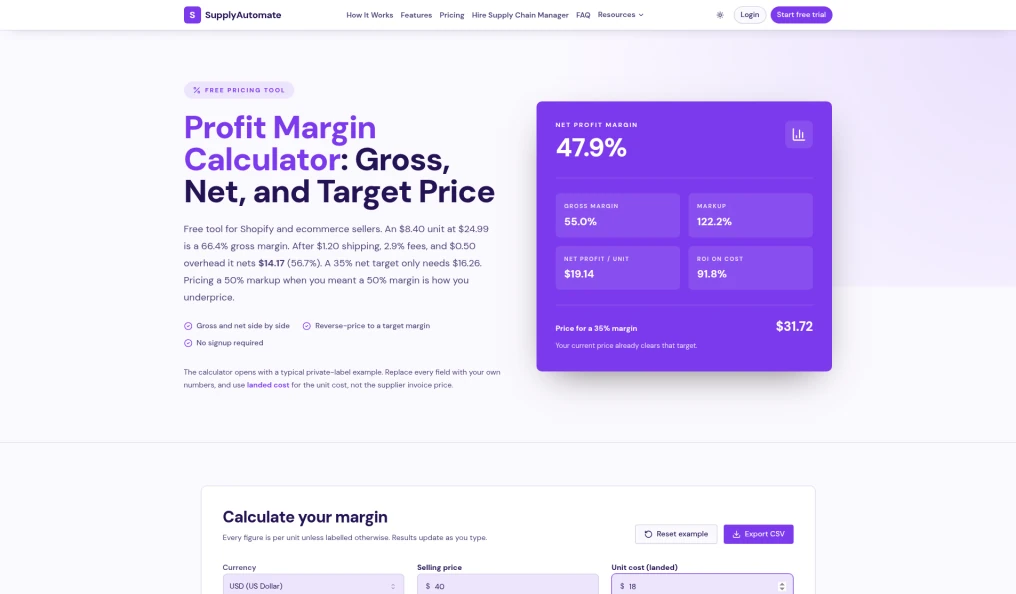
SupplyAutomate's free profit margin calculator, checked October 2026
The SupplyAutomate profit margin calculator is the free tool we built for the pricing moment above. You enter the selling price, the landed unit cost, outbound shipping per unit, the payment processing percentage, any other cost per unit, monthly units, and a target margin. It returns gross profit and gross margin, net profit and net margin, markup, ROI, the break-even price, the selling price that hits your target margin, and monthly revenue and net profit.
The unit cost field is labeled as landed cost on purpose, and the page explains why: entering the supplier invoice price alone is the most common reason a margin looks healthy while the bank balance doesn't. It runs in your browser with no signup, lets you pick your currency, and exports any scenario to CSV so you have a record of the price you chose. It's a single SKU calculator, so it won't read your store's orders or track margin over time, which is where the reports and apps further down come in.
Where the SupplyAutomate app fits is that unit cost field. Upload the supplier invoice, freight bill, and customs entry from your last shipment, and the app works out landed cost per unit from factory price, freight, duty, and samples, then exports it to CSV or Excel. That's the number to type into the calculator, and it's the same number you can enter yourself in Shopify's cost per item field or a profit app's bulk cost upload. If a shipment mixes several SKUs, allocating freight across multiple SKUs shows how the split works, and the free landed cost calculator handles a quick one-off estimate.
2. Shopify Profit Margin Calculator
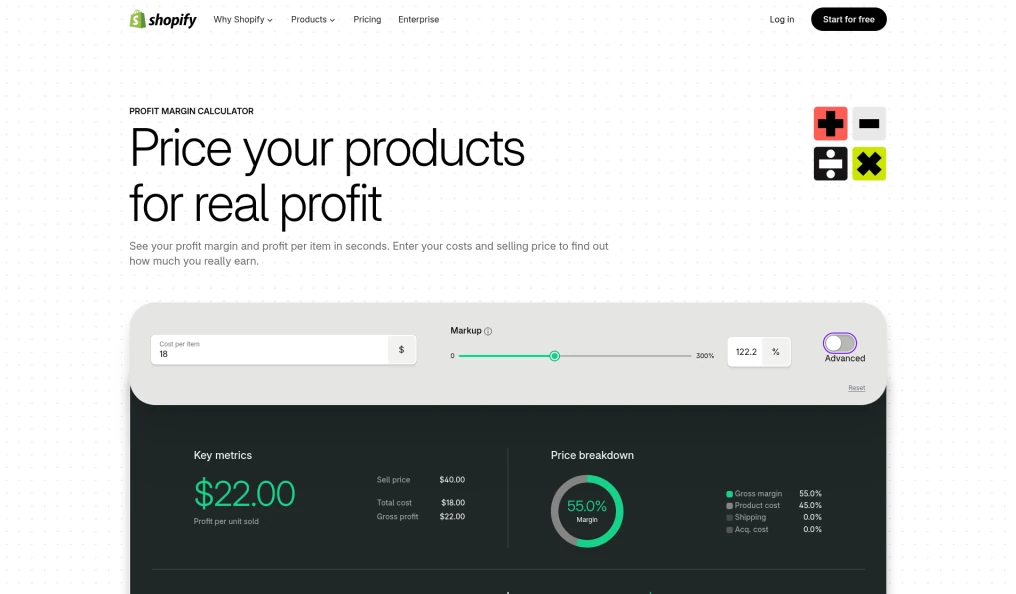
Shopify's free profit margin calculator, checked October 2026
Shopify's free profit margin calculator is the simplest option on the list. You enter your cost per item and selling price, and it shows your profit margin and profit per item, with a short explainer on the difference between margin and markup. Its FAQ notes that the basic version doesn't include shipping or customer acquisition cost, and that an advanced mode lets you add both, plus any extra expenses.
It's a good fit when you're setting a price on a new listing and want a fast sanity check. The page doesn't mention a break-even or target price output, so if you want to work backward from a margin goal, Omni or our calculator handles that. The page also doubles as a pitch for starting a Shopify store, so expect a few trial prompts around the calculator.
3. Omni Calculator Margin Calculator
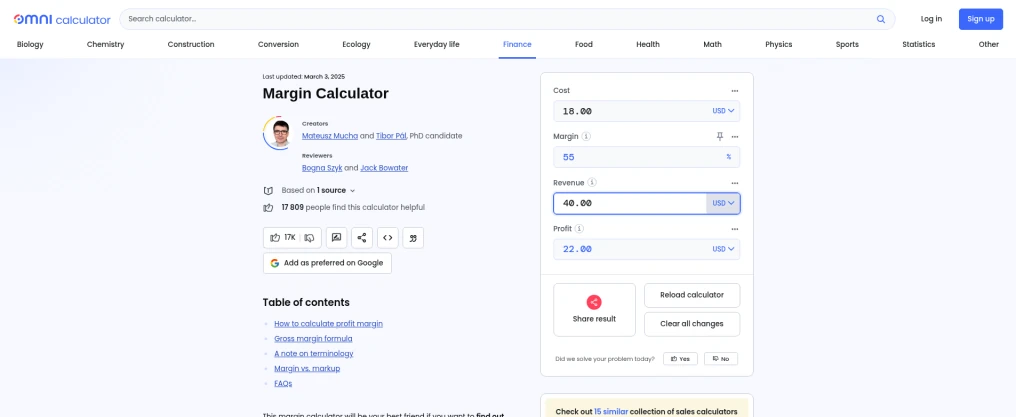
Omni Calculator's margin calculator, checked October 2026
The Omni Calculator margin calculator solves for whichever value you're missing. Give it any two of cost, margin, revenue, and profit, and it fills in the rest, which is handy when you know the margin you want and need the price. The page also explains the gross margin formula, the difference between margin and markup, and how to calculate a target margin by hand or in Excel.
Omni says plainly that it uses margin, profit margin, and gross margin interchangeably, and that costs usually means the cost of goods sold. That works for a quick number, though shipping and payment fees only show up if you fold them into the cost yourself. Omni has separate markup and margin with VAT calculators linked from the same page if you need those.
4. Shopify Profit Reports
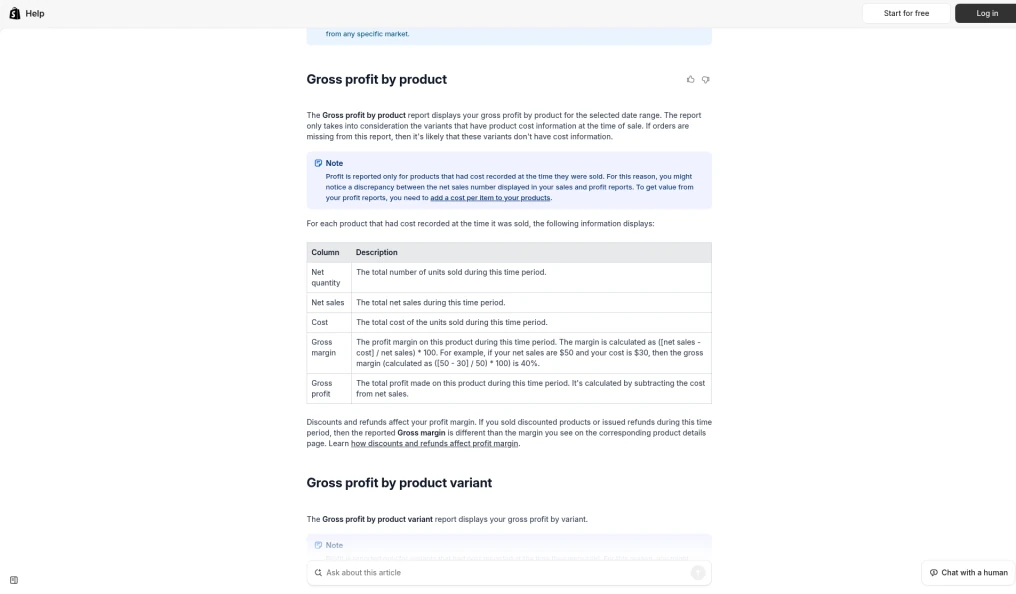
Shopify Help Center profit reports page, checked October 2026
If you want margin on what actually sold, Shopify's built-in profit reports are already in your admin under Analytics and Reports, filtered to the Profit Margin category. According to Shopify's help center, they include gross profit by product, by variant, and by POS location, plus profit margin by order and average profit margin by market. Gross margin in these reports is calculated on net sales, so discounts and refunds pull it below the margin shown on the product page.
The catch is that profit only shows for products that had a cost per item recorded at the time of sale, and Shopify describes that field as static data. If your costs change from shipment to shipment, Shopify itself suggests an ERP, an accounting system, or a reporting app for reporting on costs that move. These reports are still a solid free way to spot low-margin products, as long as the cost per item behind them is a landed cost you keep current. Our post on Shopify landed cost tools covers how that inventory cost differs from the duties Shopify can collect at checkout.
5. Google Sheets Or Excel Template
A spreadsheet is still how a lot of sellers track margin, and for a small catalog it works well. One row per SKU with selling price, landed unit cost, outbound shipping, payment fee percentage, and other costs gives you gross and net margin with a couple of formulas, and you can see every assumption. Net profit is the price minus landed cost, shipping, and other costs, minus the price times the fee rate, and net margin is that profit divided by the price.
The weak spot is upkeep. Every new shipment changes the landed cost, and the sheet only knows what you type into it, so margin drifts the longer you go between updates. If you're deciding whether you've outgrown it, landed cost spreadsheet vs software goes through the tradeoffs, and exporting landed cost per unit from SupplyAutomate to CSV or Excel is one way to keep the cost column current without retyping invoices.
6. BeProfit

BeProfit homepage, checked October 2026
BeProfit is a profit analytics app that tracks profit by order, product, country, platform, and shop, with shipping, discounts, marketing, and marketplace fees factored in. Its Shopify App Store listing shows integrations with Facebook Ads, Google Ads, TikTok, Klaviyo, and Amazon, and paid plans started at $49 a month for up to 450 orders with a 14-day free trial when I checked in October 2026. Higher tiers add a P&L report, LTV cohort analysis, and pricing and profit simulators.
On the cost side, BeProfit's data sync page says you can bring costs in through Google Sheets or a bulk upload when the costs in Shopify aren't accurate enough, and you can edit product COGS manually for variants that cost different amounts. That makes it easy to load landed costs you've already calculated, though it's on you to keep them updated. One merchant review on its App Store page also says the app only counted the Google Ads spend it could attribute through UTMs, which is worth checking during the trial if Google is a big channel for you.
7. TrueProfit
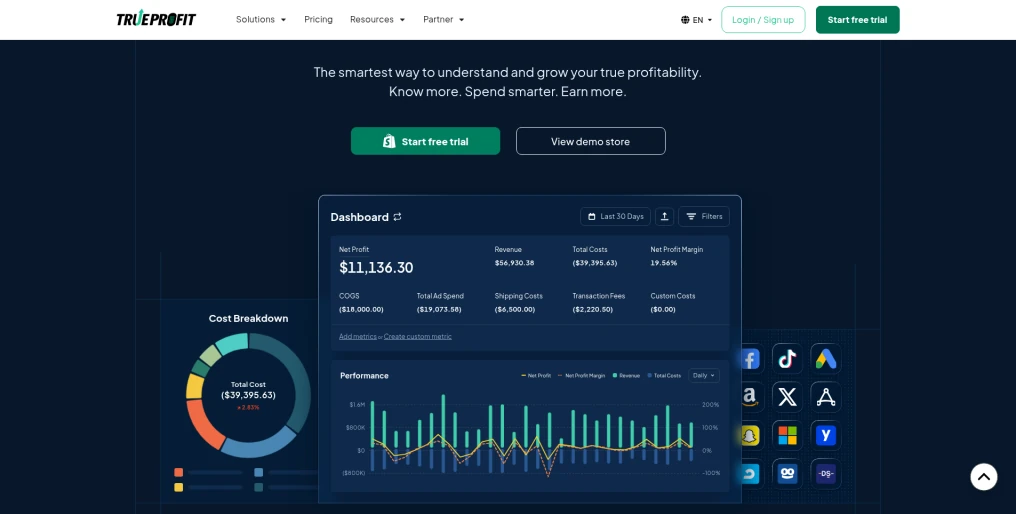
TrueProfit sample dashboard on its homepage, checked October 2026
TrueProfit is built around net profit. Its dashboard puts revenue, COGS, ad spend, shipping costs, transaction fees, and custom costs together, with product-level profit and a P&L report on the higher plans. According to its Shopify App Store listing, it syncs ad spend from Facebook, Google, TikTok, Bing, Snapchat, and Amazon, and plans started at $35 a month for 300 orders with a 14-day free trial when I checked in October 2026.
TrueProfit's COGS setup guide says it syncs Shopify's cost per item into its COGS page, and you can edit costs there or upload them in bulk with a CSV. Cost changes apply to new orders by default, and you run a recalculation if you want past orders updated too. It also has a tool that extracts costs from uploaded bills, such as Shopify invoices, into custom costs, which is aimed at business expenses and leaves per-unit freight and duty allocation to you.
8. Lifetimely
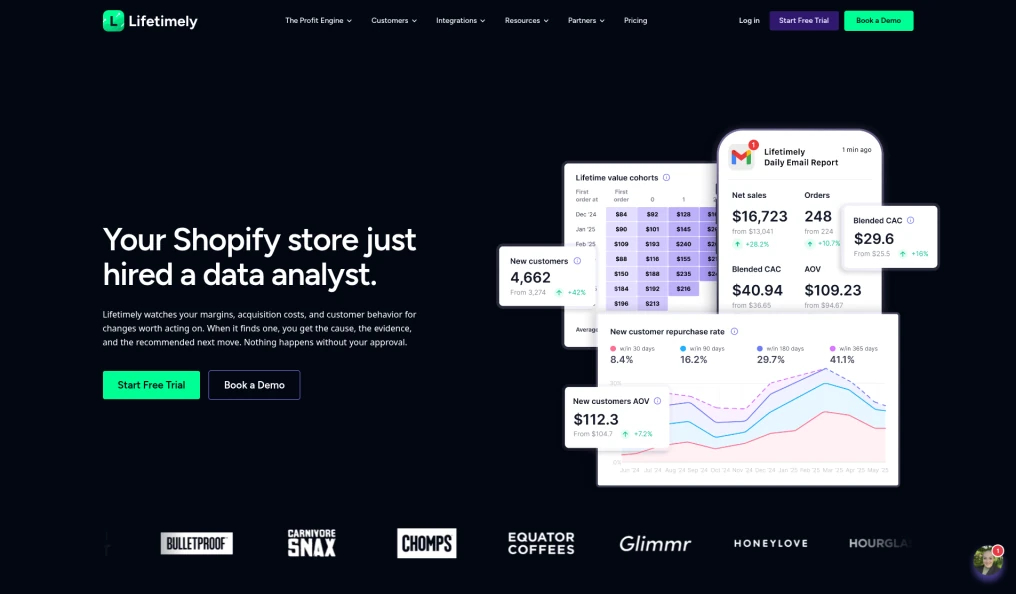
Lifetimely by AMP analytics page, checked October 2026
Lifetimely comes at profit from the customer side. It builds a P&L, contribution margin, and LTV and CAC reports by cohort, and it now includes an AI Profit Agent that flags margin and acquisition changes and suggests what to look at. Its App Store listing shows a free plan with daily profit and loss reporting, and paid plans from $49 a month for up to 500 orders, with Amazon data available as an add-on.
For product costs, Lifetimely's help docs say it imports Shopify's cost per item automatically, lets you override it with a cost set inside the app, and falls back to a default COGS margin for products with no cost at all. That default is a placeholder, and it's worth replacing with real landed costs before you trust margin by product. Lifetimely makes the most sense for subscription and repeat-purchase brands, where the margin on a customer's later orders matters as much as the first one.
How To Check A Price Before You Change It
This is the routine I'd follow when setting or checking a price. It takes a few minutes per SKU once the landed cost is right, and the landed cost is where most of the effort goes.
- Calculate landed cost per unit from the last shipment's supplier invoice, freight bill, and customs entry. The import duty from China guide covers the duty piece, and your Incoterm decides which freight costs you pay.
- Enter the selling price, landed cost, outbound shipping, and payment fee percentage into the profit margin calculator.
- Check net margin, break-even price, and the price for your target margin, and test any discount price against the break-even before you run a promotion.
- Update Shopify's cost per item with the same landed cost, so the profit reports and any profit app work from the right number.
- Repeat after each shipment, since freight and duty change from one container to the next.
If the margin looks thin, the fix often sits upstream in the order itself. A smaller order with a higher unit price can still beat a big minimum once you count the cash it ties up, which is what the MOQ calculator roundup is for, and true product cost from factory to warehouse lists the costs people most often forget.
Which Profit Margin Calculator Should You Use?
If you're pricing one SKU or checking a promotion, start with the SupplyAutomate profit margin calculator. It covers net margin, break-even, and target price in one place, and it's free. Shopify's calculator and Omni are fine for a quick margin or markup number when you don't need fees in the picture.
If you want margin on real sales, turn on Shopify's profit reports first, since they cost nothing once cost per item is filled in. When you're running paid ads and want profit tracked on every order with ad spend included, BeProfit and TrueProfit are built for that, and Lifetimely adds the cohort and LTV view for repeat-purchase brands. All of them depend on the product cost you give them, so the landed cost work comes first. For how the document upload and landed cost workflow fits next to the tools you sell through, see the Shopify ERP page, or the Amazon FBA ERP page if you also sell on Amazon, where the Amazon FBA profit calculator roundup covers the FBA fee side.
Frequently Asked Questions
What Is The Best Free Profit Margin Calculator For Shopify Sellers?
For a single SKU, the free SupplyAutomate profit margin calculator shows gross and net margin, markup, break-even price, and the price for a target margin, with payment fees as a percentage. Shopify's own calculator is simpler and works for a quick margin check. For margin across actual sales, Shopify's built-in profit reports are free once you fill in cost per item.
Does Shopify Have A Built-In Profit Margin Calculator?
Shopify shows a margin on each product page once you enter a cost per item, and its profit reports show gross profit and margin by product, variant, and order. It also has a free standalone profit margin calculator on its website. All of these rely on the cost per item you enter, and Shopify's help center suggests entering the manufacturer price without shipping, so add freight and duty yourself if you import.
What Is The Difference Between Gross Margin And Net Margin?
Gross margin counts only what the product cost you, divided by the selling price. Net margin also subtracts outbound shipping, payment processing, and other per-unit costs, so it comes out lower and closer to what you keep. In the example above, the same product shows a 66.4% gross margin and a 56.7% net margin with landed cost.
Should I Use Landed Cost Or Factory Price In A Margin Calculator?
Use landed cost per unit, meaning factory price plus freight, duty, and samples allocated to each unit. Factory price alone overstates margin and understates break-even, which is how a clearance price that looks profitable ends up losing money. See what is landed cost and the landed cost formula for the details.
Can SupplyAutomate Calculate My Shopify Profit Automatically?
No. SupplyAutomate does not connect to Shopify, Amazon, or WooCommerce and does not pull prices, orders, payment fees, or ad spend. It calculates landed cost per unit from the supplier invoices, packing lists, freight bills, and customs entries you upload, and you can export that to CSV or Excel and enter it in the free calculator, Shopify's cost per item field, or a profit app.
Do Profit Apps Like BeProfit And TrueProfit Include Landed Cost?
They include whatever product cost you give them. TrueProfit and Lifetimely read Shopify's cost per item by default, BeProfit works from your Shopify costs or the ones you upload, and all three add shipping, fees, and ad spend at the order level. If the product cost is the factory price, the freight and duty on your imports won't be in their per-product margins unless you add them some other way.
Where I Would Start
If I were repricing a product today, I'd pull up the last shipment's paperwork, work out the real landed cost, and run it through the profit margin calculator next to the current price. Most of the time the margin is fine and you just learn your true break-even, which is worth knowing before the next sale. Sometimes it turns up a SKU that's been quietly underpriced since the last freight increase, and it's a lot easier to fix once you can see the number.
If keeping landed cost current across shipments is the part that keeps slipping, that's the job the SupplyAutomate app does from your uploaded documents, and the plans are on pricing. If you'd rather hand off supplier follow-ups, freight, and paperwork entirely, the Outsourced Supply Chain Manager option covers that.
Related Guides
- Is Shopify Cost Tracking Enough For Landed Cost?
- How To Calculate Shopify Landed Cost: Factory Price To Unit Cost
- Shopify Landed Cost Tools: Inventory Cost Vs Checkout Duty
- Landed Cost Per Unit
- Landed Cost Formula: Total, Per Unit, And Allocation
- What Is Landed Cost, And Why Importers Get It Wrong
- Allocate Freight Cost Across Multiple SKUs (Worked Example)
- How To Calculate Import Duty From China For FBA And Shopify
- Best Ecommerce Landed Cost Calculators
- Best Amazon FBA Profit Calculator Tools Compared 2026
- Best MOQ Calculator Tools For Ecommerce Sellers
- Landed Cost Spreadsheet Vs Software: When To Automate Imports