Your first order from the factory has landed, and you type the $8.00 the supplier charged into Shopify as the cost of each unit. Then the freight bill, the duty bill, and the cost of the samples you paid for months ago all show up, and that $8.00 is quietly wrong. Every profit report you look at from now on will make the product look better than it is.
This guide shows you how to fix that. I'll explain what Shopify's cost per item field actually does, how to work out the real number to put in it, and which tools can help once doing it by hand gets old. I'll also cover the duty and tax tools you see at checkout, because they solve a different problem and a lot of first-time sellers mix the two up.
TL;DR
- Shopify's cost per item field holds whatever number you type in, and Shopify's own help page suggests the price you paid the manufacturer. It does not add freight, duty, or anything else for you.
- Landed cost per unit is factory price plus freight plus duty plus samples, divided by the units you received. That is the number I put in the cost field.
- Shopify only uses the cost that was saved at the time of a sale, so update the field when a new shipment lands and before those units start selling.
- Checkout duty tools estimate what a shopper pays to import an order. They help with international customers, and they never change your inventory cost.
- A spreadsheet or the free landed cost calculator is enough for your first few orders. Apps like Landara or a purchase order tool like SupplyAutomate help once you have many SKUs and shipments.
What Landed Cost Means For A Shopify Store
Landed cost is what one unit really cost you by the time it reached your warehouse or 3PL and was ready to sell. For most first-time importers buying from a factory on Alibaba, I keep it to four parts: the factory price, the freight to get it to you, the import duty, and the samples you paid for to get the product right. Shopify fees, payment processing, ads, and shipping to customers are real costs too, but they belong in your margin math later, and mixing them into the unit cost makes it harder to compare one shipment to the next.
The reason this matters is simple. If you price a product off the factory price alone, you can sell hundreds of units and still lose money once the freight and duty bills are paid. Getting the unit cost right is also what makes your reorder decisions and your landed cost vs COGS numbers trustworthy, so it's worth doing carefully on your very first order.
How The Shopify Cost Per Item Field Works
Every product and every variant in Shopify has a field called cost per item, which sits in the Price section of the product page. Shopify uses it to show your margin and profit on that product, and to fill in the profit reports in Analytics. If the field is empty, the product simply doesn't show up in those profit numbers.
Two details on Shopify's help page trip people up. First, Shopify's example says that if you resell a product, you can enter the price you paid the manufacturer, excluding taxes, shipping, or other costs. That is a fine default for a store that buys from a local wholesaler, but for an importer it leaves out the freight and duty that can add a big chunk to every unit. Second, profit is only reported for sales that had a cost saved at the time they happened, so changing the field later does not fix the reports for orders you already sold.
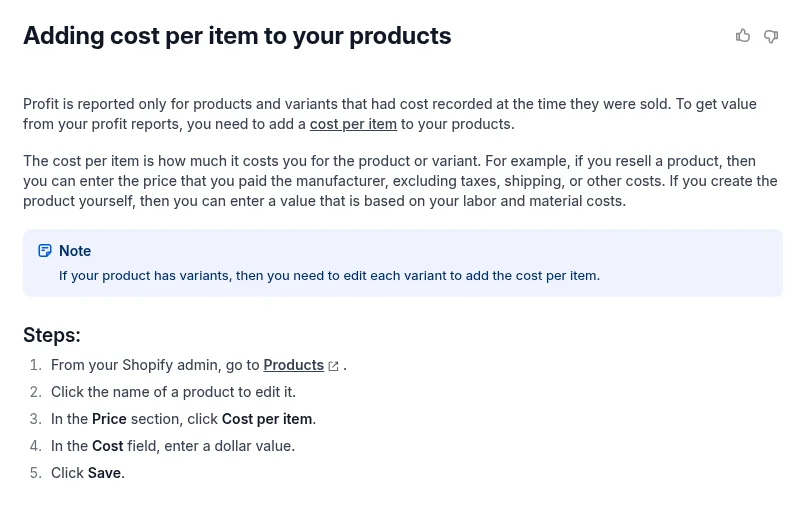
Shopify Help Center page on adding cost per item
So the field is just a box for a number. Shopify won't read your freight invoice or customs entry and won't change the cost when a new shipment lands. Whatever you type is what it uses, which is why I type the landed cost there, and why I keep a note of how I got it.
How To Calculate The Number To Enter
The math is the same for any shipment. Add up the factory price for the whole order, the freight bill, the duty bill, and the cost of any samples for that product, and then divide by the number of units you actually received. If the factory shorted you 20 units, divide by what arrived, since those missing units will never earn you anything.
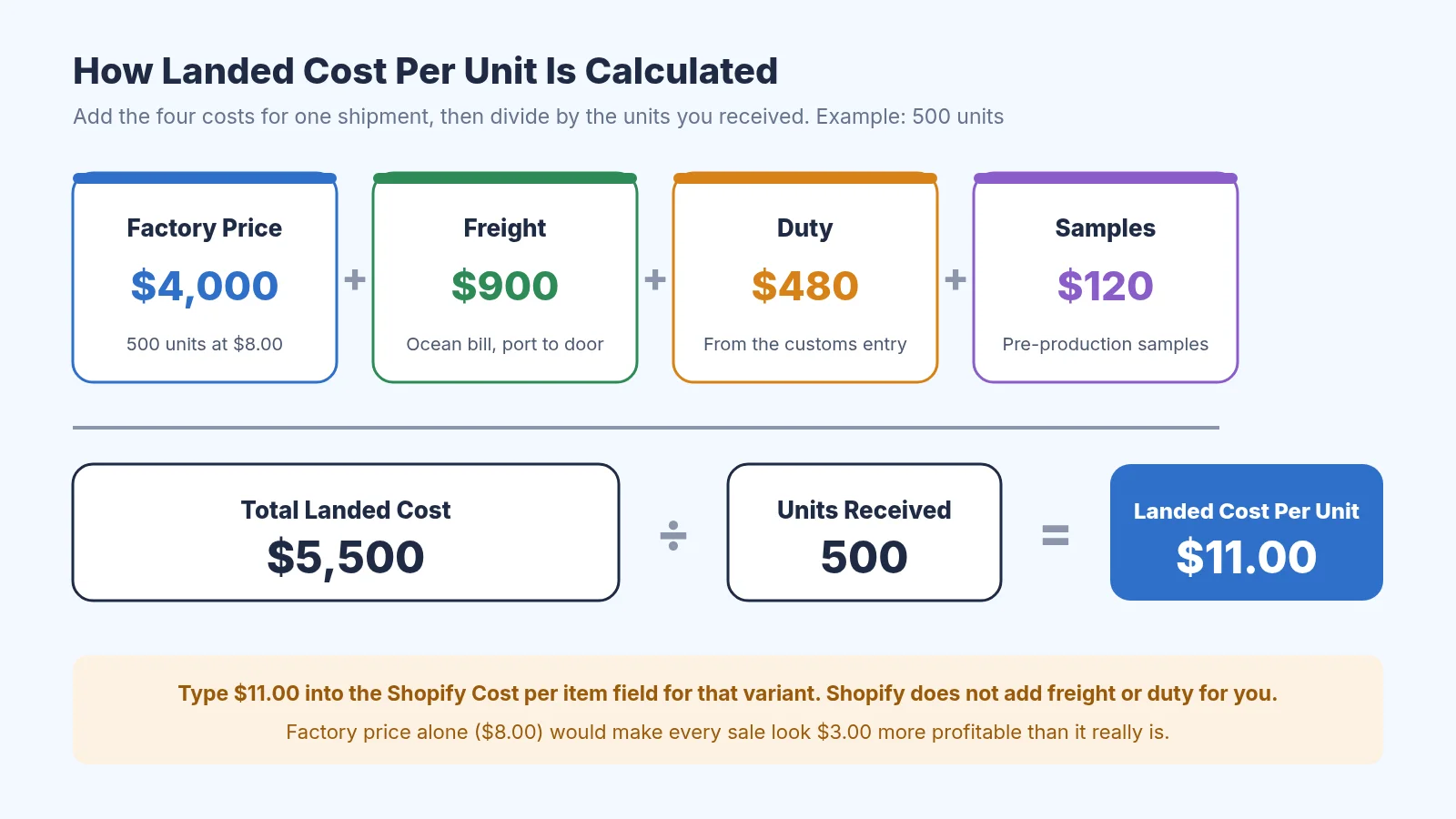
Landed cost per unit, worked for a 500 unit order
In the example above, the factory charged $8.00 a unit, but the real cost is $11.00 once freight, duty, and samples are in. If you sell that product for $25, you'd think you were making $17 a unit when you're really making $14 before Shopify fees and ads. Over a few hundred units that gap is the difference between a product that pays for the next order and one that doesn't.
If one shipment carries several products, split the freight and duty fairly between them. Freight usually splits by weight, volume, or units, and duty follows the value of each product, since that is how customs charges it. Our guide on how to allocate freight across multiple SKUs walks through the split, and how to calculate import duty from China explains where the duty number comes from. You can run your numbers through the free landed cost calculator, and if you want a rough freight figure before you place the order, the freight cost estimator gives you one.
How To Update Cost Per Item In Shopify
Once you have the number, updating Shopify takes a minute per product. From your Shopify admin, open Products, click the product, find the Price section, and enter the landed cost in the cost per item field, then save. If the product has variants, each variant has its own cost, so a small and a large size that ship together can carry different landed costs.
When you have a lot of products, editing one at a time gets slow. Shopify's bulk editor and its product CSV import both let you update many costs at once, which is how I handle a shipment with dozens of SKUs. Shopify's help guide on product pricing covers the price fields, and the timing rule from the last section still applies, so do the update before the new units start selling.
The tricky part is what happens when you still have old stock at one cost and new stock arriving at another. Shopify keeps one cost per variant, so you have to choose. I usually switch to the new cost when the new shipment goes live, or use a weighted average of what's on hand if the two costs are far apart. Either way works as long as you pick one rule and stick to it.
Inventory Cost And Checkout Duty Are Two Different Jobs
When you search for Shopify landed cost, you'll also find tools that calculate duties and import taxes at checkout. Those are for shoppers in other countries. They estimate what the customer owes to import your product into their country and either collect it at checkout or warn them about it, which is what DDP (duties paid up front) and DDU (duties paid at the door) refer to.
Shopify has its own duties and import taxes feature for this, and apps cover it as well. These tools are useful if you ship internationally, since a surprise bill at the door is a fast way to get a refund request. They have nothing to do with what your inventory cost you, though, and they won't fix a cost field that says $8.00 when the real number is $11.00. I'd sort out your inventory cost first and only look at checkout duty once you're actually selling across borders.
Tools That Help With Shopify Landed Cost
For your first few shipments, a spreadsheet is honestly fine. Once you're juggling several SKUs, partial shipments, and freight bills that show up weeks after the goods, a tool starts to pay for itself. These are the ones I'd look at, grouped by the job they do.
Landara For Shopify COGS
Landara is a Shopify app built around FIFO cost of goods sold and landed cost. Its App Store listing says it lets you raise purchase orders, uses AI to read freight and duty from your invoices for you to approve, and posts COGS journals to Xero or QuickBooks Online at month end. That makes it a good fit if your store is Shopify-only and your bookkeeper wants clean COGS entries.
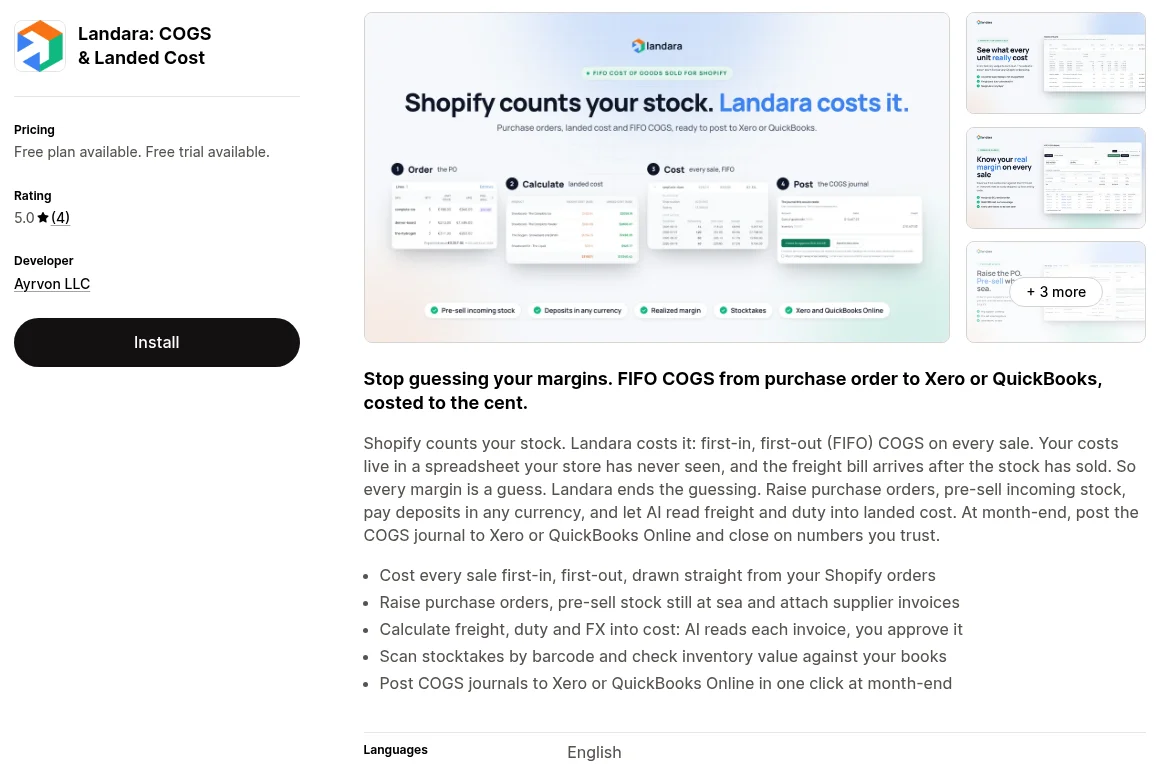
Landara listing on the Shopify App Store
The listing shows a free plan and a free trial, so check the current limits before you rely on it. If Amazon FBA is a big part of your business, test how it handles stock that never passes through Shopify, because that is where Shopify-centered apps tend to struggle.
Sumtracker For Stock Across Channels
Sumtracker is a multichannel inventory tool that keeps stock counts in sync between Shopify, Amazon, and other marketplaces, with purchase orders and bundles. It's the one I'd trial if your bigger headache is overselling the same units on two channels. Check how far its landed cost features go with your own freight bill before you count on it for unit cost.
Sumtracker homepage
Spreadsheets And The Free Calculator
A simple sheet with one row per shipment and columns for factory cost, freight, duty, samples, and units received will carry you a long way. Our post on landed cost spreadsheet vs software explains when the sheet stops being worth the effort. If you'd rather not build one, the free landed cost calculator does the math for a single product, and the profit margin calculator shows what's left after you price it.
Where SupplyAutomate Fits
SupplyAutomate is where I keep the purchase order, the supplier invoice, the packing list, and the freight and duty bills for each shipment together. You upload those documents, track the parcel or ocean container until it arrives, and get landed cost per unit from the factory price, freight, duty, and samples. You can then export the numbers to CSV or Excel.
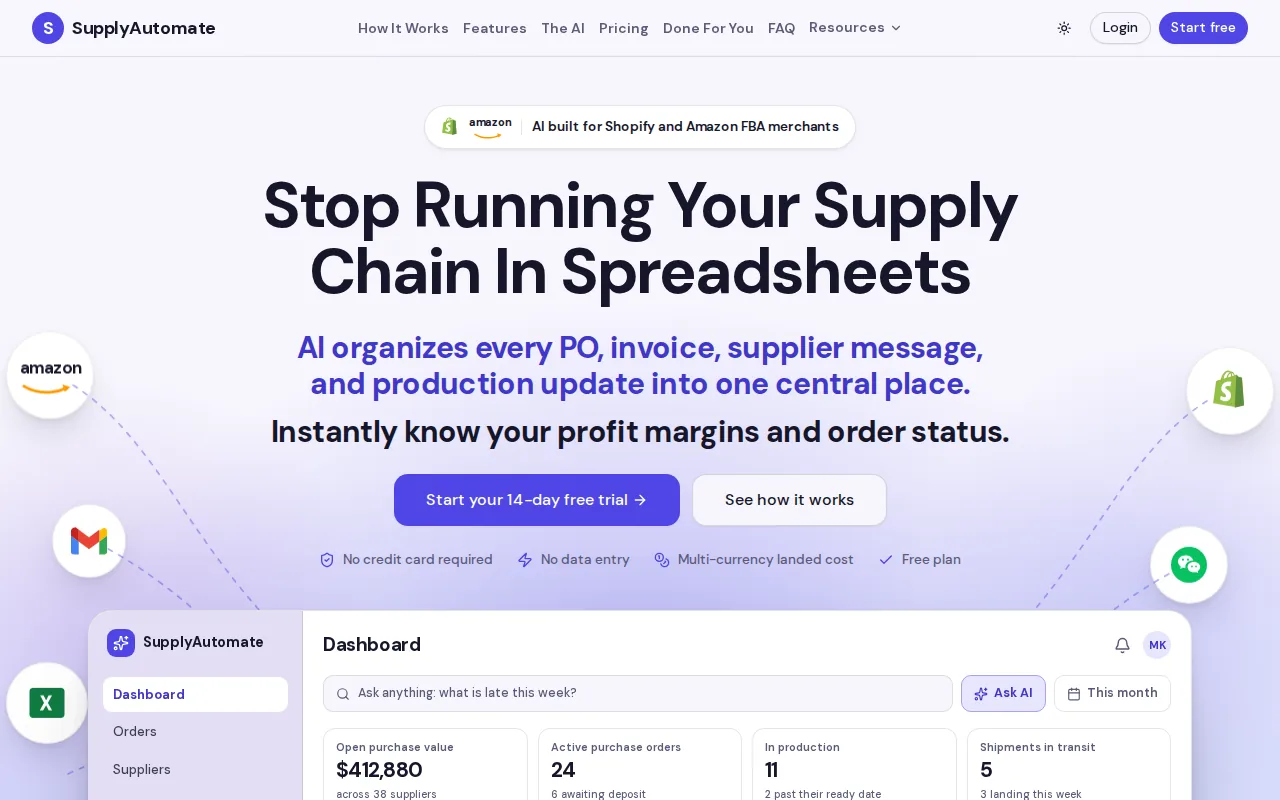
SupplyAutomate homepage
To be clear about what it doesn't do, SupplyAutomate has no Shopify connection and doesn't sync anything into your store. You take the landed cost it gives you and type it into Shopify's cost per item field yourself, or paste it into a product CSV for a bulk update. If you sell on Amazon too, the same unit cost works for both channels, which is handy when you're comparing margins. Plans start with a 14-day free trial, and you can see the details on the pricing page or read more about SupplyAutomate for Shopify brands.
Test Any Tool On One Real Shipment
Before you pay for anything, run one real shipment through it rather than the demo data. Pick a recent order with two or more SKUs and gather the supplier invoice, the freight bill, and the duty or customs bill. Enter it the way it actually happened and see what unit cost comes out.
Then compare that number to what's in your Shopify cost field and to your own spreadsheet. A good tool gives you a number someone else on your team could rebuild from the same documents, and it handles a freight bill that shows up late without rewriting costs on units you already sold. If you still need your spreadsheet to trust the result, or the only thing it produces is a duty estimate at checkout, it's the wrong tool for this job.
Frequently Asked Questions
Does Shopify Calculate Landed Cost Automatically?
No. Shopify stores whatever you type into cost per item and uses it for margin and profit reports, but it doesn't add freight, duty, or samples on its own. You work out the landed cost yourself or with a tool, then enter it in the field.
What Should I Put In Shopify's Cost Per Item Field?
If you import, I'd put the landed cost per unit, meaning factory price plus freight, duty, and samples divided by the units received. Shopify's own example uses the manufacturer price alone, which works for local resellers but understates cost for importers. Whatever you choose, use the same method for every product so your margins are comparable.
Does Changing Cost Per Item Fix Old Profit Reports?
No. Shopify reports profit using the cost that was saved when each sale happened. That's why it pays to update the cost before new stock starts selling.
What Is The Difference Between DDP And DDU?
DDP means import duties and taxes are paid before delivery, often collected from the shopper at checkout. DDU means the customer pays them when the package arrives. Both are about international customers, and neither one sets your inventory cost.
Which Tool Is Best For Shopify And Amazon FBA Together?
If you want documents and one unit cost across both channels, I'd start a trial of SupplyAutomate. For Shopify-only stores that want FIFO COGS posted to Xero or QuickBooks Online, Landara is the one to try. If your main problem is overselling across channels, look at Sumtracker or a similar inventory sync tool.
Getting The Number Right Before You Reorder
If you take one thing from this, make it the habit of updating cost per item every time a shipment lands, using the full landed cost instead of the factory price alone. It takes a few minutes per order and it changes how you price, which products you reorder, and which ones you quietly drop. Start with your most recent shipment and run it through the landed cost calculator.
When the invoices, freight bills, and tracking numbers start piling up across several suppliers, start a free SupplyAutomate trial and keep each shipment's documents and unit cost in one place. You'll still update Shopify yourself, but you'll always know where the number came from.
SupplyAutomate Pages And Free Tools
- SupplyAutomate For Shopify Brands
- SupplyAutomate For Amazon FBA Sellers
- SupplyAutomate Pricing
- Outsourced Supply Chain Manager
- Free Landed Cost Calculator
- Free Import Duty Calculator
- Free Freight Cost Estimator
- Free Profit Margin Calculator
Related Guides
- How To Calculate Shopify Landed Cost
- Is Shopify's Cost Per Item Enough For Landed Cost?
- What Is Landed Cost And Why It Matters
- Landed Cost Per Unit
- Landed Cost Vs COGS
- Allocate Freight Cost Across Multiple SKUs
- Landed Cost Spreadsheet Vs Software
- Landed Cost In QuickBooks
- Landed Cost For Amazon FBA
- Shopify Inventory Management: A Step By Step Guide
- Shopify ERP
- 30/70 Payment Terms With Chinese Suppliers