83% of surveyed SMB Shopify merchants reported difficulty keeping inventory, manufacturing, and accounting data synchronized in 2024, according to Katana Cloud Inventory and Worldwide Business Research. That reframes the software decision. A cleaner stock counter won't fix a supplier delay, an unrecorded transfer, or freight costs sitting in an accountant's inbox.
The best inventory management software for Shopify is the tool that addresses the store's actual bottleneck. For an importer, that means fewer stockouts and less excess inventory, with freight, duty, and late invoices included in product cost. It also means a small team can run the workflow without turning implementation into an ERP project.
The Software Class That Fits Your Store
Global inventory distortion cost retailers approximately $1.7 trillion in 2025, equivalent to 6.5% of global retail sales, according to industry estimates cited in Shopify's retail inventory management guide. The estimated components were about $1.2 trillion from out-of-stocks and $572 billion from overstocks.
Those are opposite operating failures. One loses orders because stock isn't available. The other leaves cash tied up in products the business can't sell quickly enough.
Which inventory software class fits the store you run
| Situation | Failure you already see | Shortlist this class | Skip it when |
|---|---|---|---|
| One Shopify location, short catalog, no import POs | Counts drift only on manual transfers | Shopify locations, transfers, adjustment history | Existing calendar reorders are reliable and no additional software is needed |
| Multi-location DTC, stock in a 3PL and a shop | Oversells because locations were treated as one pool | Location-aware stock sync that respects Shopify states | Purchasing and inbound cost are the real pain |
| Shopify plus Amazon FBA, overseas factory | Late POs and aging FBA stock | PO, supplier, and landed-cost workspace beside Shopify | Manufacturing planning or a general ledger is required |
| Large catalog, many locations, rising order volume | Stale stock after full-catalog exports | IMS using webhooks, GraphQL, and bulk reconciliation | The team cannot staff setup or daily exceptions |
Match the purchase to the failure
A small accessories store with a countable catalog and dependable reorder dates should start with native inventory controls. If staff forget to record movements, another dashboard won't make those movements accurate. Assign responsibility for adjustments before adding software.
A DTC brand selling through a shop and a 3PL has a different problem. A customer order must consume inventory from the location that can fulfill it, not from a convenient combined total. The buying test is reliable allocation, not an impressive purchasing screen.
An overseas importer needs visibility before inventory reaches the warehouse. Production, inspection, pickup, transit, receiving, and readiness all affect replenishment. A supplier's promised completion date isn't the date a customer can buy the goods.
A large catalog needs a synchronization architecture that can recover from delays and failed updates. A successful initial import doesn't prove the connector will handle daily operational pressure.
Stop before buying unnecessary scope
Shopify alone is enough when counts reconcile, purchasing is simple, and reorder dates remain dependable. The practical discussion of whether ERP software is overkill for a small Shopify store helps separate a genuine systems requirement from avoidable complexity.
For teams evaluating how to reduce costs with inventory automation, ECORN's guide provides useful context. Automation should remove a recurring failure, not automate an unreliable spreadsheet unchanged.
The operator should circle the relevant row and reject products that solve a different problem.
Shopify Inventory States Software Must Not Break
A factory balance is not a fulfillment promise. Take a SKU with 80 units split three ways: 40 at a factory, 25 at a 3PL, and 15 in a retail store. Under Shopify's location setup guidance, each location carries its own balance, so an order routed to the 3PL can only consume the 25 units sitting there. The factory's stock does not become sellable at that address until a transfer lands.
That distinction belongs in the demo. Ask the vendor to show a transfer leaving one location, arriving at another, and becoming available through the receiving workflow. A combined total across both warehouses conceals where the stock sits.
Test states rather than a headline stock count
Shopify's inventory app documentation distinguishes incoming, on-hand, available, committed, reserved, damaged, safety stock, and quality-control quantities. It supports adjustments through inventoryAdjustQuantities, but committed inventory cannot be directly adjusted through the Admin API.
Shopify manages that committed quantity through order, reservation, transfer, and fulfillment events. A connector must reconcile by SKU and location without trying to overwrite Shopify's order logic.
A useful demonstration includes these tests:
- Order allocation: Place an order and inspect the movement between available and committed stock.
- Unavailable goods: Mark damaged or quality-control inventory without making it sellable.
- Transfer receipt: Receive a partial shipment and retain the remaining inbound balance.
- Recovery: Replay an interrupted update and confirm that quantities aren't changed twice.
The operational question behind preventing stockouts across sales channels is whether every channel receives a defensible available quantity. A fast update is still wrong if it reads the wrong state.
Check location capacity and connector scale
Plan limits cap how many active locations the model can hold:
Shopify active location limits by plan
| Shopify plan | Active locations allowed |
|---|---|
| Starter | 2 |
| Basic | 10 |
| Grow | 10 |
| Advanced | 10 |
| Shopify Plus | 200 |
| Deactivated locations | Do not count toward the limit |
A factory, multiple 3PL facilities, an Amazon-related fulfillment location, and retail stores can exhaust that structure quickly. Deactivate unused locations or redesign the model before purchasing an app to hide the problem.
Scale also affects reliability. Shopify's API limits documentation caps array inputs at 250 items and pagination at 25,000 objects, while recommending GraphQL's calculated-cost model and bulk operations for large jobs.
The connector should use event-driven updates, incremental reads and writes, bulk reconciliation, and idempotent retries. Repeatedly exporting the entire catalog is a poor substitute for an exception-aware integration.
Pass-fail test: Can the tool adjust the states it is allowed to touch, leave committed stock alone, and recover safely when updates fail? A pass here still leaves the cost side open, because states track units rather than the freight, duty, and late invoices attached to them. A sub-$5M team needs both answers without an ERP project.
Vendor Approaches Side by Side
A $50-per-month sync app and a light ERP can both rank for the same query, yet they answer different problems. Compare operating approaches before comparing logos.
Four inventory approaches on the work that changes the buy
| Approach | Shopify stock | POs and suppliers | Landed cost | Time to control | Best fit |
|---|---|---|---|---|---|
| Shopify admin | Native by location and state, transfers included | Manual or outside the admin | Not an auditable inbound allocation | Already live | Short catalog, no import POs |
| Stock-sync app | Require incremental updates and protection of committed stock | Ask for a sample PO export; check whether supplier terms, revisions and attachments appear | In the demo, post a freight invoice against a closed PO and see where the cost lands | Fast install, days of connector testing | Multi-location oversells, simple buying |
| Forecasting IMS or light ERP | Confirm which system owns each inventory state before signing | Confirm the purchasing module covers supplier terms and any manufacturing scope | Check allocation methods and whether revised invoices keep history | Implementation effort must be quoted | Teams that can staff implementation |
| Procurement and landed-cost workspace | Sellable stock stays in Shopify, no order or stock sync | Versioned POs, supplier and 3PL collaboration | SKU-level costs, including late invoices | Browser-based setup, no IT project | Importers under $5M whose bottleneck is the PO |
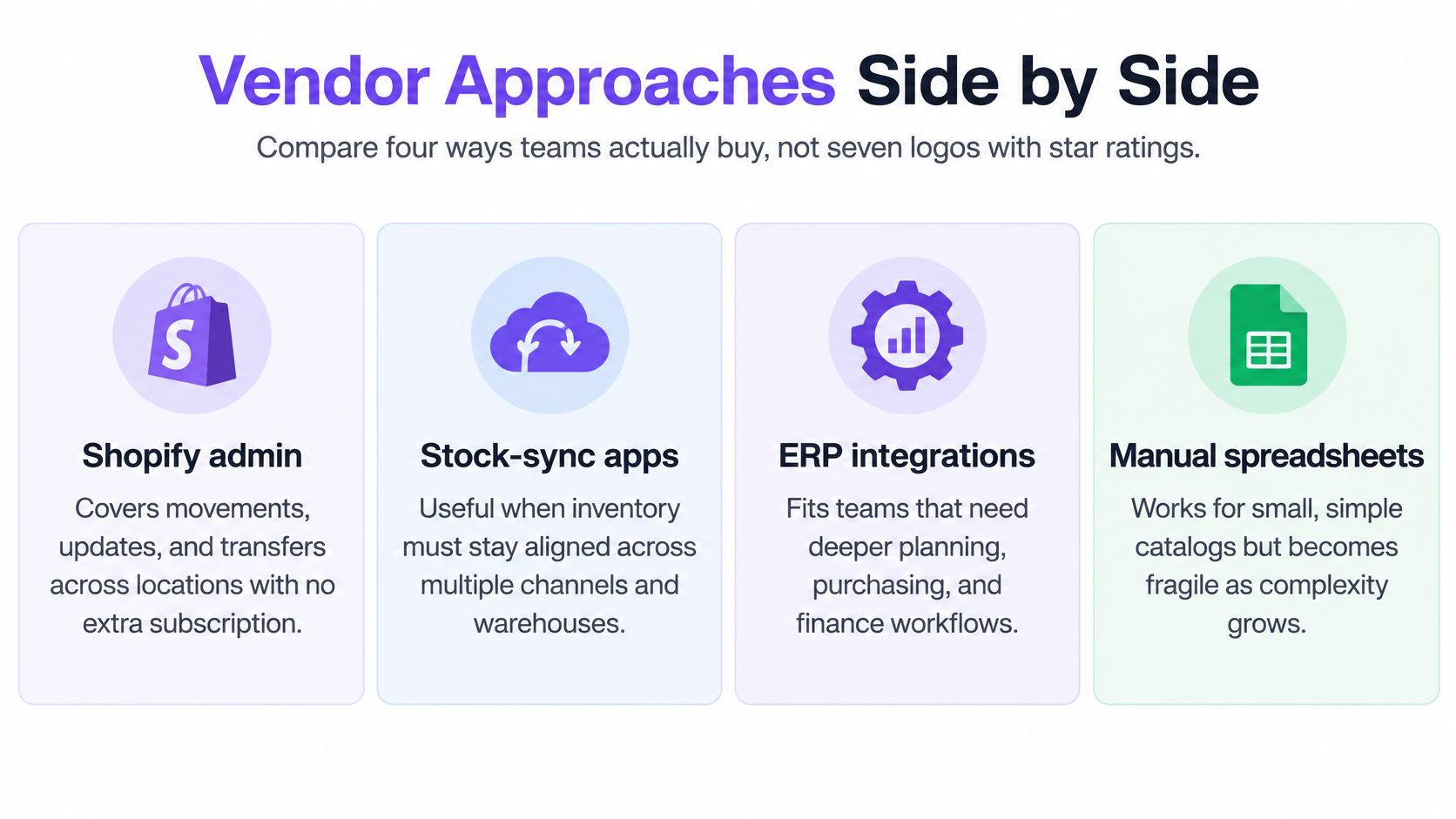
The visual comparison separates the same four operating approaches.
What each approach earns
Shopify admin covers stock movements, updates, and transfers across locations without an additional subscription, as described in Shopify's inventory management system guide. It remains the sensible baseline while procurement stays straightforward.
Stock-sync apps earn their fee when overselling is the expensive failure. Purchasing and landed-cost capability need proof in a demo before they count; a connector gets no credit for features inferred from its category.
Forecasting suites and light ERPs fit teams that need demand planning, purchasing, or manufacturing coordination and can assign an implementation owner. Get a current quote, confirm which inventory states the system owns, and ask how it writes to Shopify before shortlisting.
SupplyAutomate occupies the procurement and landed-cost row for Shopify, WooCommerce, DTC, and Amazon FBA sellers. It isn't a Shopify app and doesn't sync orders or stock. Products, checkout, and sellable stock remain in Shopify, and nothing is written to the store. Suppliers, agents, 3PL providers, and accountants can be invited into an order, and you control what each collaborator sees.
Managing customer orders is a different job from controlling supplier commitments, which is the gap Shopify order management software leaves open for importers.
Time to a reliable PO and a cost that can be defended beats a longer feature list.
Compare margin control and implementation burden
Shopify reports in its retail reporting guidance that 77% of surveyed merchants track sales and total revenue, while fewer than half track key metrics such as profit margin. A stock count alone therefore isn't a sufficient financial buying test.
Score every demo on PO version control, supplier collaboration, mobile use, audit history, landed-cost revisions, and continued use of the existing 3PL or forwarder. A cheap connector is the wrong purchase if freight and duty still live in a separate sheet, and a full ERP is the wrong purchase if nobody on a sub-$5M team can own the rollout.
Excess stock represented 38% of inventory among SMBs surveyed worldwide in Netstock's 2024 Inventory Management Benchmark Report. Estimate the working capital tied up as excess units multiplied by landed cost. Treat that as inventory value, not an automatic profit gain or guaranteed cash recovery.
Landed Cost, Purchase Orders and a First Live PO
Supplier price is only the opening cost. SupplyAutomate tracks the total cost of every purchase order, including supplier price, freight, duty, and fulfillment, while keeping supplier communication and documents attached to the purchasing workflow.
Consider a hypothetical container from China containing a heavy accessory with a supplier price of $4.20 and a lightweight premium accessory priced at $9.10. Ocean freight, insurance, brokerage, and duty arrive on separate documents, including a Section 301 line where applicable. These are illustrative purchase prices, not tariff rates or market benchmarks.
In this scenario, another freight invoice arrives three weeks later, after some goods have sold through Shopify and others have reached FBA. A supplier-price spreadsheet now understates both products' cost. Replacing the old total with the new total fixes the display but destroys the explanation of what changed.
Allocate costs according to what caused them
A single allocation method shouldn't be applied blindly to every charge. Freight, insurance, and product-specific duties may need different drivers.
| Allocation method | Useful application | Product it can misstate |
|---|---|---|
| Quantity | Similar products with comparable logistics requirements | Heavy accessory receives too little freight |
| Value | Insurance or charges related to merchandise value | Expensive lightweight accessory receives too much weight-driven freight |
| Weight | Charges driven by physical weight | Bulky lightweight product receives too little space-related freight |
| Volume | Space-driven transport or storage charges | Dense compact product receives too little weight-related freight |
| Manual split | Documented SKU-specific duty or handling | Any SKU affected by an undocumented judgment |
In the hypothetical shipment, a quantity allocation undercharges the heavy accessory if it accounts for most of the freight burden. A value allocation assigns more freight to the premium accessory, even though its higher supplier price doesn't explain transport usage.
The operator should allocate each invoice line using the most defensible driver available. A customs charge specific to a product belongs with that product. A shared shipment charge needs a documented allocation basis that finance can reproduce.
Not every business expense belongs in landed inventory cost. AI2Fin's explanation of fixed, variable and mixed overhead costs helps separate operating overhead from shipment-specific costs; the accountant should approve the capitalization policy.
Preserve the purchasing history
A changed ship date should create a traceable PO revision, not replace the original promise. The original quantity, revised quantity, approval, and current expected date should remain identifiable.
Partial receipts need the same discipline. A warehouse receipt should close only what arrived, leaving a visible open balance for missing cartons, rejected goods, or a later shipment.
Late invoices require both an updated cost and the prior cost history. Finance needs to distinguish inventory still on hand from units already sold, then determine the appropriate accounting adjustment. A purchasing workspace supplies the evidence; it doesn't replace the accountant's judgment or the general ledger.
Cost-control rule: A revised landed cost should explain which document changed it, how the charge was allocated, and which order and SKUs were affected.
The buying criteria for purchase order software for Shopify stores should therefore begin with a live import order, not a polished sample catalog.
Put a live purchase order through the workflow
- Export the operating truth. Gather open POs, supplier contacts, outstanding balances, and actual inbound milestones. Record the elapsed time from commitment to sellable inventory, rather than relying on a supplier's quoted production duration. Keep unresolved discrepancies visible instead of cleaning them out of the migration.
- Recreate a live order with the agreed product description, SKU, unit price, quantity, currency, Incoterms, and ship-to details. Attach the accepted specification so a factory's product description can't substitute for the brand's approved version. Confirm who owns freight booking and which charges remain estimates.
- Invite collaborators with order-level permissions. Give the factory, agent, warehouse, or 3PL access only to the information needed for that order. The platform supports control over what collaborators can see or edit. A supplier shouldn't need access to another factory's pricing to confirm readiness.
- Put the proforma invoice, commercial invoice, packing list, and carton count in the order thread. Retain approvals beside the relevant document. When a carton count changes, the forwarder and receiving warehouse should be able to identify the current document without searching a separate chat.
- Log production, QC, pickup, and readiness separately. Production complete doesn't mean inspection passed, and inspection passed doesn't mean the forwarder collected the goods. Assign each milestone an owner and retain the supporting confirmation. This prevents a reassuring supplier message from becoming an unsupported arrival forecast.
- Allocate freight, insurance, brokerage, and duty documents as they arrive. Keep estimates distinguishable from posted invoices and preserve the previous calculation. When the late freight invoice lands, revise the affected order rather than adding an unexplained miscellaneous expense to a monthly spreadsheet.
- Export the reconciliation package. Send CSV or Excel records to the accountant with the PO references, receipt status, cost allocations, and supporting documents. Leave payroll, the general ledger, and manufacturing planning in their existing tools.
The plan includes an AI assistant, landed cost on every order, PO, invoice and customs uploads, supplier communication in one thread, supplier and 3PL collaborators, CSV or Excel export, and priority support. It runs in the browser and is optimized for mobile, which matters when approvals happen away from a desk.
Free starting tools include a purchase order creator, landed cost calculator, Amazon profit calculator, import duty calculator, freight cost estimator, MOQ calculator, lead time calculator, and dropshipping profit calculator. These can help structure the inputs, but the live order still needs actual documents and accountable owners.
The first useful outcome is an accountant-ready export whose figures can be traced back to the purchasing record.
FBA and Shopify Cases That Change the Shortlist
Amazon's aged-inventory surcharge policy applies to units stored in its fulfillment network for 181 days or longer, takes an inventory snapshot on the 15th of each month, and adds the charge on top of ordinary monthly storage fees. The published bands rise steeply with age. In the policy's own example, 10 cubic feet aged 366–455 days produces $69 per monthly assessment on the cubic-foot basis, before ordinary storage, unless the per-unit calculation comes out higher. Check the policy page for the full band schedule before sizing an FBA allocation, since the rate climbs sharply past the 181-day threshold.
A shared PO needs separate channel decisions
A purchase order of 800 units, split 500 to FBA and 300 to a Shopify 3PL, shows the problem. The factory quotes 35 days; the actual commitment-to-sellable cycle runs 52 days. Those durations are illustrative, not industry benchmarks.
A reorder triggered only by production completion leaves the Shopify allocation short, while an oversized FBA allocation accrues age toward the surcharge threshold. The operator needs channel-specific demand, destination quantities, and receiving milestones for each allocation, rather than one total inbound figure.
FBA age measures storage inside Amazon's network, not time spent manufacturing at the factory. An effective Amazon FBA inventory management workflow separates procurement progress from Amazon's inventory-age record, so a delayed shipment is not mistaken for aged stock and aging stock is not mistaken for a purchasing problem.
Keep reimbursement evidence alongside operational records
Customer-return reimbursement isn't an automatic recovery of every discrepancy. Amazon's reimbursement policy requires eligible items to meet FBA rules and places customer-return claims no earlier than 60 days and no later than 120 days after the refund or replacement.
For a refund dated 1 January, that window corresponds approximately to 2 March through 1 May, subject to Amazon's date-calculation rules. Shipment, return, refund, and unit history must remain accessible throughout the applicable window. A missing receipt or unmatched unit record can put an otherwise valid claim out of reach.
The purchasing workspace described here is AI supply chain software for Shopify, WooCommerce, DTC, and Amazon FBA sellers. Its FBA fit is finished goods imported from China and other overseas factories, where it tracks cost of every purchase order, including supplier price, freight, duty, and fulfillment. It doesn't replace Amazon's reimbursement console or inventory-age reporting; it keeps the documents and supplier threads those reports depend on.
When inbound commitments and aging stock set the cash position, a tool that only mirrors Shopify's available quantity leaves freight, duty, and late invoices hidden in a spreadsheet.
Choose by the Bottleneck Not the Feature List
The final choice should follow the expensive failure. Stay native when a small location network, countable catalog, and trusted reorder dates provide adequate control.
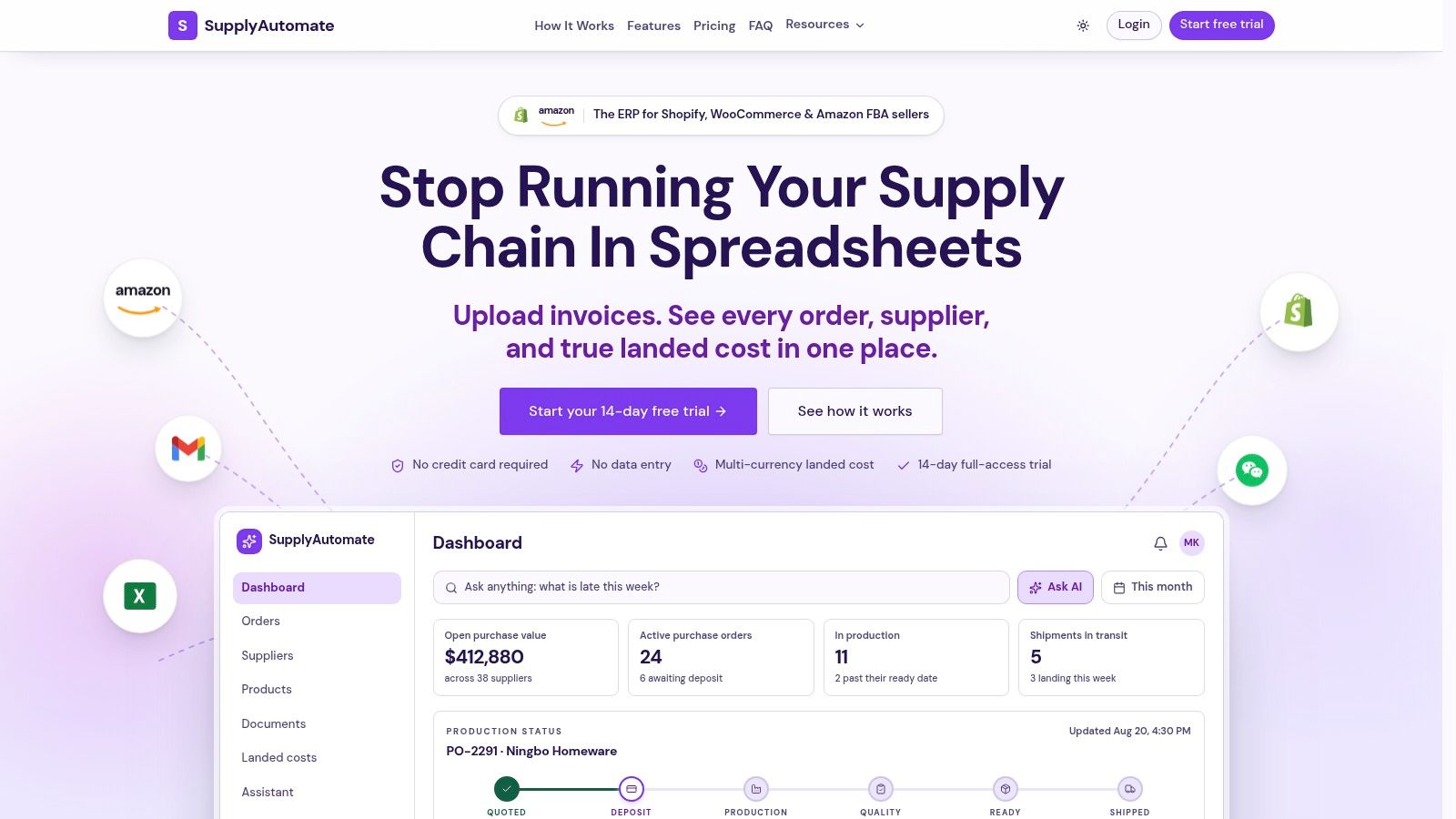
The dashboard illustrates the purchasing workspace rather than a replacement for Shopify checkout.
Buy stock synchronization when location or channel oversells are the primary failure and procurement remains simple. Choose a forecasting suite or ERP when manufacturing planning or deeper operational coordination justifies assigning an implementation owner.
SupplyAutomate fits an under-$5M importer whose bottleneck is supplier threads, PO revisions, and landed cost. Although offered under Shopify ERP and Amazon FBA ERP positioning, its relevant role here is a purchasing and landed-cost workspace beside Shopify. It doesn't perform manufacturing planning, payroll, or general-ledger accounting, and it sits next to existing accounting software.
The price is $99 per month after a 30-day free trial, with no credit card required. The buying decision should depend on whether a live order becomes easier to control, not whether the team can populate another dashboard.
If the quote isn't the cost, a stock app won't fix the margin.
The demonstration provides another way to inspect the workflow before committing a live order.
Demand-generation work belongs in a separate decision process. Rankira's guide to compare keyword relevance and difficulty can support search planning, but a promising keyword isn't a reason to increase a purchase order without checking stock, inbound commitments, and margin.
The next test is an open container, not a catalog migration. Recreate its PO, invite the factory with limited permissions, and determine whether the team can explain the expected landed cost before the goods begin selling.
Supply Automate offers purchase orders, supplier communication, documents, and SKU-level landed-cost control alongside Shopify and Amazon FBA operations. Visit Supply Automate to trial a live purchase order, attach the shipment documents, and test whether the team can replace scattered supplier messages with a cost record the accountant can defend.