The sheet says the mugs land on 6 May. Then production slips, the forwarder rolls the sailing, and the prep warehouse counts 590 units against an order for 600. The ETA cell doesn't move, ads keep spending, and nobody can say who confirmed that date in the first place.
Why One ETA Cell Loses the Order
A purchase order can feed two different destinations. PO-1842 covers 600 mugs for Amazon FBA, while another order from the same factory feeds Shopify. If cartons split across those paths, one shared ETA cannot show who confirmed each date or what evidence supports it.
Manual PO handling costs small brands time: someone has to reconcile factory messages, freight updates, and the sheet. Three gaps make that work harder:
- The date has no source: An arrival date copied from email or WeChat stays in the cell after the vessel rolls.
- The next update has no owner: A late flag appears, but nobody is responsible for getting a revised date.
- The flag has no consequence: Shopify stock promises and FBA replenishment plans still use the old date, even as the sellable date changes.
Track milestone owners and evidence, not one ETA. For each open order, record who owns the next update, the date they confirmed, and the evidence behind it. A prettier sheet doesn't fix a stale ETA.
Keep the commercial PO separate from the receipt. A Shopify order for 500 units can be checked in as 480; an FBA prep order for 600 can be checked in as 590. The PO records what the supplier agreed to ship. The warehouse receipt records what arrived. Keeping both quantities makes shortages visible for invoice matching and reorder decisions. A lead time calculator for supply chain planning can help estimate timing, but it cannot replace a dated update from the person responsible for the milestone.
A calendar can work for a small set of SKUs if everyone trusts it. Once email, WeChat, and the sheet disagree about the same PO, record the latest inbound date and its owner on the order.
Purchase Order Tracking Template Columns to Copy
Copy the header row first and fill in one live order before touching colors or formulas. One row is one PO line, not one chat thread and not one supplier. A PO with three SKUs gets three rows, because each SKU can finish, pass QC, and receive on a different day.
Freeze the Commercial Fields
Some fields stop moving the moment the supplier acknowledges the order. Lock PO number, supplier, seller SKU and factory item code, destination, quantity ordered, currency, and unit price at that point. If the price changes later, the change goes in a version note, not over the original cell. Anyone building the order itself from scratch can follow the steps for creating a purchase order and then drop the approved terms straight into these frozen columns.
Destination needs a place, not a channel label. For FBA, write the prep center or the fulfillment center, such as prep warehouse then ABE2. For Shopify, write the inventory location that will receive the transfer. A row that just says "Amazon" can't tell the warehouse where to send cartons, and a row that just says "Shopify" can't tell the store which location gains the stock.
Let the Milestone Fields Move
The moving fields carry the life of the order: PO status, shipment status, owner, supplier acknowledgment date, production complete, QC result, pickup booking, ETD, ETA, received quantity, shortage or reject quantity, invoice status, and a short exception note. Those milestones mirror how orders get released. The Spendesk summary of APQC benchmarking reported across 1,250 companies that the median time from receiving a purchase requisition to releasing the purchase order was 2.0 days, while top-performing organizations issued POs in approximately 1 day. That source also reports that only 28% of invoice line items were approved through three-way matching, despite a median PO-to-invoice match rate of 85% across APQC's 470-company research sample. Keeping quantity, price, confirmation, receipt, and invoice status on one auditable row is what makes a match possible later.
Freight, duty, and insurance columns stay empty until a forwarder number exists. A guessed landed cost makes a cheap SKU look profitable until the vessel arrives and the actual charges land. Once the forwarder quotes, those figures belong on the row next to the unit price.
| Field | What to record | PO-1842 example |
|---|---|---|
| PO number | ID shared with factory and forwarder | PO-1842 |
| Supplier | Factory or trading company | Ningbo Home Goods Co. |
| SKU | Seller SKU and factory item code | HG-MUG-12 |
| Destination | Shopify location or FBA prep or FC | Prep warehouse then ABE2 |
| Qty ordered | Quantity on the approved PO | 600 |
| Unit price | Agreed price and currency | $2.40 USD |
| PO status | Commercial stage, not the vessel | Ordered |
| Shipment status | Booking, on water, or at the dock | Booked |
| Owner | Person who posts the next update | Ops lead |
| Supplier ack date | Date qty, price, and window were confirmed | 12 Mar 2026 |
| Production complete | Supplier finish date plus evidence | Carton photo 2 Apr 2026 |
| QC | Pass, fail, or conditional and who signed | Third-party pass 4 Apr 2026 |
| Pickup booked | Forwarder booking reference | BK-2291 |
| ETD and ETA | Departure and arrival, each with its source | ETD 8 Apr 2026, ETA 6 May 2026 |
| Received qty | Units actually checked in | 590 |
| Shortage or reject | Units not accepted and why | 10 short |
| Invoice status | Matched, variance, or unpaid | Open |
| Exception | Off-plan reason and the next action | Short ship, claim by Friday |
PO-1842 shows why the split matters. The commercial row says 600 units at $2.40, the booking reference is BK-2291, and the warehouse received 590. The invoice stays Open because the 10-unit shortage hasn't been claimed yet. Copy the header, fill one live PO with that level of honesty, and only then consider formulas.
How to Update Owners Dates and Status
A weekly routine keeps the columns honest. The four moves below show the rhythm before the detailed rules.
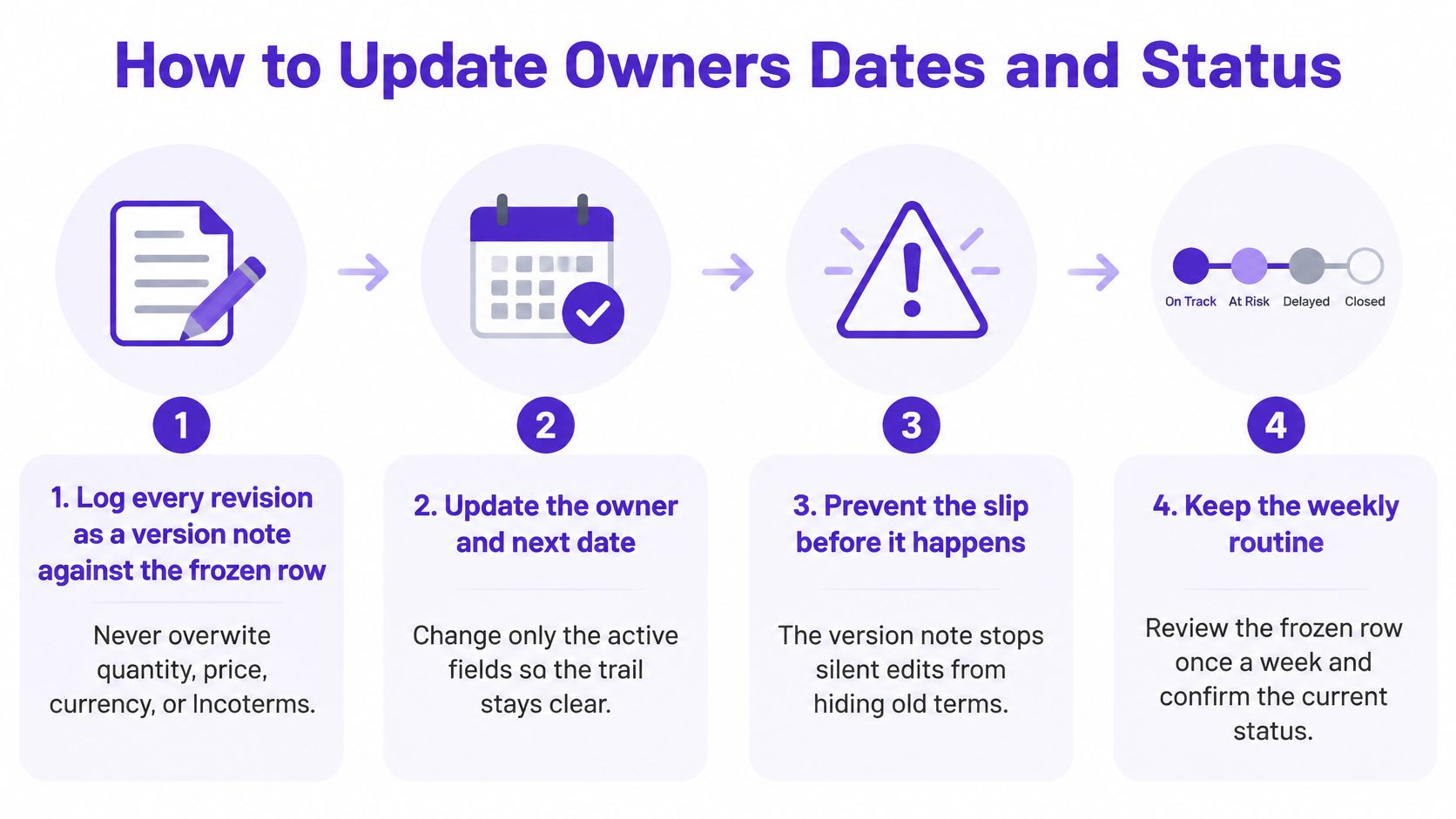
Each numbered step prevents a specific slip. Skipping one usually shows up two weeks later as a wrong sellable date.
- Log every revision as a version note: Quantity, price, currency, and Incoterms never get overwritten, so the approved version stays readable.
- Name one owner per open PO: The owner is the person who posts the next update, not a shared ops inbox that everyone assumes someone else checked.
- Set PO status from the commercial path only: Quoted, deposit paid, in production, ready, and shipped describe the deal, and a confident WeChat voice note doesn't make an order shipped.
- Write each date from evidence: Use the acknowledgment message, a dated production photo, the QC report, the booking number, the bill of lading, or a carrier milestone.
- Keep shipment status separate: Ordered can sit next to Booked, On the water, or At the prep dock without either field lying about the other.
- Age silent rows at 7 days: Any row with no new evidence for a week goes on Monday's chase list automatically.
- Move downstream dates the same day: When an ETA shifts, the date given to ads, FBA replenishment, or the Shopify launch shifts too, with the name of whoever confirmed it.
The short walkthrough below shows the update sequence in motion.
A founder running supplier, freight, and inventory alone shouldn't add more columns to fix a discipline problem. Fewer fields with a named owner beat a wide tracker that nobody updates. The lookup below locks the allowed values so two people don't invent two spellings for the same stage.
| Field | Allowed values | Who sets it |
|---|---|---|
| PO status | Quoted, deposit paid, in production, ready, shipped | Owner, from the commercial path only |
| Shipment status | Booked, on the water, at the prep dock, received | Forwarder or warehouse evidence |
| Date source | Acknowledgment, dated photo, QC report, booking, bill of lading, carrier milestone | Owner, with the evidence attached |
| Aging flag | Flagged after 7 days with no new evidence | Owner, on Monday's chase list |
Monday pass: Fifteen minutes covers exceptions first, then rows older than 7 days, then only the POs whose next milestone falls this week.
That order matters. Reading the whole sheet top to bottom wastes the pass on rows that aren't moving, while the slipped production date hides in the middle. Exceptions get an owner and a next action before anything routine gets touched.
Shopify Receipts and Amazon FBA Prep Examples
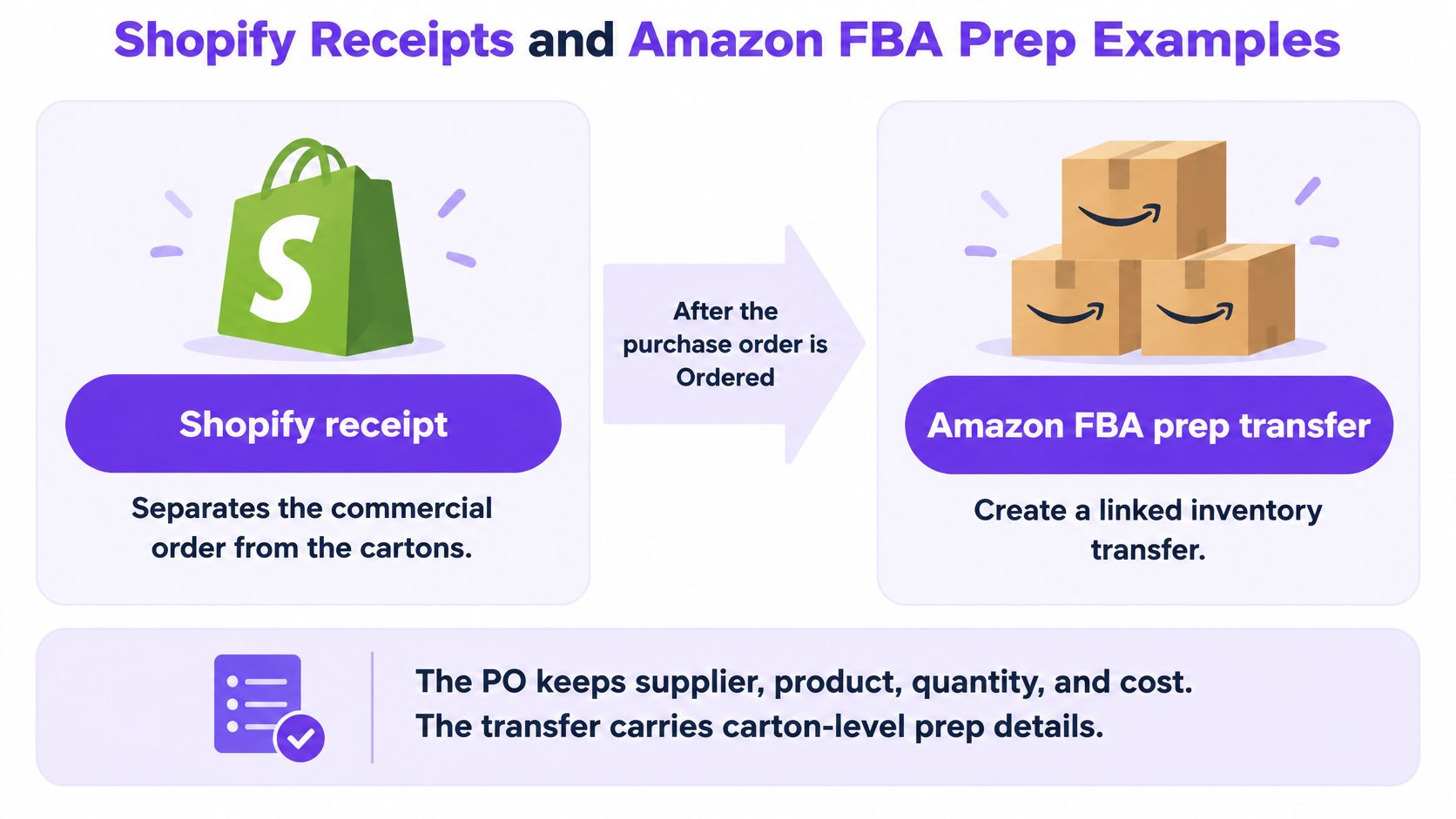
Shopify separates the commercial order from the cartons, and the template should copy that split. The Shopify guide to creating purchase orders explains that after a purchase order is marked "Ordered," the seller can create a linked inventory transfer, and Shopify also automatically creates a shipment when the transfer is processed. The PO records supplier, product, and ordering details, while the transfer tracks shipment movement, receiving, and cost adjustments. Treating the PO itself as proof that goods arrived skips the only count that matters.
The diagram below sets the two receiving paths side by side.
The 500 to 480 Shopify Case
Say a private-label brand orders 500 units into its Shopify warehouse. The transfer gets received, staff scan what showed up, and 480 units are accepted while 20 are short-shipped. The ordered quantity stays at 500, received becomes 480, and shortage becomes 20. Closing the PO at 500 would overstate stock the store can't sell and bury the claim for the missing units.
In Shopify POS, staff open the order under the In transit tab and either receive all or type the quantity scanned. That partial receipt is the honest number. The template row should match it the same day, with the exception note stating where the 20 units will be claimed.
The 600 to 590 FBA Prep Case
The FBA path needs the same honesty one step earlier. A brand ships 600 units to its prep warehouse, and the check-in count is 590. Recording 590 received and 10 short before anyone creates the FBA inbound keeps Amazon's receiving report reconcilable. Closing the PO at 600 first guarantees a mismatch that surfaces weeks later, when the claim window feels much shorter. Prep work at this stage also has to avoid common FBA packing errors, since a labeling mistake found at check-in is far cheaper than one found at the fulfillment center.
A mixed PO can send 400 units to a Shopify location and 600 units to FBA prep. Two destination rows share one PO number, so in-transit units don't appear as available on either channel. That split also keeps channel-level decisions clean, and it pairs naturally with disciplined Amazon FBA inventory management once the FBA share leaves the prep dock. Supplier purchase orders and transfers can change Shopify stock levels, so a blank destination overstates what the store can sell.
| Receipt | Ordered | Accepted | Short or rejected | Claim and record rule |
|---|---|---|---|---|
| Shopify transfer | 500 | 480 | 20 short | Claim the 20 units; ordered stays at 500 |
| FBA prep check-in | 600 | 590 | 10 short | Claim the 10 units before creating the FBA inbound |
| Mixed PO split | 400 Shopify + 600 FBA | Counted per destination row | Shortage recorded on the row where it landed | Two destination rows sharing one PO number; in-transit units not shown as available |
Every receipt ends with three quantities: ordered, accepted, and short or rejected. A fourth note states where the short units will be claimed. Without that note, the shortage becomes a shrug at the next reorder instead of money recovered.
Tips for Late Production and Short Ships
An ETA typed from a carrier email goes stale the hour production, pickup, transshipment, or customs timing changes. The Orkestra guide to purchase order tracking makes the point that a red "late" flag also has limited value if nobody is automatically notified or assigned an action. That guide describes the gap plainly: templates record planned dates but rarely define who confirms a revised date, when the buyer escalates, and which downstream milestones must be rescheduled. Fewer fields with explicit owners, evidence, and escalation rules beat an elaborate tracker displaying stale status.
Each slip gets a named confirmer and a same-day consequence. The pattern stays consistent even when the cause changes.
- Production runs late: The supplier confirms a revised finish, and the owner moves the sellable date plus any ad or launch plan built on the old one.
- QC fails: The QC owner stops the booking that day, because pickup should never get requested on a failed lot.
- The sailing rolls: The forwarder owns the new ETD, and the FBA delivery window moves with the booking rather than a week later.
- Customs holds the freight: The broker updates the row, and Shopify doesn't get promised stock that hasn't cleared.
- The receipt comes up short: The warehouse owns the count at check-in, and both the invoice match and the next replenishment use the accepted quantity, not the PO quantity.
Teams formalizing this discipline often borrow the logic behind measuring on-time in-full delivery, because a shipment that's on time but short still breaks the plan. The same thinking applies to partial movements, which is why operators ask whether purchase order software can track partial shipments from suppliers before a split shipment turns into two conflicting rows. On PO-1842, the 10-unit shortage is a Friday claim, not a closed order. Price changes, quantity variances, missing documents, and unmatched invoices belong in the exception field too, so they don't hide inside a normal looking status.
| Slip | Who confirms | Escalate after | What else moves |
|---|---|---|---|
| Production late | Supplier | 2 days past promised finish | Sellable date and launch plan |
| QC fail | QC owner | Same day | Do not book pickup |
| Rolled sailing | Forwarder | When the booking changes | FBA delivery window |
| Customs hold | Broker | 48 hours with no release update | Do not promise Shopify stock |
| Short or rejected receipt | Warehouse receiving | At check-in | Invoice match and replenishment |
The practical test is simple. A teammate should see the owner, the proof, and the next date without opening WeChat.
Margin belongs in the exception habit as well. Once the forwarder quotes, origin plus a rough freight, duty, and insurance note go on the row. Unit cost alone can show a profit that the landed shipment doesn't have, and catching that before receipt beats discovering it in the month-end numbers.
Move Open Orders Off a Stale Sheet
The decision to leave a sheet behind should come from the last two weeks of chasing, not from a software demo. The summary below frames that test.
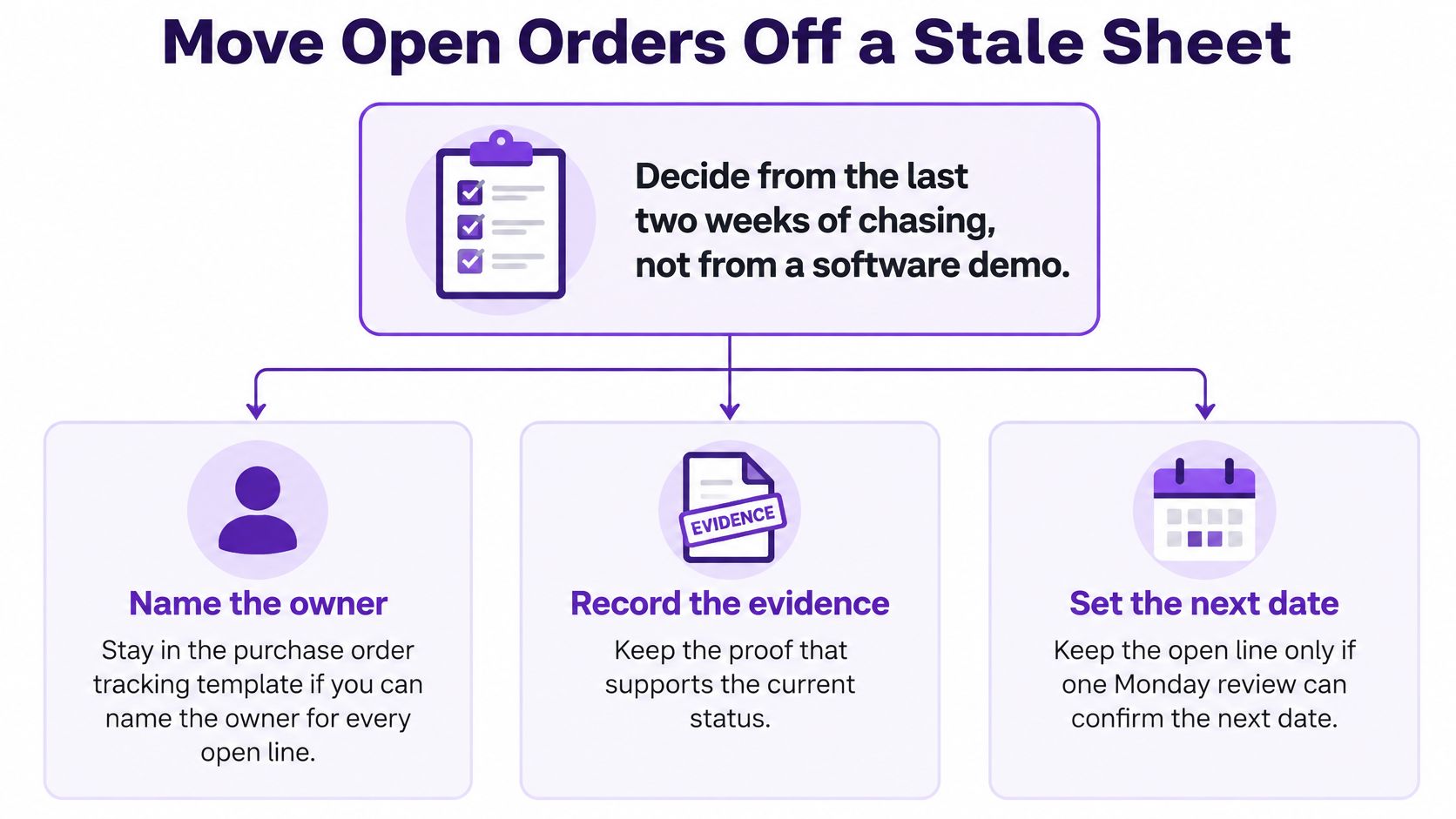
Staying in the purchase order tracking template makes sense when one Monday pass can name the owner, evidence, and next date for every open line. It also holds up when a short ship already appears as a quantity rather than a story someone tells in a thread. Under those conditions, the sheet is doing its job and prettier tooling adds little.
Moving becomes the right call under different conditions:
- The same PO lives in three places: WeChat holds the promise, a forwarder email holds the booking, and the sheet still shows the date from before the sailing rolled.
- A second person can't read the row: Nobody covering for the ops lead can tell Shopify stock from units still on the water.
- Updates depend on late-night copying: The latest status exists only because someone transcribed a group chat by hand.
Every purchase order in SupplyAutomate moves through quoted, deposit, production, ready and shipped stages, with dates attached, and suppliers who communicate only over WeChat can be invited to a purchase order to share updates and documents directly. That structure mirrors the template's own statuses, so the move doesn't require relearning the stages. Teams that reach this point often want the same milestone view rolled up, which is where a manufacturing dashboard starts to earn attention alongside the PO record itself.
Either way, the work this week is identical. Copy the header row, fill every open PO, and run the 7-day aging rule once. Then count how many open rows lacked an owner, evidence, or next date. That count, not a feature list, decides whether the sheet still works. The sheet gets retired only after updates against the same PO number happen without a scavenger hunt for the latest status.
Supply Automate gives FBA and Shopify brands a single workspace where each purchase order carries its supplier, SKUs, quantities, prices, dates, and documents from quoted through shipped, so milestone owners and evidence stop living in scattered threads. Free downloadable templates, including a purchase order template, packing list, commercial invoice, and landed cost spreadsheet, let a team start with the same columns covered here and grow into the platform when the sheet stops keeping up. Visit Supply Automate to put the next open order on a record the whole team can trust.