Your first factory order from Alibaba just shipped, and your inbox now holds a proforma invoice, a commercial invoice, a packing list, and a freight bill that all use slightly different numbers. Every ad you see says AI can read those documents for you. Before you sign up for anything, it helps to know what these tools really cost and what you get for the money.
I built an Amazon FBA and Shopify brand to $3M ARR, and I typed a lot of supplier invoices by hand before I paid for any software. This guide lists the published prices for the tools small sellers actually use, the fees that hide behind the monthly number, and a simple way to work out whether any of it pays off at your volume.
TL;DR
- Small business invoice reading tools start around $25 to $40 a month. Dext is $31.50 a month or $302.50 a year for 250 documents, and Docparser starts at $39 a month for 100 documents.
- Accounts payable tools that also approve and pay bills charge per user. BILL starts at $49 per user per month, and your accounting software is a separate bill on top.
- The hidden costs are line item extraction, document caps, extra users, setup work, and the time you still spend checking each invoice against the purchase order.
- If you place one order every month or two, a spreadsheet and a folder per order usually cost less than any subscription. Software starts to pay off when documents pile up faster than you can check them.
- For importers, the number that matters most is landed cost per unit, so pick a tool by whether it helps you get from the supplier invoice to that number.
The Short Answer
For a small seller, AI invoice processing software costs anywhere from nothing to about $2,000 a year. The cheap end is a document reader that pulls the supplier name, date, and total from a PDF. The expensive end is software that also pays the bill, keeps your books, or tracks the whole order through to landed cost.
The price on the pricing page is rarely the full bill. Most tools cap documents or users, charge extra to read individual line items, and assume you already pay for QuickBooks Online or Xero. The sections below walk through each cost so you can add it up for your own business before you commit.
What Counts As AI Invoice Processing
AI invoice processing means software reads an invoice you upload or forward, pulls out the key fields, and puts them somewhere useful. That might be a spreadsheet, your accounting software, or a purchase order record. The "AI" part is the reading, which replaces the typing you'd otherwise do yourself.
For an importer, that reading is only the first of five jobs. Someone still has to check the invoice against the purchase order and what arrived, pay the deposit and balance by wire or bank transfer, record the bill in your books, and then add freight, duty, and samples to get your real cost per unit.
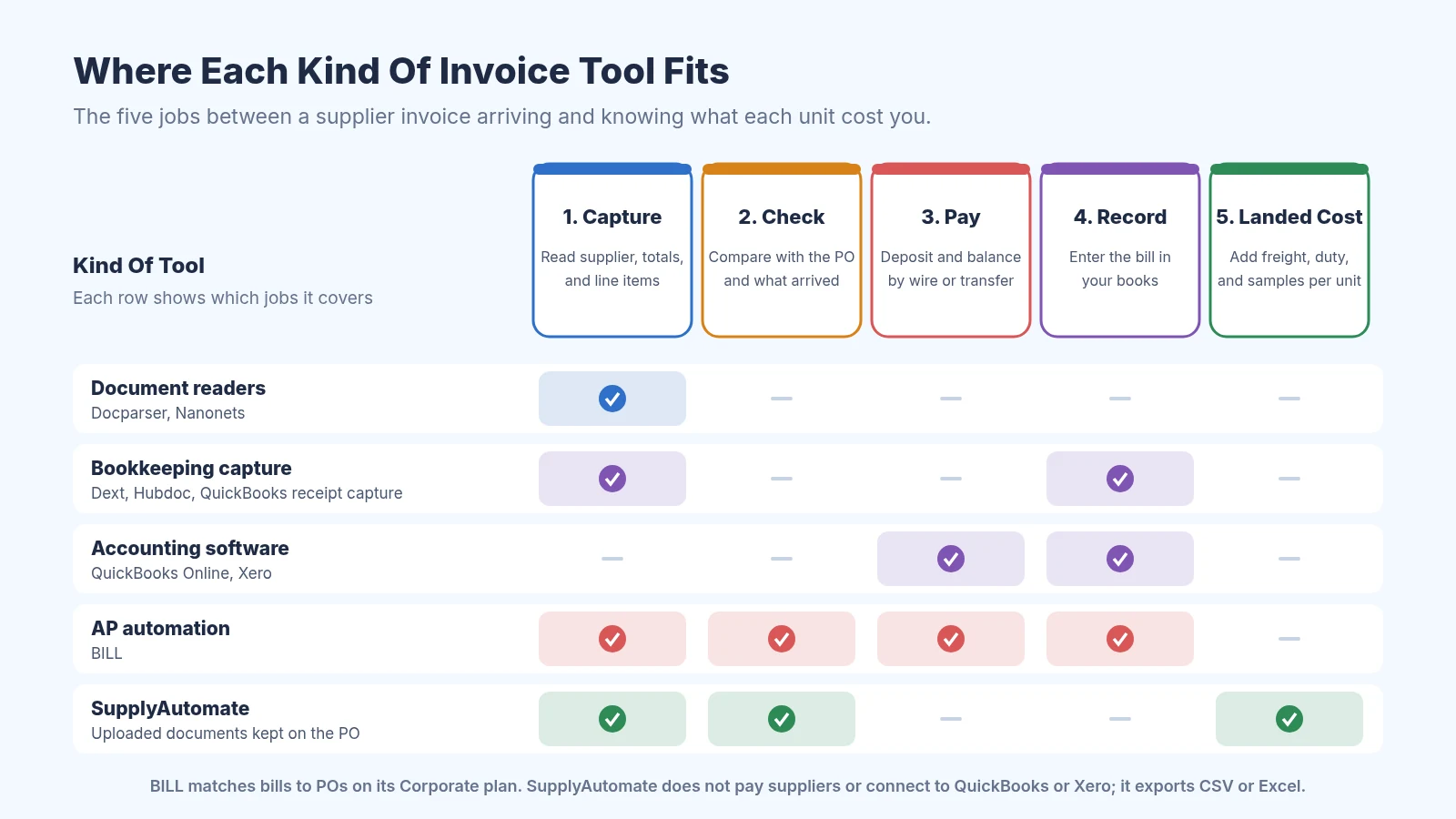
Most invoice tools cover one or two of the five jobs an importer has to do
That's why prices vary so much. A tool that only reads documents is cheap because it does one job. A tool that reads, routes approvals, and pays suppliers costs more because it replaces more of your week. If you want a deeper look at the reading and matching side, our guide to invoice processing software for Shopify and Amazon FBA compares the options feature by feature.
What Each Tool Costs
Here's what each tool's own pricing page listed when I wrote this in October 2026. Prices change often and many tools run intro discounts, so treat these as a starting point and check the page before you buy.
| Tool | What it does | Published starting price | What to watch |
|---|---|---|---|
| Google Sheets and a folder | You type the numbers | Free with a personal Google account | Your time |
| Dext | Reads receipts and bills, sends them to your books | $31.50 a month, or $302.50 a year | 250 documents a month, line items cost extra |
| Hubdoc | Reads bills and sends them to Xero | Included with Xero plans | Needs a Xero subscription |
| QuickBooks Online | Accounting with receipt capture and bills | $38 a month, $85 a month for bill management | Intro discounts end after three months |
| Xero | Accounting with document capture and bills | $27 a month, $59 a month for more than 5 bills | Multiple currencies need the $97 plan |
| Docparser | Reads documents into Excel, CSV, or Google Sheets | $39 a month, or $32.50 a month billed yearly | 1 credit covers a document up to 5 pages |
| Nanonets | Reads documents with usage pricing | $50 free credits, then $100 a month for 100 credits | Each step of a workflow is billed |
| BILL | Bill approval and payment | $49 per user a month | Per user, plus payment fees |
| SupplyAutomate | Purchase orders, supplier documents, landed cost | $199 a month, or $1,999 a year | Doesn't pay bills or keep your books |
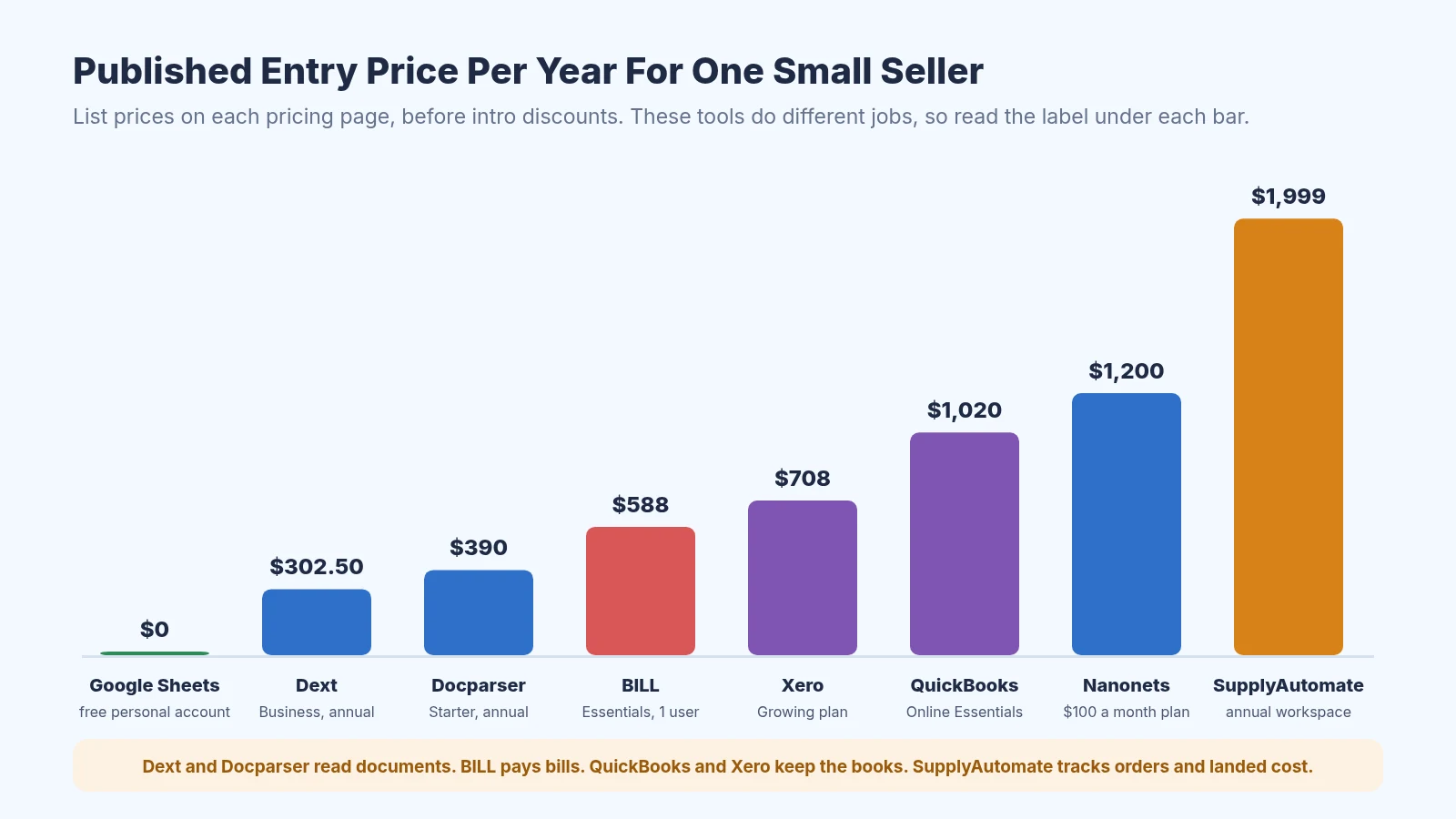
Yearly list prices side by side, keeping in mind that each tool does a different job
Dext
Dext is built for bookkeeping. You snap, email, or upload a receipt or supplier bill, and it reads the supplier, date, amounts, and tax and publishes them to your accounting software. The business plan is $31.50 a month billed monthly, or $302.50 a year billed annually, and it includes 250 documents a month and five users.
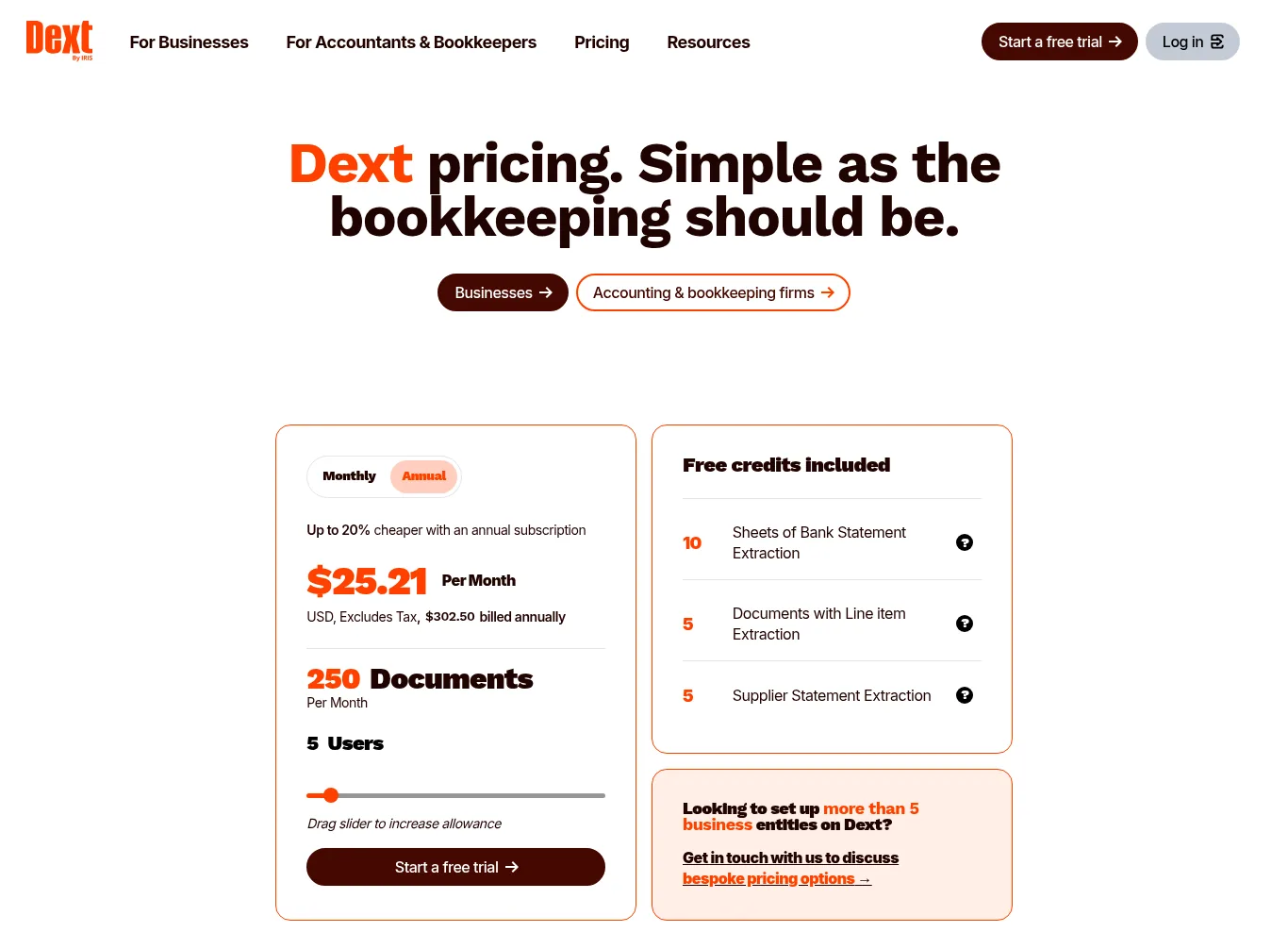
Dext business pricing with 250 documents a month and paid add-ons
The catch for importers is line items. The base plan includes only five documents a month with line item extraction, and more costs from $20.50 a month or $0.50 a document. A factory invoice with six SKUs needs those line items if you want cost per unit, so budget for that add-on from day one.
Hubdoc With Xero
If you already use Xero, Hubdoc is the cheapest option because it's included in Xero's US plans. It captures bills and receipts from your phone, email, or scanner and gets them ready to publish to Xero with the original document attached.
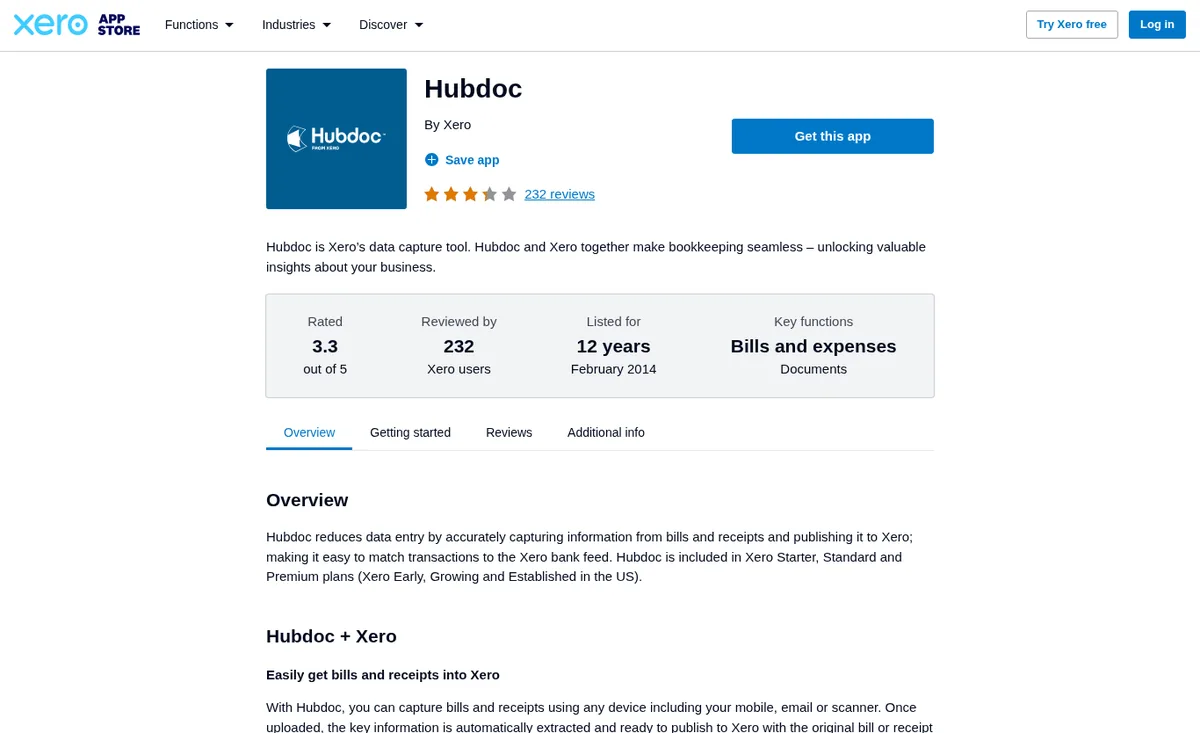
Hubdoc comes with Xero plans in the US
Xero itself is the real cost here. The Early plan is $27 a month but limits you to five bills, so most sellers who enter supplier bills end up on Growing at $59 a month. If you pay factories in a currency other than your own, multiple currencies are only on the Established plan at $97 a month.
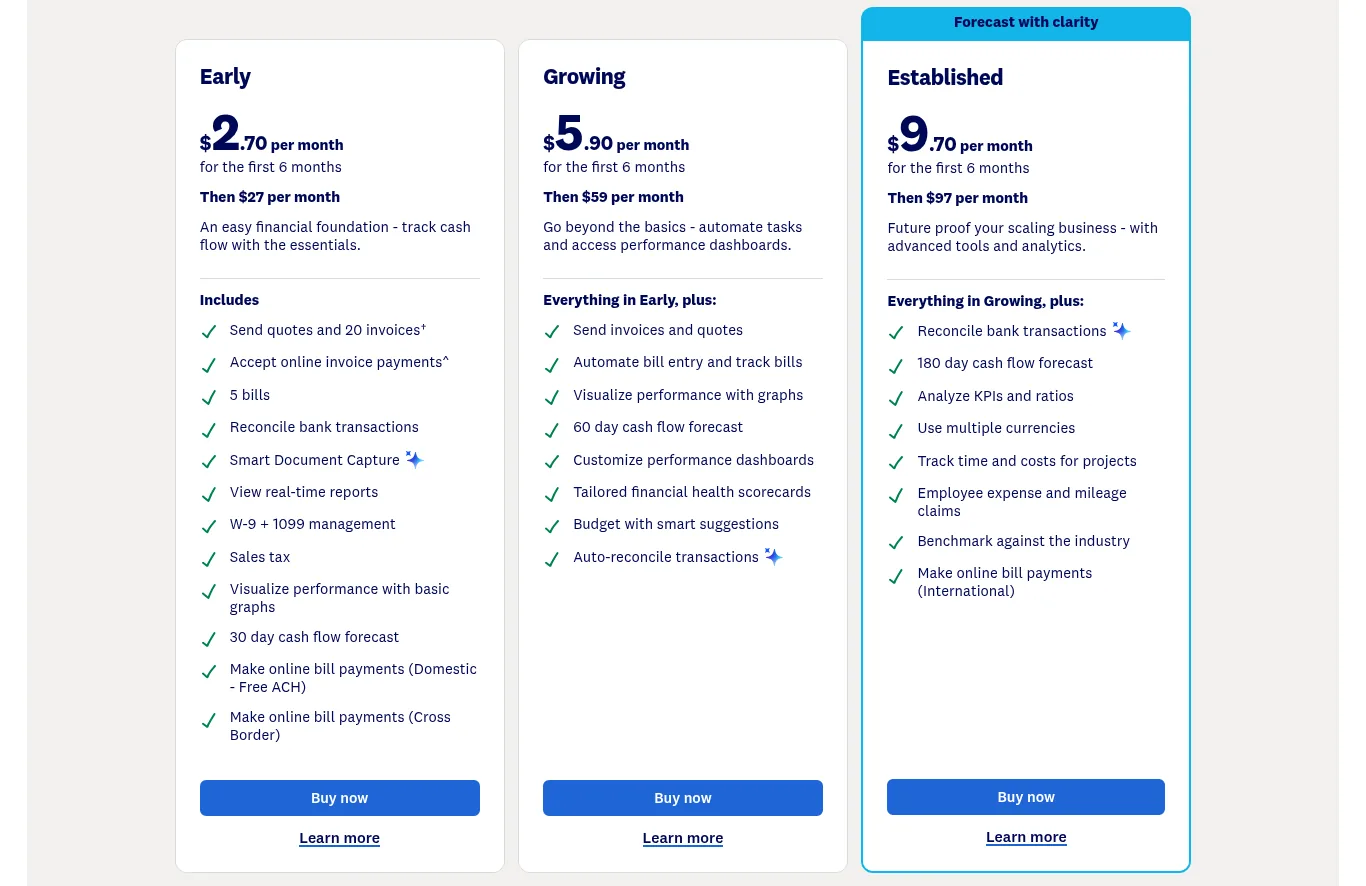
Xero plans, where the regular price applies after the intro offer
QuickBooks Online
QuickBooks Online includes receipt capture through its mobile app on every paid plan. Simple Start is $38 a month for one user, and Essentials is $85 a month for three users and adds bill management, which is what you need to track what you owe suppliers. Plus is $140 a month and adds inventory tracking.
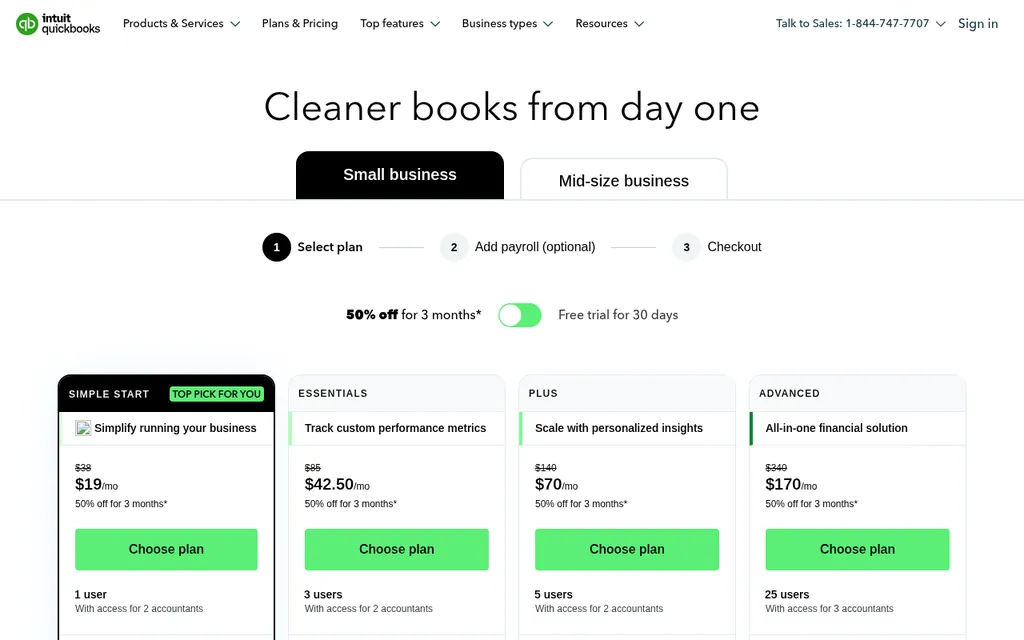
QuickBooks Online plans with the intro discount shown next to the list price
Watch the intro offer. The pricing page often shows half price for the first three months, and the full price applies after that. Bill payments also carry fees once you pass your monthly allotment of free standard ACH payments, which matters less for factory payments since those usually go by international wire. If you want to see how supplier bills flow into QuickBooks, read our guide to getting supplier invoices into QuickBooks Online.
Docparser
Docparser reads documents with parsers you set up from a template or its AI parser, then sends the results to Excel, CSV, JSON, or straight into Google Sheets. That makes it a good fit if your supplier invoices all look the same and you want the line items in a spreadsheet you already use.
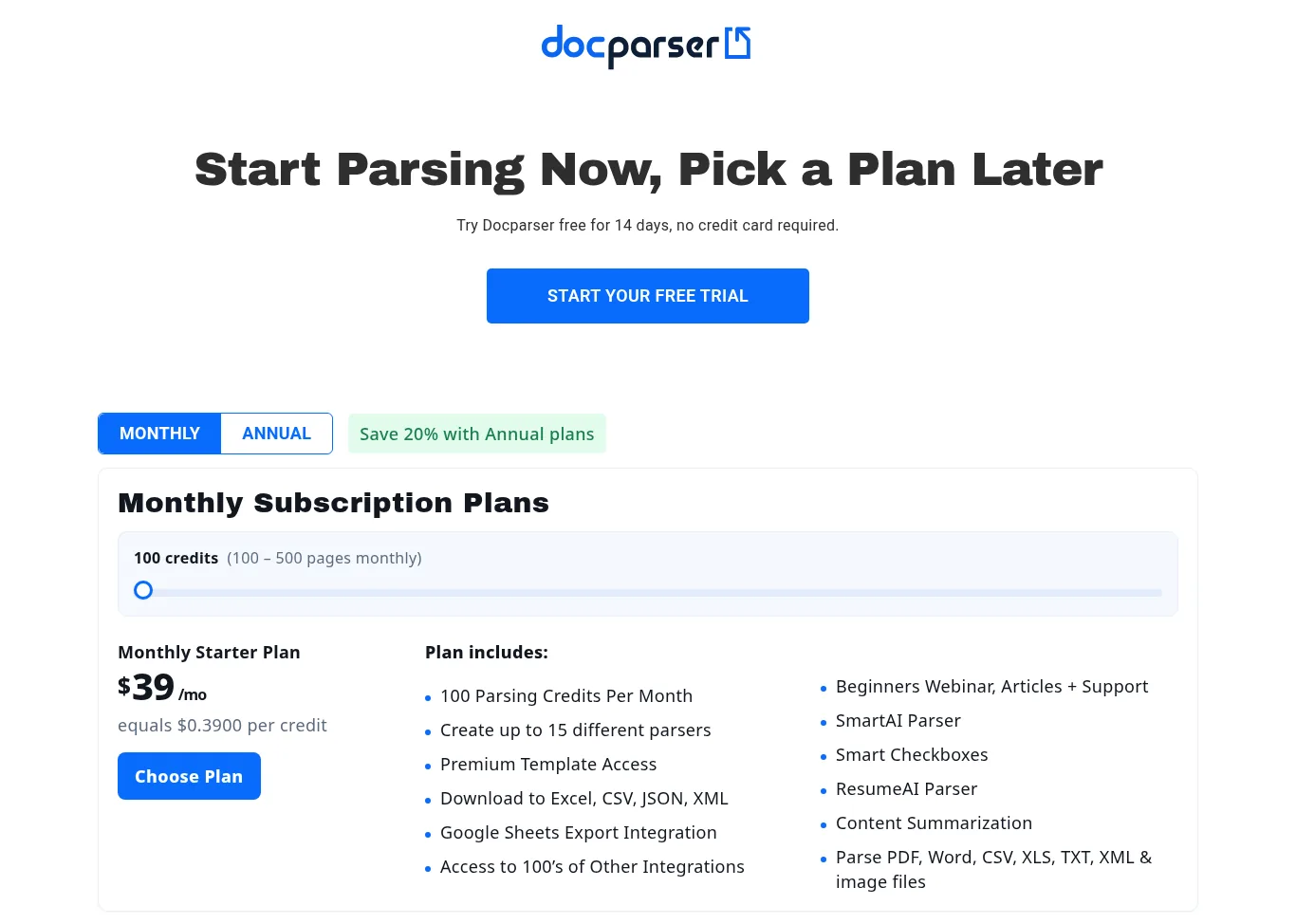
Docparser prices by parsing credits, where one credit covers a document up to five pages
The Starter plan is $39 a month for 100 credits, or $32.50 a month billed yearly for 1,200 credits a year, with a 14-day free trial. One credit covers a document of up to five pages, so a long packing list can use more than one. If you don't want to build the parser yourself, Docparser's setup service costs $149 per layout.
Nanonets
Nanonets uses pay as you go pricing. You start with $50 in free credits and no card, and after that the self-serve plan is $100 a month for 100 credits. Each step in a workflow is billed, from $0.02 for simple steps to $0.30 for AI data extraction.
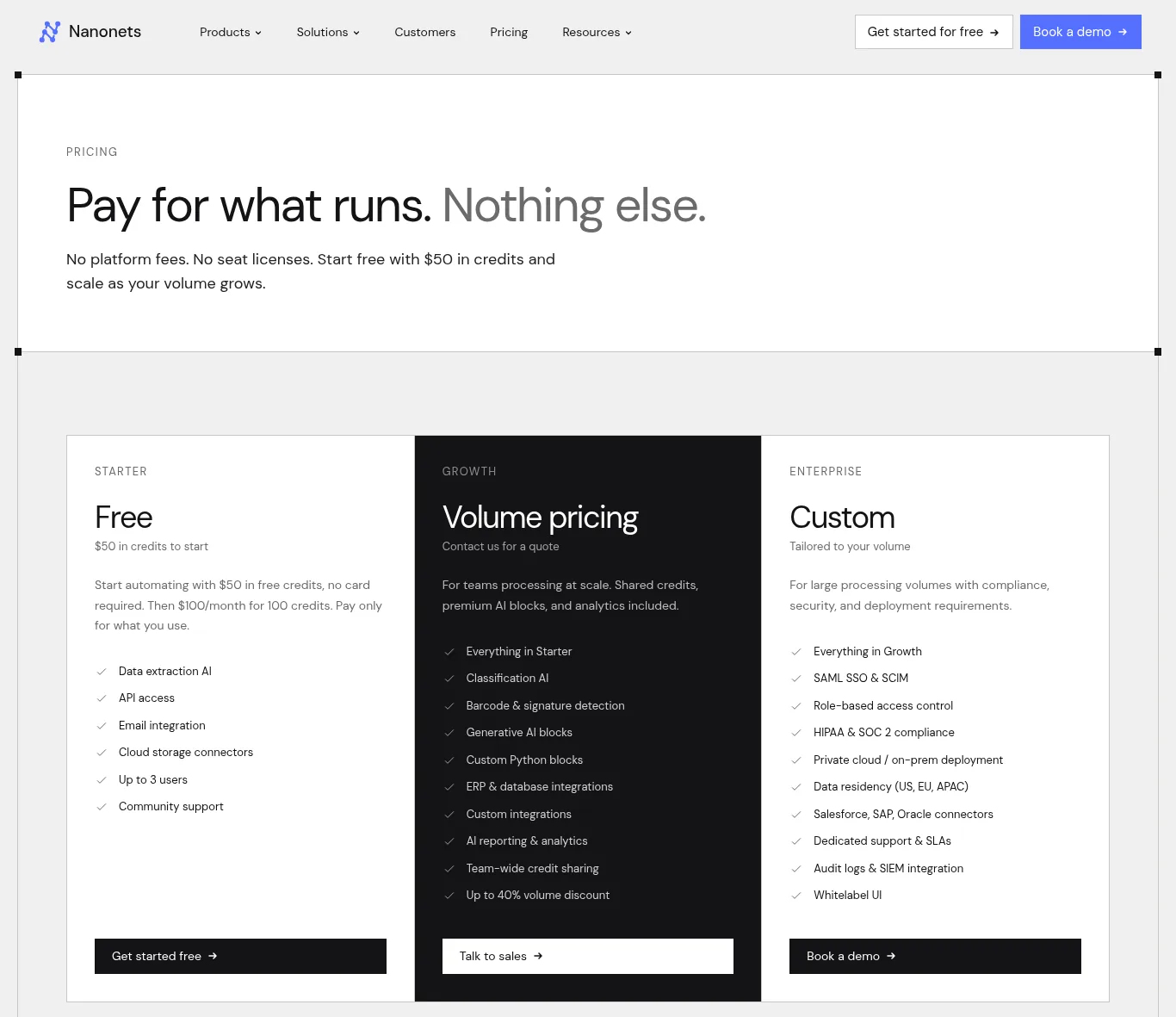
Nanonets bills for each step a workflow runs
Nanonets says a typical invoice workflow runs four to six steps and costs under $2 per invoice. That's cheap per document, but the monthly plan makes it the priciest reader on this list for a seller with a few invoices a month. It makes more sense once you have steady volume and someone comfortable setting up workflows.
BILL
BILL is accounts payable software. It collects bills in one inbox, routes them for approval, and pays suppliers, and it reads bills with AI to code them on its higher plans. Essentials is $49 per user a month and connects to your accounting software through CSV import and export. Team at $65 adds automatic sync with QuickBooks and Xero, and Corporate at $89 adds purchase orders and two-way matching.
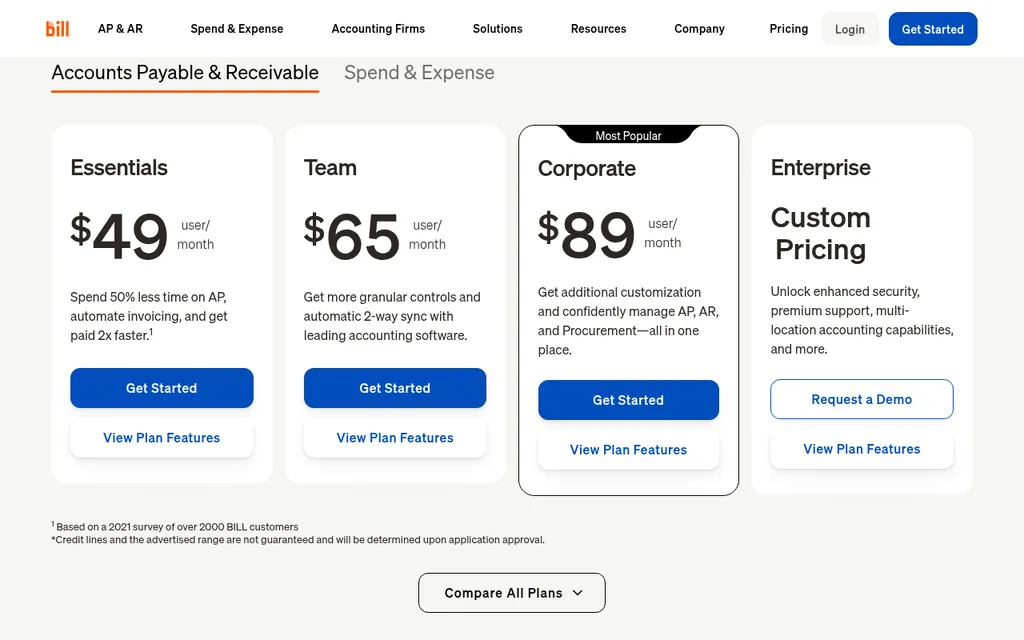
BILL charges per user, and PO matching starts on the Corporate plan
Per user pricing adds up fast if a partner, bookkeeper, and assistant all need logins. Payments also carry their own fees depending on how you pay. For a deeper comparison of tools in this group, see our guide to accounts payable automation software.
SupplyAutomate
SupplyAutomate is the tool I built, so weigh this section with that in mind. It isn't an accounting or bill payment tool. You upload supplier invoices, packing lists, freight bills, and customs entries, and it reads the key values and keeps them on the purchase order, tracks the parcel or ocean container, and calculates landed cost from factory price, freight, duty, and samples. You can export everything to CSV or Excel for your bookkeeper.
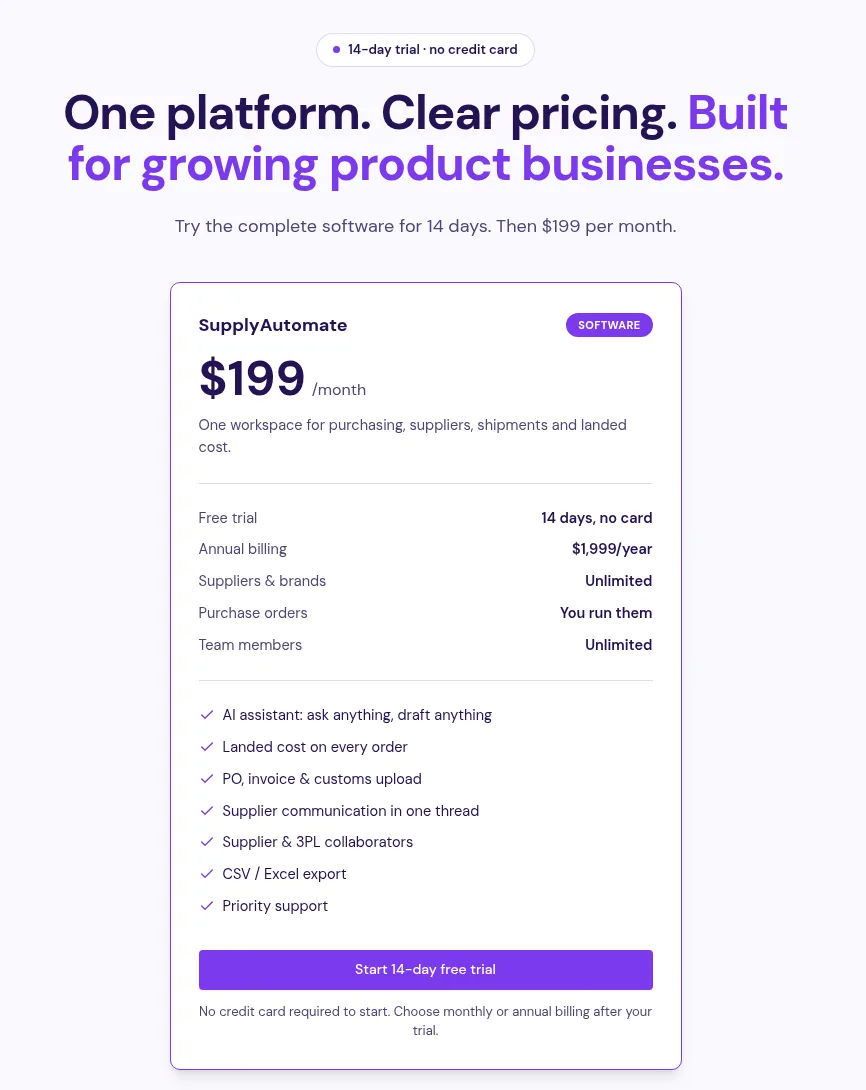
SupplyAutomate is priced per workspace with unlimited team members
It's $199 a month or $1,999 a year per workspace after a 14-day trial, with unlimited team members. It has no Shopify, Amazon, WooCommerce, QuickBooks, or Xero connection and doesn't sync sales, so you'd still keep your books in QuickBooks or Xero. It's the most expensive line on the chart above, and it only makes sense if the order and landed cost side is where your time goes. The pricing page lists everything included.
The Hidden Costs Behind The Monthly Price
The monthly price is the number everyone compares, but it's only one layer. When I add up what a small importer actually pays, five things show up again and again.
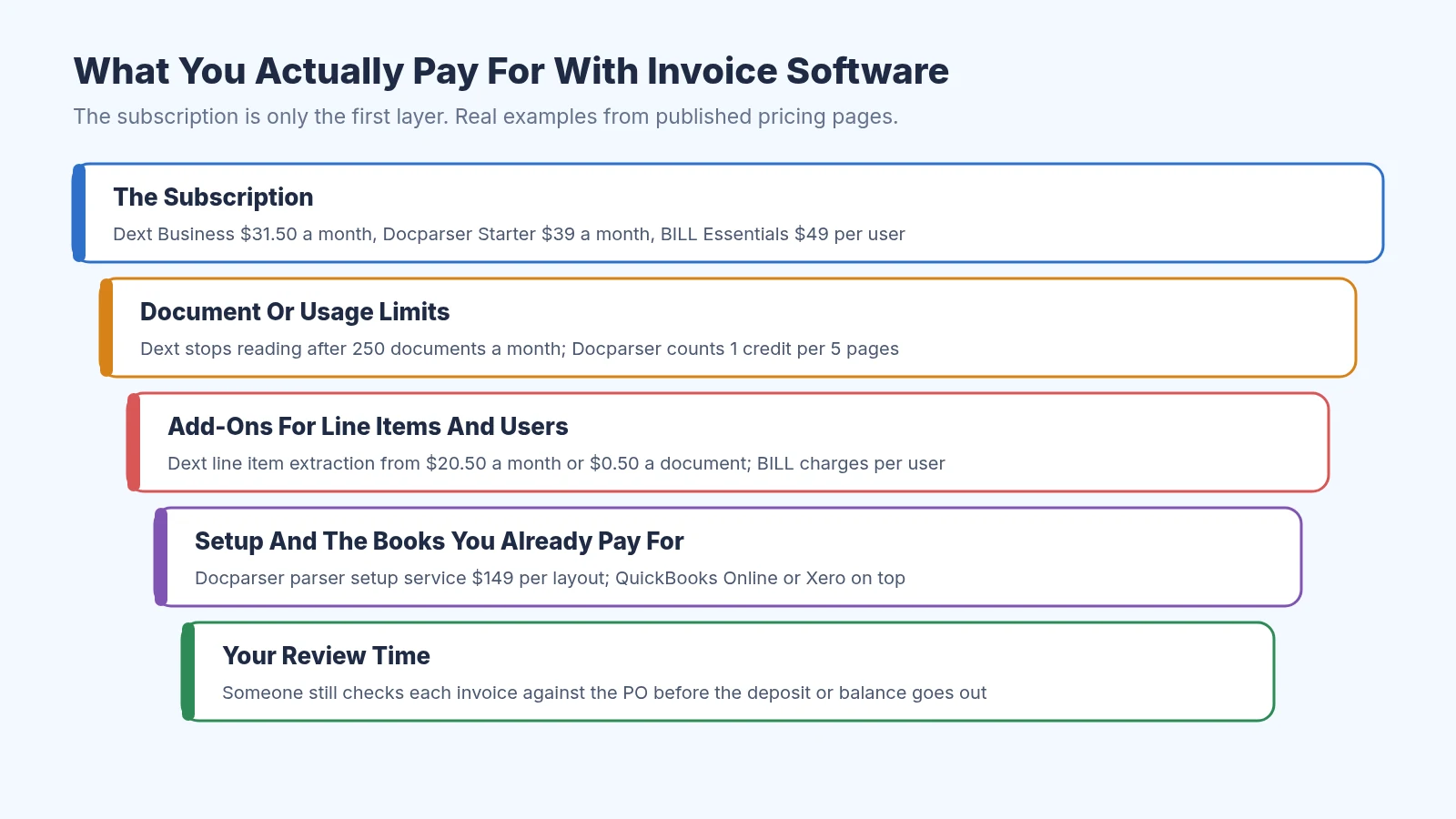
The subscription is the top layer of what invoice software really costs
- Line items. Supplier invoices list several SKUs, and you need each line to work out cost per unit. Dext charges extra for this beyond five documents a month, and tools like Docparser need a parser set up for each supplier layout.
- Document and usage caps. Dext stops extracting once you pass your monthly document limit until the next billing date or an upgrade. Docparser counts pages, and Nanonets counts every workflow step.
- Users. BILL charges per user, so adding a partner or virtual assistant raises the bill every month.
- Setup. Someone has to set up suppliers, rules, and approval steps. That's your time, or a paid service like Docparser's $149 per layout setup.
- The software you already pay for. Dext, Hubdoc, and BILL send data into QuickBooks Online or Xero, so their price sits on top of your accounting subscription.
The cost no pricing page shows is review. AI reading still makes mistakes on blurry scans, mixed language invoices, and deposit lines, so someone has to check each invoice against the purchase order before money goes out. Our guide on how to reconcile a supplier invoice to a purchase order shows what that check looks like.
A Worked Example For A First-Time Importer
Say you sell on Amazon FBA and place one order with one factory every six weeks, which is about eight orders a year. Each order leaves around six documents: the proforma invoice, the commercial invoice, the packing list, the freight bill, the customs entry, and the broker's invoice. That's about 48 documents a year, or four a month.
Now suppose each document takes you ten minutes to read and type into a sheet. That's eight hours a year, and if your time is worth $30 an hour, it's about $240 of time. Use your own numbers here, since your minutes per document and hourly value will differ from mine.
Compare that with the cheapest paid readers. Dext at $302.50 a year works out to about $6.30 per document at 48 documents, and Docparser at $390 a year is about $8.13 per document. At this volume, a free sheet and a folder per order cost less than either tool, even before you add line item fees.
Google Sheets is free and covers one factory and a few orders a year
The math flips with volume. At 100 documents a month, the same ten minutes each adds up to about 17 hours a month, or roughly $500 of your time at $30 an hour. A $30 to $100 a month tool that cuts most of that typing pays for itself many times over. A free landed cost spreadsheet template and our landed cost calculator cover the low volume case well.
When Paying For Invoice Software Makes Sense
Volume is the clearest signal. These are the situations where I'd start paying for a tool, even as a small seller.
- You can't keep up. Documents sit unread for days, and you find a wrong balance after you've already paid it.
- Someone else needs access. A partner, bookkeeper, or virtual assistant needs the same documents without asking you for files.
- You buy from several factories. Each one sends a different invoice layout, and the checking takes longer than the typing.
- Your landed cost is a guess. If you price products off the factory price alone, a tool that ties invoices, freight, and duty to each order can save more than its subscription. Our explainer on landed cost vs COGS shows why that number matters.
- You're paying by wire. Wires are hard to recall, so a check for changed bank details or duplicate invoices before you pay is worth a lot.
On that last point, a new supplier deserves extra care. For a first order with a factory you've never used, I'd pay through Alibaba Trade Assurance instead of wiring money directly, and keep the supplier's invoice with the order so you can match it later. Our post on 30/70 payment terms covers how deposits and balances usually work.
How To Test A Tool Before You Pay
Most of these tools offer a free trial, so test them on your own paperwork. Dext and Docparser both offer free trials with no card, Nanonets gives you $50 in credits, and SupplyAutomate has a 14-day trial with no card.
- Pick one finished order and gather every document for it, including the proforma, commercial invoice, packing list, freight bill, and customs entry.
- Upload them all and check whether the tool reads each line item, the deposit, and the balance correctly.
- Time how long it takes you to fix mistakes, then compare that with how long typing took you.
- Check where the data ends up. You want it in your books, a spreadsheet, or a purchase order record you'll actually use.
- Add up the full yearly cost, including add-ons, extra users, and your accounting subscription, before you choose a plan.
If a tool can't read your factory's invoice cleanly on the trial, it won't get better once you're paying. Keep a simple purchase order template or use our free purchase order creator so every invoice has a PO number to match against.
Frequently Asked Questions
How Much Does AI Invoice Processing Software Cost Per Invoice?
At published prices, it ranges from under $1 to several dollars per document depending on your volume. Nanonets estimates under $2 per invoice, and Dext's add-on for line items is $0.50 a document. At very low volume, a yearly plan divided by a few dozen documents can work out to $6 or more each.
Is There Free AI Invoice Processing Software?
Hubdoc is included with Xero plans, and QuickBooks Online includes receipt capture on paid plans, so you may already have a basic reader. Nanonets gives you $50 in free credits to start. Most tools also offer a free trial, which is the best way to see whether they read your supplier invoices well.
Is Invoice Software Cheaper Than Hiring Help?
At low volume, a few hours of your own time usually costs less than any subscription. Once documents pile up, software is cheaper than hiring someone to type, but someone still needs to review invoices and approve payments. If you want the work handled for you, our outsourced supply chain service is one option to compare.
Does AI Invoice Software Calculate Landed Cost?
Most invoice readers and accounting tools stop at reading the invoice and recording the bill. Landed cost needs the factory price, freight, duty, and samples tied to one order, which usually means a spreadsheet or a tool built for importers. You can try our free import duty calculator and freight cost estimator to get the pieces.
Does SupplyAutomate Connect To QuickBooks Or Xero?
No. SupplyAutomate has no QuickBooks, Xero, Shopify, Amazon, or WooCommerce connection, and it doesn't sync sales or orders. You upload your supplier documents, and you can export landed cost and order data to CSV or Excel for your bookkeeper.
What I'd Spend In Your Shoes
If I were placing my first or second order today, I wouldn't pay for invoice software yet. I'd keep a sheet with one row per order, a folder per purchase order for every document, and I'd work out landed cost before I set my price. If I already used Xero, I'd turn on Hubdoc since it's included.
Once I was buying from a few factories or handing paperwork to someone else, I'd trial two tools on one real order and pick the one that read my invoices cleanly for the lowest full yearly cost. If you're at the stage where purchase orders, shipments, and landed cost are the slow part, you can see how SupplyAutomate works for Shopify brands and Amazon FBA sellers and decide whether it's worth a trial.
Related Guides
- Best Purchase Invoice Processing Software For Shopify And Amazon FBA
- AI Invoice Matching Software For Ecommerce And FBA Sellers
- Accounts Payable Automation Software For FBA And Shopify Importers
- How To Organize Supplier Invoices By Purchase Order
- How To Reconcile A Supplier Invoice To A Purchase Order
- How To Get Supplier Invoices Into QuickBooks Online
- How To Set Up A Xero Invoice Approval Workflow
- Supplier Management Software Cost In 2026
- Is Supplier Management Software Worth It For One Supplier?
- Is ERP Software Overkill For A Small Shopify Store?
- Best Purchase Order Management Software
- Landed Cost Vs COGS
- Best Supply Chain Control Tower Software For E-Commerce
SupplyAutomate Pages And Free Tools
- SupplyAutomate For Amazon FBA Sellers
- SupplyAutomate For Shopify Brands
- SupplyAutomate Pricing
- Outsourced Supply Chain Manager
- Free Landed Cost Calculator
- Free Import Duty Calculator
- Free Freight Cost Estimator
- Free Purchase Order Creator
- Free Commercial Invoice Template
- Free Proforma Invoice Template
- Free Packing List Template
- Free Landed Cost Spreadsheet Template
- Free Purchase Order Template