Picture the week a container clears customs. The factory wants its 70% balance, the freight forwarder has sent a bill with three lines you don't recognize, the customs broker wants duty paid by Friday, and your 3PL says two cartons arrived short. Every one of those bills ties back to a purchase order you raised two months ago, and you're trying to decide what to pay from four inboxes and a spreadsheet. That's the procure to pay process, and it's where an importer's cash and margin quietly leak.
Procure to pay software is supposed to hold that whole chain together, from the purchase order to the moment the supplier gets paid. The trouble is that no single product covers every step the way an ecommerce importer needs it, so you usually end up with two or three tools that each own a piece. I went through the official pages for eight tools that cover different parts of the chain and mapped which stage each one actually covers, with the prices they published in October 2026 and a screenshot of what I saw. If you want the broader question of which buying tasks to automate first, our guide to procurement automation software covers that side, and this post stays on the chain itself.
A note on our own product so the comparison stays fair. SupplyAutomate is $199 a month or $1,999 a year after a 14-day trial, and it covers the purchase order and document part of the chain. It doesn't pay suppliers, and it doesn't connect to Shopify, Amazon, WooCommerce, QuickBooks, Xero, or any bank or payment app, so you'd pair it with one of the tools below for approvals and payment.
TL;DR
- Procure to pay covers five stages: the purchase request and order, receiving the goods, matching the invoice to the PO and receipt, approving the bill, and paying the supplier.
- Accounting software you may already pay for, like QuickBooks Online Plus or Xero, handles purchase orders, bills, and domestic bill payments for a small team.
- AP and spend tools like BILL and Ramp add approval workflows and payments, and both sell purchase orders and matching as a higher plan or add-on.
- Full procure to pay platforms like Precoro (from $499 a month billed annually) and Procurify (custom quote) cover the whole chain, with longer setup.
- For importers, the hard parts are deposits and balance payments, freight and duty bills from other vendors, partial shipments, and paying in another currency, so check those first in any trial.
What Procure To Pay Means For An Importer
In a textbook, procure to pay starts with someone requesting a purchase and ends with the payment posted in the books. For an ecommerce brand buying from factories overseas, the same chain looks a little different because the purchase is big, slow, and paid in pieces. A typical order goes from purchase order to production to a deposit, a balance payment before shipping, a freight bill, a duty bill, and finally receiving at a warehouse, 3PL, or Amazon FBA. Each of those steps creates a document, and each document has to land on the right order.
Here's how I'd break the chain into stages, because the tools below are easiest to compare that way. The request and purchase order stage covers who can commit money and what the PO says. Receiving is the record of what actually arrived and in what condition. The three-way match compares the PO, the receiving record, and the supplier invoice, and our guide to reconciling a supplier invoice to a purchase order walks through that step by hand.
Approval and payment are the last two stages. Approval is the rule for who signs off before money moves, and payment is the transfer itself, often by international wire for a factory and by ACH for a domestic forwarder. If you've never written down who does each stage today, do that before you look at software, because the gaps are usually obvious once they're on paper. Our post on creating a purchase order is a good place to start if the PO itself isn't standard yet.
Procure To Pay Tools At A Glance
| Tool | Stages it covers | Published price when checked |
|---|---|---|
| QuickBooks Online | POs (Plus and Advanced), bills, bill pay | Simple Start $38, Essentials $85, Plus $140, Advanced $340 a month, with 50% off for 3 months offered |
| Xero | POs that convert to bills, bills, bill pay | Early $27, Growing $59, Established $97 a month, with 80% off for 3 months for new US customers |
| BILL | Bill capture, approvals, payments; POs and 2-way matching on Corporate | Essentials $49, Team $65, Corporate $89 per user a month; Enterprise custom |
| Ramp | Invoice capture, approvals, bill pay; POs and three-way match with the Procurement add-on | Free plan; Plus $15 per user a month plus a platform fee |
| Precoro | Requests, POs, receipts, invoices, 2- and 3-way match, payments | Core from $499 a month, Automation from $999 a month, billed annually |
| Procurify | Requests, POs, receiving; bills and payments with the AP add-on | Custom quote |
| Wise Business | International supplier payments | 31 USD set-up fee; sending fees from 0.23% depending on currency |
| SupplyAutomate | POs, invoice and document reading, invoice to PO checks, landed cost | $199 a month or $1,999 a year after a 14-day trial |
Accounting Software You May Already Have
QuickBooks Online
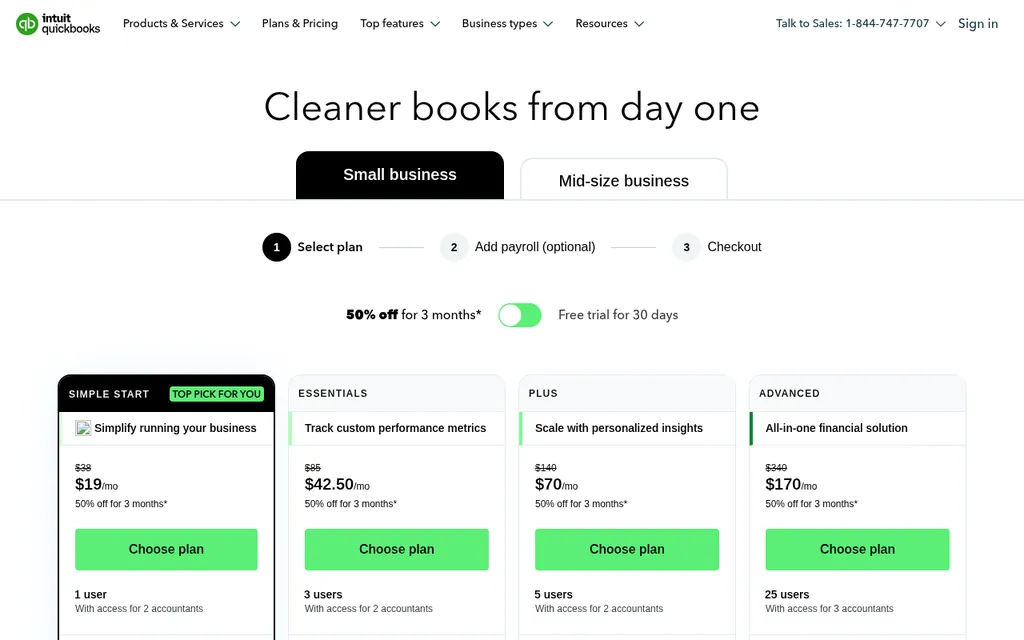
QuickBooks Online pricing page, checked October 2026
If your books are already in QuickBooks Online, part of procure to pay is sitting in your subscription. The QuickBooks Online pricing page lists Simple Start at $38 a month, Essentials at $85, Plus at $140, and Advanced at $340, and it was offering 50% off for the first 3 months when I checked. Plus includes 5 users and Advanced includes 25, and the paid plans include bill pay with free standard ACH up to a monthly allotment, then $0.50 per standard ACH payment.
Purchase orders are the catch for importers. QuickBooks' own purchase order help article says POs are only available on Plus and Advanced, and you can add an accepted PO to a bill when the supplier invoices you. Approval workflows for bills are listed only on Advanced. Comparing that bill with what actually landed at your warehouse is still a step you do yourself, and our guides to landed cost in QuickBooks and getting supplier invoices into QuickBooks Online cover how importers handle it.
Xero
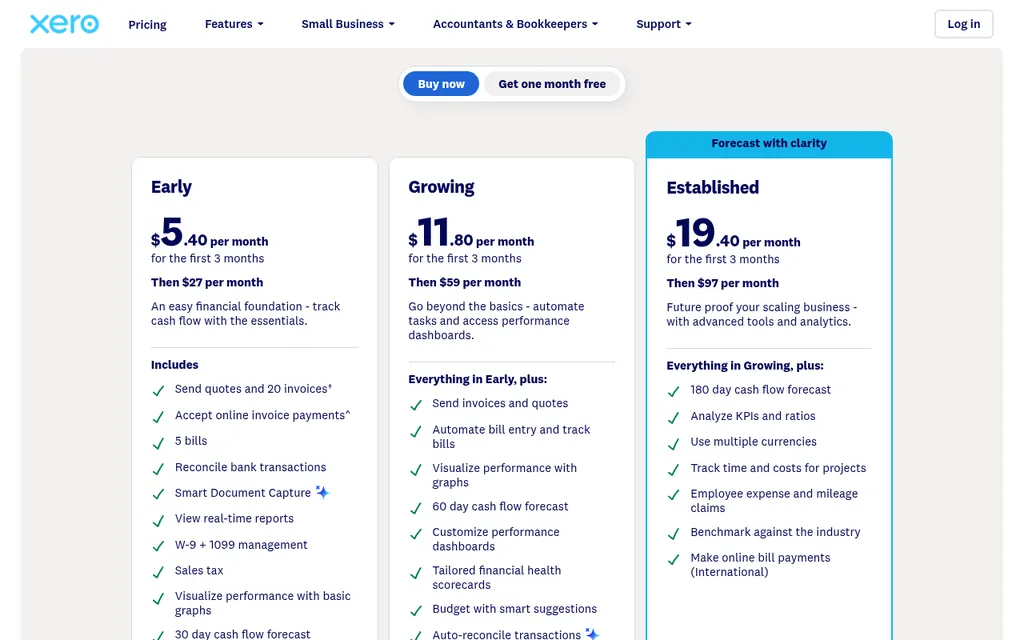
Xero pricing page, checked October 2026
Xero covers a similar slice of the chain. The Xero pricing page lists Early at $27 a month, Growing at $59, and Established at $97, with 80% off the first 3 months for new US customers when I checked. Early is limited to 5 bills, so most importers would start on Growing, which adds automated bill entry, and multiple currencies and international bill payments are listed on Established.
The Xero purchase order page says you can raise and send POs, control who approves them with user roles, and copy an approved order into a bill. It also handles partial deliveries in a simple way: you bill what you received and the order stays open for the rest. That works well for a brand whose factory ships in two lots, and our post on whether purchase order software can track partial shipments compares how other tools handle it.
AP And Spend Tools That Add Approvals And Payments
BILL
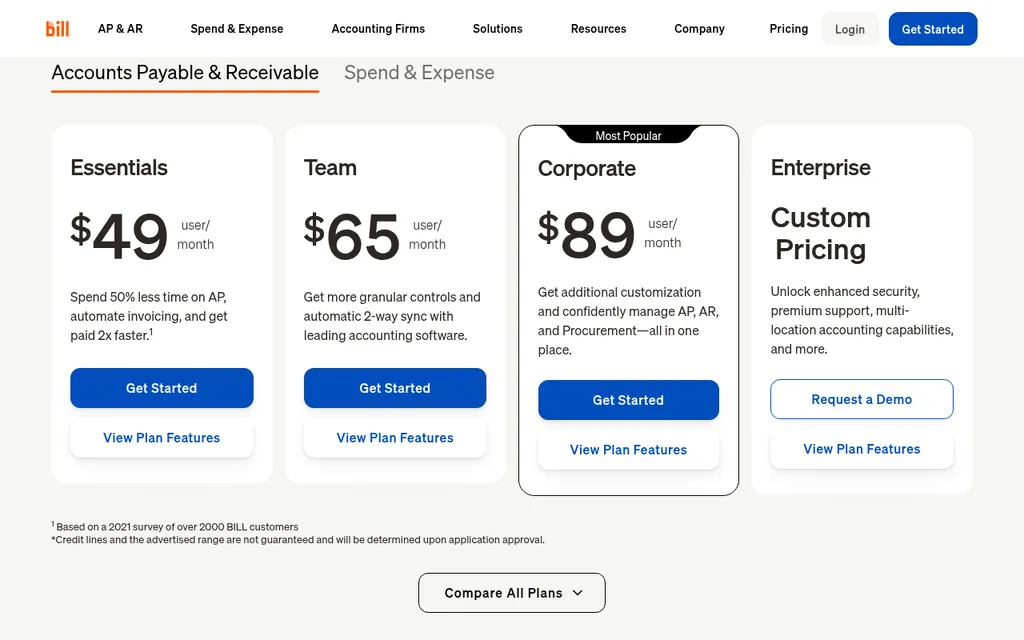
BILL pricing page, checked October 2026
BILL sits between your inbox and your accounting system and handles the approve and pay stages. The BILL pricing page lists Essentials at $49 per user a month, Team at $65, and Corporate at $89, with Enterprise on custom pricing. Every plan includes bill entry, approval workflows, a central inbox for bills, and payments by ACH, virtual card, credit card, and more, and per transaction fees apply on top for some payment types.
The procurement pieces live higher up. Purchase requests, purchase orders, tolerance rules, and 2-way matching are included on Corporate and sold as a Procurement add-on on Essentials and Team, and BILL lists automatic 2 and 3-way matching on Enterprise, with features that vary by accounting system. Essentials only moves data to QuickBooks or Xero by CSV, while Team and above sync both ways. Our roundup of the best accounts payable automation software for ecommerce compares BILL with other AP tools.
Ramp
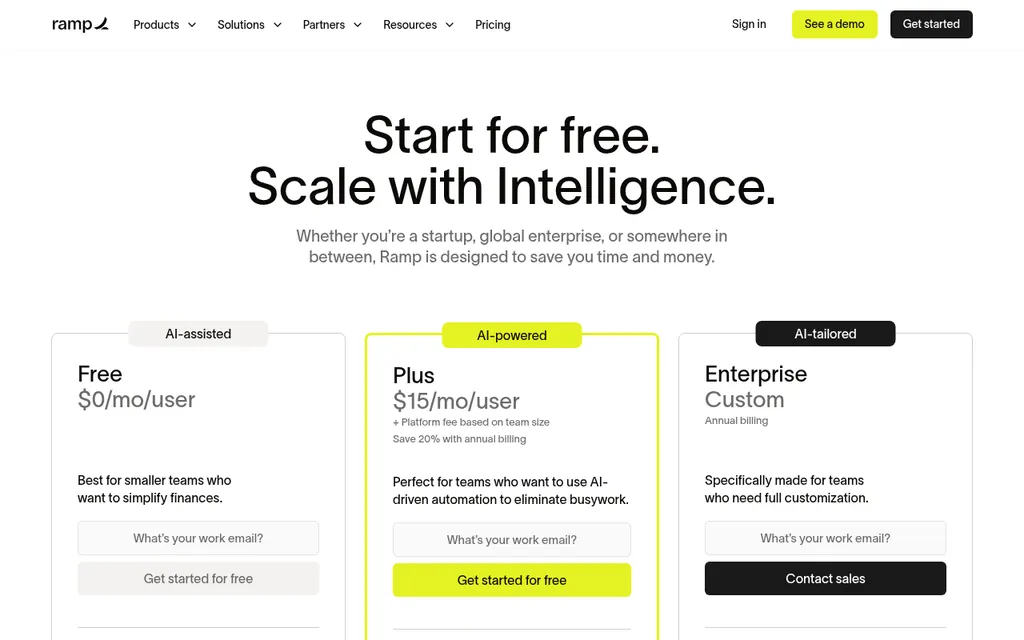
Ramp pricing page, checked October 2026
Ramp started with corporate cards and now covers bills and procurement too. The Ramp pricing page lists a Free plan at $0 per user that includes invoice capture with OCR, configurable approval workflows, bill payments by ACH, card, check, and wire, and QuickBooks Online and Xero integrations. Plus is $15 per user a month plus a platform fee based on team size, with 20% off for annual billing and a 30-day free trial.
Purchase orders come with the Procurement add-on, which Ramp sells on top of Plus or Enterprise. The pricing page lists PO creation and tracking, custom intake and approval workflows, and three-way match with Ramp purchase orders and item receipts as part of that add-on, but it doesn't publish the add-on price. Ramp also lists paying global vendors in USD or local currency, which is worth asking about if your factories invoice in another currency.
Full Procure To Pay Platforms
Precoro
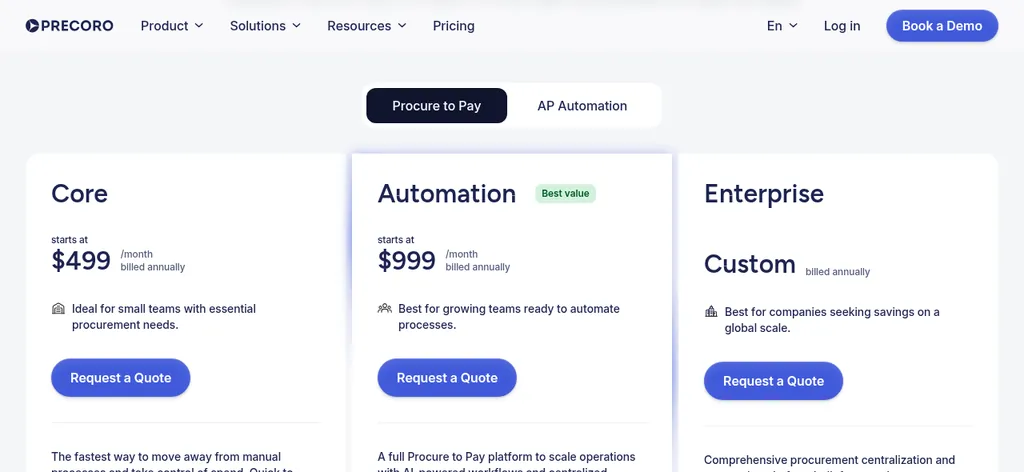
Precoro pricing page, checked October 2026
Precoro publishes prices for its full procure to pay plans, which makes it easy to budget for. The Precoro pricing page has a Procure to Pay tab with Core starting at $499 a month and Automation at $999 a month, both billed annually, and Enterprise on a custom quote. Core includes purchase requests, purchase orders, receipts, invoices, 2- and 3-way matching, automated approvals, invoice payments, and QuickBooks Online and Xero integrations.
Automation adds AI document processing, intelligent AP automation, inventory, and a supplier portal, and Precoro lists support for 300 currencies on its plans. Setup takes real time, because Precoro says onboarding typically runs 4 to 6 weeks with a customer success manager. That fits a brand with a purchasing team and several approvers better than a founder buying from three factories, and our guide to procurement software for small business importers covers that trade-off in more detail.
Procurify
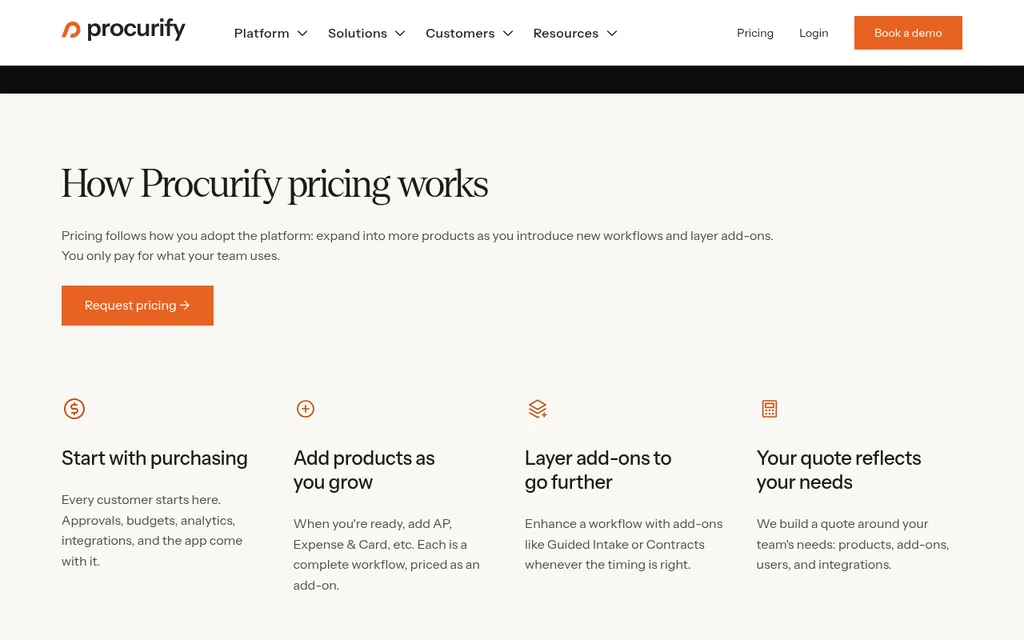
Procurify pricing page, checked October 2026
Procurify doesn't publish prices. The Procurify pricing page says every customer starts with Purchasing, which includes order requests, purchase orders, receiving items with an audit trail, approval routing, budgets, and accounting integrations with QuickBooks, NetSuite, Sage Intacct, and Microsoft Dynamics 365. Accounts Payable is an add-on that captures and matches vendor invoices, resolves exceptions before payment, and pays vendors by ACH, wire, or check in the US and EFT in Canada.
The quote is built around the products, add-ons, users, and integrations you need, and Procurify says it includes unlimited Basic users who can request and receive items, with pricing set by Pro users. That model suits a company where many people request purchases and a few approve them. A small import team should ask for the number early so it can compare against the published plans above.
Paying Overseas Suppliers
Wise Business
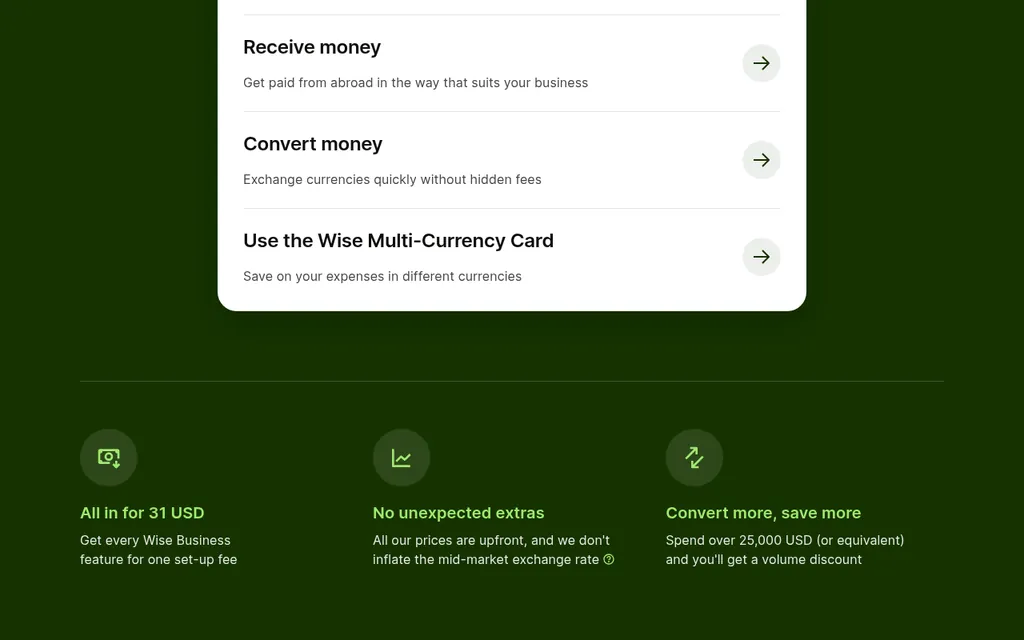
Wise Business pricing page, checked October 2026
The payment stage is where importers differ most from domestic buyers, because the factory usually wants an international transfer. The Wise Business pricing page says registering is free and one 31 USD set-up fee unlocks every Wise Business feature, and sending fees vary by currency, starting from 0.23%. The Wise Business page also lists paying up to 1,000 people at once with batch transfers and syncing your account to accounting software.
Wise doesn't handle purchase orders or approvals, so it fills only the last link in the chain. You would typically pay the deposit and balance from Wise and record the payment against the bill in QuickBooks or Xero. Before you rely on it, check that your supplier's country and currency are supported, and read our guide to 30/70 payment terms with Chinese suppliers for how deposits and balances usually line up with production.
Where SupplyAutomate Fits
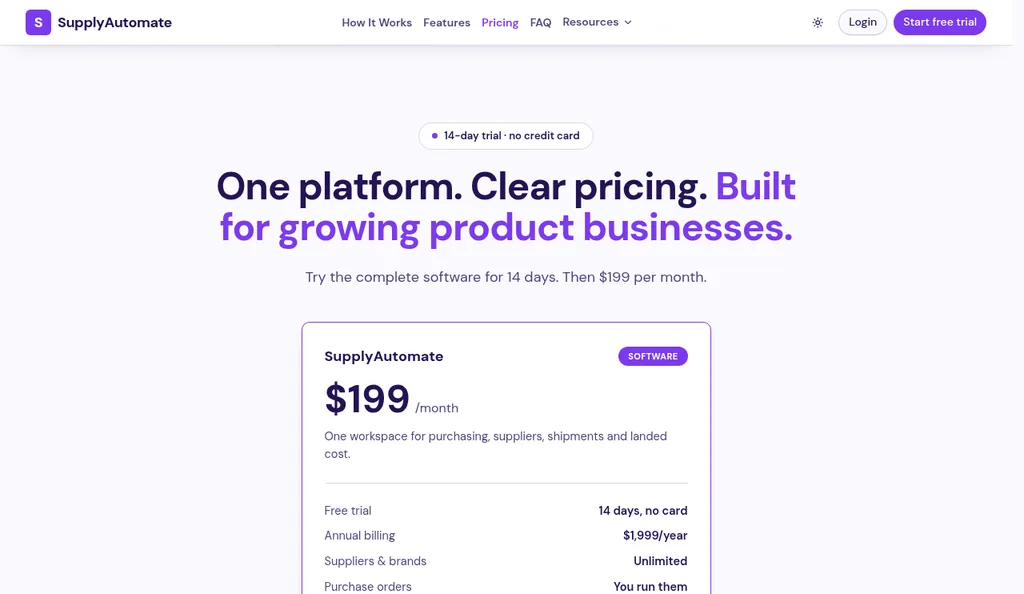
SupplyAutomate pricing page, checked October 2026
SupplyAutomate covers the purchase order and document stages, which is where a lot of the reconciling happens. You create purchase orders with your factories, then upload the supplier invoice, packing list, freight bill, and customs entry, and each document is read and filed on the right order. When an invoice lands on an order that already has items, SupplyAutomate compares the invoiced quantities and unit prices with the order lines and shows where they differ, and it checks the invoice's stated total against its own line items.
Parcel and ocean container tracking show where the goods are, and the landed cost per unit is built from the factory price, freight, duty, and samples. The pricing page lists one plan at $199 a month or $1,999 a year, with a 14-day trial and no credit card. It doesn't pay suppliers or connect to QuickBooks, Xero, Shopify, or Amazon, so approval and payment stay in your accounting or payment tool, and you export the order and landed cost data to CSV or Excel. Our Shopify ERP and Amazon FBA ERP pages show how that fits each channel.
How To Put A Procure To Pay Stack Together
For a small brand with one or two people doing the buying, the simplest stack is the accounting software you already have plus a way to pay suppliers abroad. QuickBooks Online Plus or Xero Growing can hold the POs and bills, Wise or your bank can send the international payments, and a tool like SupplyAutomate can keep the invoices, freight bills, and customs entries on each order so the match is quicker. Our guide to invoice matching software for ecommerce sellers compares the matching side in more depth.
Once several people can commit money, approvals start to matter more than data entry. That's the point where BILL or Ramp earns its place, because a bill can't go out until the right person has signed off, and the payment is recorded back in your books. If you want POs, receiving, matching, and payment in one system with a supplier portal, Precoro and Procurify are built for that, and the setup time and price reflect it.
Whatever you pick, write down which tool owns each stage. Two tools that both think they own the purchase order will drift apart quickly, and that's worse than one spreadsheet. If you'd rather hand the whole buying process to someone else, our Outsourced Supply Chain Manager service runs purchase orders, shipments, and supplier follow-up for you.
What Breaks The Chain For Importers
Start with deposits. A factory that wants 30% before production and 70% before shipping turns one purchase order into two payments, often weeks apart, against a single invoice or a proforma. Test how each tool records a deposit against an open PO, and whether the balance payment can be checked against what actually shipped.
Freight and duty arrive from other vendors after the goods are already in transit. Your forwarder and customs broker bill separately, and those costs belong to the order even though they aren't on the supplier's invoice. If they only live as separate bills in your accounting system, your unit cost understates what you paid, and our guides to allocating freight across multiple SKUs and landed cost per unit show how to bring them back onto the product.
Short shipments and currency round out the list. A short carton count should hold back part of the balance until the supplier credits it, and an invoice in one currency paid from a USD account rarely matches to the cent. Run a real order with a short shipment and a foreign currency invoice through any tool before you commit, and use the Incoterms guide for FBA sellers to check which costs your supplier's price already includes.
Frequently Asked Questions
What Is Procure To Pay Software?
Procure to pay software manages the chain from a purchase request or purchase order through receiving, invoice matching, approval, and payment to the supplier. Some products cover the whole chain, like Precoro and Procurify, while others cover part of it, like accounting software for bills or Wise for international payments.
What Is The Difference Between Procure To Pay And Accounts Payable?
Accounts payable starts when the supplier's invoice arrives and ends when it's paid. Procure to pay starts earlier, with the request and the purchase order, and includes receiving, so the invoice can be checked against what you ordered and what arrived. Our guide to accounts payable automation software covers the AP side on its own.
Does QuickBooks Online Do Procure To Pay?
It covers part of it. QuickBooks Online Plus and Advanced include purchase orders, all paid plans include bills and bill pay, and Advanced adds bill approval workflows. Receiving checks and matching against what arrived are steps you handle yourself or with another tool.
What Is A Three-Way Match In Procure To Pay?
A three-way match compares the purchase order, the receiving record, and the supplier invoice before the bill is paid. If the quantities or prices disagree, the bill is held until someone explains the difference, which is how short shipments and price changes get caught.
Which Procure To Pay Software Is Best For A Small Ecommerce Brand?
Most small brands do well with the accounting software they already use plus a payment tool for overseas suppliers. Add an AP tool like BILL or Ramp when approvals become a problem, and look at a full platform like Precoro once several people raise purchase orders every week.
Where To Start
If you're buying from a handful of factories, start by writing down your own chain: who raises the PO, who checks what arrived, who approves the bill, and how the money leaves. Then look at what your accounting software already covers, because QuickBooks Online Plus or Xero may handle more of it than you think. Add tools only for the stages that keep breaking, and test each one with a real order that includes a deposit, a freight bill, and at least one short carton. A week of that tells you far more than any feature list.
Related Guides
- Procurement Automation Software For FBA And Shopify
- Procurement Software For Small Business Importers
- Reconcile A Supplier Invoice To A Purchase Order
- Best Accounts Payable Automation Software For Ecommerce
- Invoice Matching Software For Ecommerce Sellers
- How Much Does Purchase Order Software Cost?
- How To Organize Supplier Invoices