A batch is four days late. The factory's last message was a photo of a pallet with no date on it, the spreadsheet says the goods ship on the 14th, and your Shopify listing shows 38 units left while Amazon shows 22. You don't need a nicer dashboard. You need one page that tells you whether to pay the deposit, chase the factory, rebook freight or trigger a reorder today.
That page is a status report, and most small brands run it badly. Order details live in three places at once: a WhatsApp thread, the supplier's proforma PDF and a spreadsheet only one person opens. When the question is "what did we agree to", nobody can answer with a document.
For FBA and Shopify sellers, the cost of that gap is specific. It's air freight on 200 units because a ship date slipped unnoticed, a payment released against a price the supplier changed, or storage fees on cartons that arrived early and then sat. A status report fixes those three problems before they reach your bank account.
Essential Fields in a Purchase Order Status Report
A purchase order status report is the single view of one order's agreed terms and current progress, built from the PO record and updated at each milestone. It exists to answer four questions in one screen: what did we agree, what has moved, what is wrong, and who is fixing it.
The report is only as good as the record underneath it. Each purchase order should hold the supplier, SKUs, quantities, prices, dates and documents on a single record, so the status view is a read of the PO rather than a second spreadsheet assembled by hand.
| Field | What it records |
|---|---|
| PO number | Unique ID that links every document and message, such as PO-2026-0412 |
| Supplier and SKU | Who makes the product and which SKU or FNSKU it maps to, such as the 300 mL bottle mapped to one Shopify variant and one FBA FNSKU |
| Ordered quantity | Units agreed on the PO, such as 1,200 units |
| Confirmed ship date | Date the supplier acknowledged in writing, such as 14 May |
| Status | Current stage: quoted, deposit, production, ready or shipped |
| Shipped quantity | Units that left the factory, such as 1,200 |
| Received quantity | Units counted at the warehouse or fulfillment center, such as 1,180 |
| Unit cost and currency | Agreed price used for landed cost, such as USD 3.80 per unit |
| Carton count and dimensions | Freight and FBA storage inputs, such as 60 cartons at 40 x 30 x 30 cm |
| Open exception | Issue, reason and owner still unresolved, such as a 20-unit shortfall owned by the ops lead |
Why the mandatory set is narrow
Procurement data-quality practice sets a minimum bar that's lower than most sellers assume. The controls that matter most are mandatory fields for quantity, price, currency, Incoterms, requested ship date, country of origin, carton information and supplier acknowledgment status, according to Manutan's procurement data-quality guidance. The same guidance notes that obsolete product references, incorrect unit prices, missing countries of origin and inconsistent supplier lead times sit behind erroneous orders, supplier returns and emergency replenishment.
That list maps directly to money. Country of origin drives duty. Incoterms decide who pays freight and when risk transfers. Acknowledgment status is the difference between a hope and a commitment.
A blank field isn't neutral. It's a decision nobody has made yet.
An empty carton count stalls your FBA inbound plan, because the booking needs real volume, not a guess. An empty acknowledgment field hides a supplier who never agreed to the date you've been planning around. An empty currency field turns a USD 3.80 quote into a landed-cost error the moment the factory invoices in EUR.
If you're weighing systems to hold these fields, it's worth taking the time to compare procurement software options against the field list above rather than against a feature page. And if you want to know which numbers the report should feed upward, the supply chain KPIs worth tracking start with on-time receipt and lead-time variance, both of which come straight out of these fields.
What a Status Report Does That Email Cannot
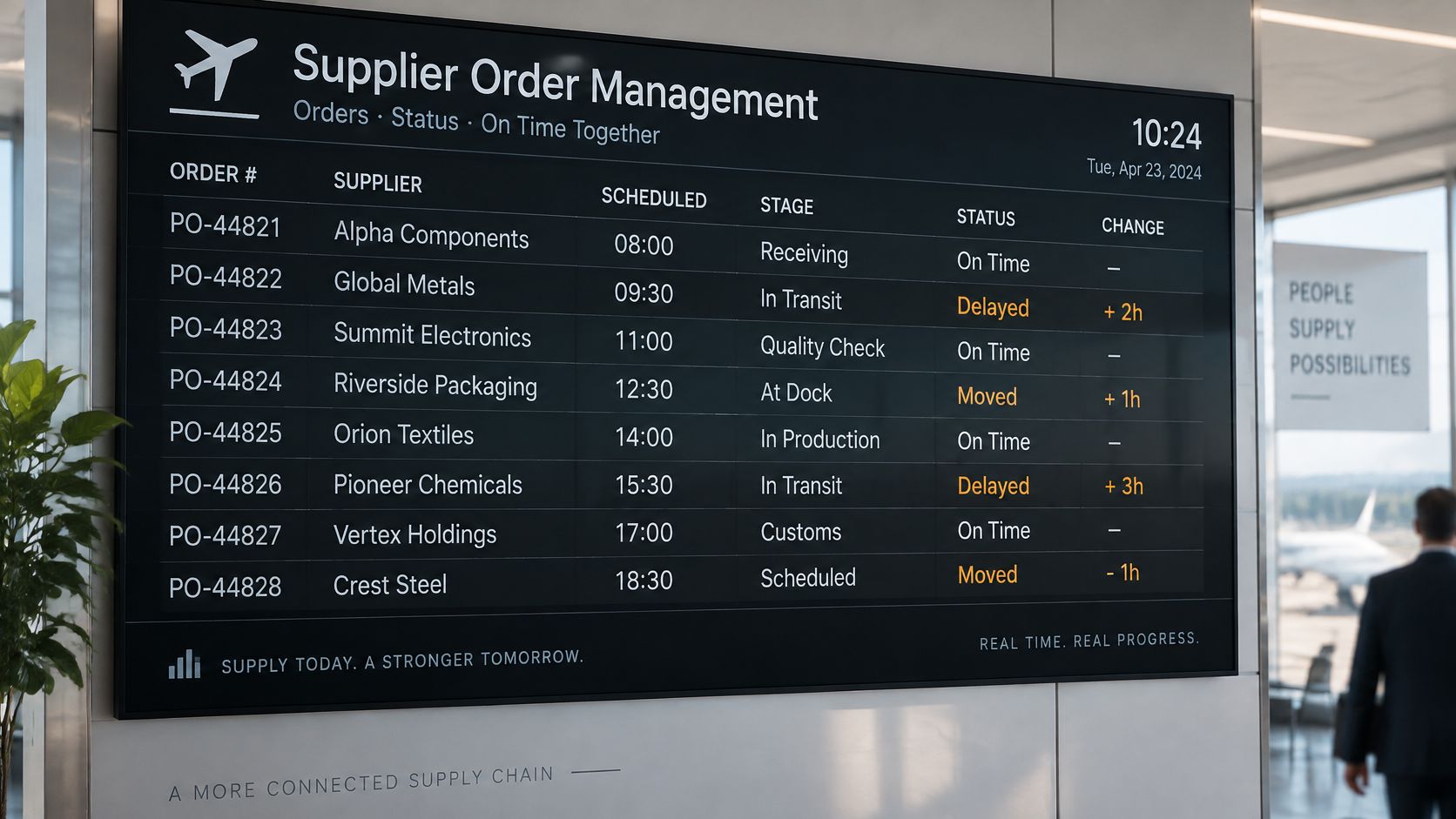
Think of the departure board at an airport. One line per flight, showing the scheduled time, the gate and any change. Nobody reads a departure board for pleasure. They read it because one glance answers two questions: what's planned, and what has moved.
An order book needs the same treatment. In most small brands, the order lives in a thread. A quote arrives as a PDF, the factory confirms a date in a chat message, someone updates a spreadsheet, and a second person quotes a different date to the freight forwarder. Nobody is lying. The record has no single owner.
A Shopify seller, before and after
Before: the seller asks in a thread when the 1,200-unit batch ships and waits two days for a reply that contradicts the spreadsheet. Freight gets booked against the wrong week. The Amazon inbound plan is built on a number nobody can source.
After: the seller opens PO-2026-0412, sees status Production, confirmed ship date 14 May, a flagged carton gap and the name of the person who owns it. The next action is a call to one factory contact, not a search through four apps.
The difference isn't speed of messaging. It's what each source holds. A thread holds opinions about a date. A report holds the agreed quantity, the acknowledged date and the open exception with an owner attached.
The one-screen test
Apply this test to whatever you use now. Ask a teammate who isn't you to answer three questions from one screen, without opening email: what did we agree, what has shipped, and what is still open?
If they can, the report is doing its job. If they have to ask which file to open, you don't have a report. You have a filing habit, and it will fail on the week you take a day off.
How Order Stages Move Through the Report
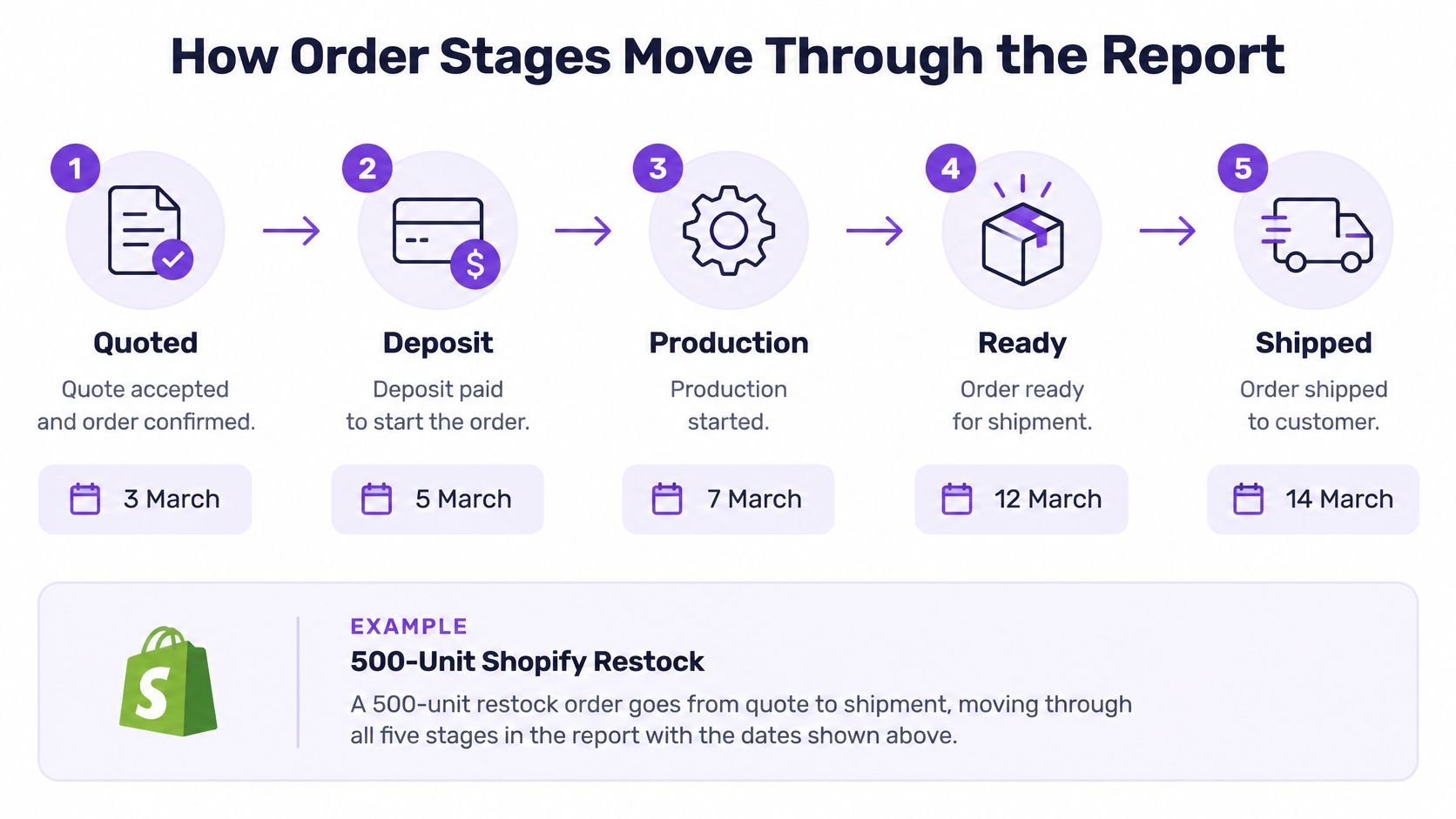
Every purchase order moves through five stages, and each stage carries a date. The date is the point. A status without a timestamp is a mood, not a fact.
For a 500-unit Shopify restock, the sequence looks like this. The quote is accepted on 3 March. The deposit goes out on 5 March. Production is confirmed for 2 April. The batch is ready on 16 April after QC passes. It ships on 22 April. Five stages, five dates, one record.
Two records, two jobs
The purchase order and the physical movement of inventory are separate records, and Shopify treats them that way. A purchase order documents the commercial agreement with a supplier, including products, quantities, prices, payment terms and supplier information, as Shopify's purchase order documentation explains. Once the supplier confirms, the seller marks it as Ordered and can create a linked inventory transfer, which tracks the shipment, receiving progress and cost adjustments.
That separation is useful, not bureaucratic. The PO says 500 units at an agreed unit cost and payment terms. The transfer says how many left and how many arrived. Shopify records inventory changes from supplier transfers in inventory-adjustment history, which gives you a traceable record for reconciliation.
The most common mistake in that handoff is moving an order to shipped on the supplier's word before a transfer exists. Stock then looks available in planning conversations days before it's sellable, and someone promises a customer a delivery date the warehouse can't meet.
Date rule: a stage without a date is an unfinished update. If the factory says "production started", the reply is "started when".
Partial and split shipments are the other place these two records diverge, and purchase order software that tracks partial shipments from suppliers has to keep both open rather than closing the PO on the first receipt.
The FBA stage that comes after shipped
Amazon sellers need a sixth stage: inbound received at the fulfillment center. The shipped date tells you when the factory let go. The received date tells you when the units became sellable and when storage liability started. Both belong on the report, in that order.
The checklist to hold yourself to: quote date, deposit date, production start date, ready date, shipped date, received date. Six dates per order. If any is blank, the order isn't tracked, it's described.
Exception Flags That Need Action the Same Day
A status report earns its keep on exceptions. Normal orders need a glance. Broken orders need a rule that fires without anyone remembering to look.
| Exception | Trigger | First action |
|---|---|---|
| Short shipment | Received below shipped quantity, such as 800 shipped and 760 received | Log the 40-unit gap, keep it open and request the packing list |
| Late production | Confirmed ship date passes without a ready status | Message the factory the same day and recalculate sales cover |
| Price variance | Invoice unit price differs from the PO price | Hold payment and check PO version history |
| Missing carton data | Carton count still blank three days before pickup | Block the FBA inbound booking until the count is entered |
| Missing document | Commercial invoice or packing list not uploaded by the ship date | Request it from the supplier and hold the customs filing |
| Lead-time slip | Ship date moves more than 7 days | Update the reorder point and check the new stockout date |
How a short shipment should be recorded
Shopify's receiving workflow allows partial and exception-based receiving, and inventory is received on the inventory transfer linked to the purchase order rather than on the PO itself. For each line item, the recipient can accept, reject or cancel units if they were never shipped, per Shopify's inventory transfer guide.
Take the 800/760 case. The supplier ships 800 units, the warehouse counts 760. The right move is to record 760 as received, keep the remaining 40 open as an exception, and request the packing list so the gap can be traced to a loading error, a customs hold or a factory miscount. The wrong move is marking the PO complete and "dealing with it later", because later means the 40 units vanish from the reconciliation and the invoice gets paid in full.
Shopify also supports full or partial receipt across multiple shipments, which matters when goods leave in separate batches. Purchase-order transfer reports can carry expected delivery dates, shipment status, destination and shipped, received, accepted and rejected quantities, so the exception is visible on the same record as the order.
Let the warehouse raise the flag
The count is only reliable if the counter updates the record. A 3PL provider or internal warehouse team can be invited to a purchase order so shipment and inventory updates post directly to the order. That single permission change moves the exception from a phone call to a system flag raised at the moment of counting, which is the only moment anyone has the cartons open.
Escalation rule: any open exception older than 48 hours goes to the person who owns the supplier relationship, along with the next date the seller needs stock on hand. No exceptions to the rule.
Flags without an owner and a deadline are a list of problems. The owner is what turns a report into a work queue, and the deadline is what stops a 48-hour silence becoming a 30-day stockout. For late-shipment signals specifically, the early triggers worth automating are covered in supplier management software that flags late shipments early.
Shopify and FBA Examples Read Side by Side
Two orders, same discipline, different failure modes. Follow the numbers through each report.
The Shopify restock
The 500-unit order at USD 4.20 per unit ships, and 495 units are counted at the warehouse. The report shows 500 shipped, 495 received, and a 5-unit gap held open as an exception with an owner and a date.
Now the cost side. Freight and customs-duty adjustments are added to the linked transfer as shipment-cost adjustments. If those add roughly USD 255 across the batch, the landed cost per unit moves from USD 4.20 to about USD 4.71, and the true cost per sellable unit is closer to USD 4.76, because the value was spread across 495 units, not 500. The margin shows before the stock sells, instead of surfacing in a month-end surprise.
The FBA inbound
An 1,000-unit inbound across 40 cartons is booked for 12 June. Because the report carries carton count and dimensions, the inbound plan uses real volume rather than someone's recollection of "about forty boxes". That volume number then flows into the storage calculation.
Amazon's storage mechanics make this worth tracking. The unified monthly storage fee is calculated using the daily average volume of properly packaged, shipment-ready inventory in cubic feet, assessed at the FNSKU level at month end and charged between the 7th and 15th day of the following month, per Amazon's FBA storage fee documentation. Higher charges apply to inventory held more than six months as aged inventory, and the published table includes a rate of $0.78 per cubic foot for new sellers, individual sellers and sellers with daily average volume of 25 cubic feet or less in the standard period, with $0.56 shown for the corresponding fourth-quarter period.
Two POs with identical unit costs can carry different storage liabilities if one batch sits longer. When the received date on the report shows a batch has been in the fulfillment center for 90 days, the seller sees the fee building while there's still time to run a promotion or a removal order.
Where the report ends
Neither example replaces the store. Supply Automate's purchase order tools track supplier price, freight, duty and fulfillment on every order (landed cost tracking), but the platform is not a Shopify app and doesn't sync orders or stock. The store count and the report have to be reconciled by hand each week, which takes minutes when the fields are complete and hours when they aren't.
Lead Time and Cost Fields That Change Reorder Timing
The promised date is not the planning date. A factory that says 30 days is quoting its best case, and planning on the best case is how brands stock out in a good sales month.
History beats the quote. A 2025 study using historical purchase-order data from a global equipment manufacturer found that machine-learning-derived plan lead times were more than 30% more accurate than existing plan lead times when evaluated by mean-squared error, according to the study on lead-time prediction. The practical instruction is to calculate expected performance from transaction history (ordered date, acknowledgment date, production completion, pickup, receipt, supplier, SKU, quantity and season) instead of displaying the latest promise.
Three lead times per supplier
Keep all three, per supplier and per SKU:
- Planned from the quote, which is what the factory hopes to achieve.
- Confirmed from the written acknowledgment, which is what it committed to.
- Observed from PO sent to sellable stock, which is what happened, including production, QC, pickup, transit, customs and final delivery.
Splitting the observed figure into those intervals stops one optimistic number from hiding the replenishment risk. Transit can be stable while customs adds nine days twice a year.
The reorder math
Take a SKU that sells 20 units a day with 400 units of safety stock. A 30-day quote gives a reorder point of 1,000 units (20 x 30 + 400). An observed 48-day lead time gives 1,360 units, a gap of 360 units, or about 18 days of sales.
Ordering at 1,000 units when the real cycle is 48 days means the reorder fires 360 units too late, every cycle. The report should trigger the order on the observed figure, and the planned figure belongs in a footnote.
A supplier's quoted lead time is a sales document. Your observed lead time is a planning input.
Cash sits on the same page. Landed cost fields such as freight, duty and fulfillment belong beside the supplier price on the PO, so margin and expedite costs show at the order level rather than at year end. Supply Automate's landed cost view tracks supplier price, freight, duty and fulfillment per order, which is the minimum needed to compare a USD 4.20 unit cost against a USD 6.10 air-freighted alternative. For teams still building the calculation, a lead time calculator for supply chain planning is the quick way to test how a changed lead time moves the reorder point.
Review quarterly. When observed lead time runs more than 10% above planned, change the reorder trigger, not just the note in the report.
Set Up Your Status Report This Week
Five steps, in order, on live orders rather than a spreadsheet you'll abandon.
- Create one PO per supplier order, using the fields from the first table. The free Purchase Order Creator takes supplier, ship-to and line items and downloads a PDF, which is enough to start with a complete record instead of a thread.
- Invite the factory, agent or 3PL to the order. Supply Automate lets collaborators into their own portal, and what they say stays attached to the purchase order rather than sitting in personal inboxes.
- Set the five stages with a date on each, and add the FBA inbound received stage if you ship to Amazon.
- Load the six exception triggers, each with a named owner and the 48-hour escalation rule.
- Review every Monday: open exceptions, orders past their confirmed date, and cartons with no count. Fifteen minutes, same agenda, every week.
If a calculator helps before you commit to a process, the free tools include a lead time calculator, import duty calculator and landed cost calculator, and there's no reason to build those numbers by hand first.
Then pick one live order this week and run it from quote to received through the report. Hand the screen to a teammate and ask what was agreed, what has shipped and what's still open. The answer tells you more about your operation than any dashboard demo.
Supply Automate gives Shopify and Amazon FBA sellers one workspace for purchase orders, supplier messages, production milestones and SKU-level landed cost, so a late ship date or a short shipment shows up as a flag with an owner instead of a message you scroll past three days later. The plan is $99 per month after a 30-day free trial with no credit card, and most brands are live in under 10 minutes with no IT work. Start with the free purchase order creator, then move one live order onto Supply Automate this week and see what your supplier agreed to.