A Shopify seller has 38 units left, a factory asking for a deposit today, and a spreadsheet that says production takes 45 days. The Amazon version of the same week is tighter. Stock is moving, storage capacity isn't unlimited, and the only price on file came from a quote sent before freight changed. Sending money off a half-finished purchase order request turns that pressure into a stockout, a repriced invoice, or cartons the warehouse can't receive.
A strong request works as a cash and inventory control document. Supplier management tools earn their place here when they keep the supplier record, confirmed price, documents, approvals, and receiving quantities together, rather than letting each decision live in a separate email or chat thread.
Required Fields for Every Purchase Order Request
A request isn't ready to submit until every field below has a value and a source document behind it. Use the purchase order template as a pre-submission checklist.
| Field | What to Enter | Why It Matters |
|---|---|---|
| Supplier legal name, phone, address and website | Exactly as on the supplier's invoice | Amazon rejects invoices with missing or inconsistent supplier details |
| SKU and supplier product code | Your SKU beside the factory's code | Keeps catalog changes from breaking the order |
| Quantity and MOQ | Ordered units and carton count, checked against MOQ | Orders below MOQ get refused or repriced |
| Unit price and currency | Confirmed price from the latest quote | Early estimates cause price disputes at invoicing |
| Incoterm | FOB, EXW or similar | Decides who pays freight and duty |
| Production lead time | Days from deposit to completion | Sets the real clock to sellable stock |
| Payment terms | Deposit and balance split, with due dates | Ties cash out to supplier milestones |
| Carton dimensions and weight | Per carton, in cm and kg | Needed for FBA receiving and freight quotes |
| Ship-to and delivery date | Warehouse or FBA inbound address, target arrival | Lets receiving and storage capacity be planned |
| Attached documents | Proforma invoice, packing list, spec sheet | Gives approvers and receivers the evidence they need |
Supplier Identity and SKU Mapping
Copy the supplier's legal name, phone, factory address, and website exactly as they appear on its invoice. A shortened trading name on the purchase order creates an avoidable mismatch later. Put the internal SKU beside the factory's product code on every line, so a catalog revision doesn't point the factory to a different variant.
That discipline starts with a standardized supplier master record. APQC's procurement benchmarking guidance identifies supplier lead time and supplier on-time delivery as core procurement benchmarks and emphasizes maintaining vendor master data. Assign a unique supplier and factory identifier, then normalize SKU, MOQ, unit price, Incoterm, lead time, carton dimensions, and payment terms before the first order.
Practical rule: If a field can't be traced to a confirmed quote, spec sheet, or invoice, it's an estimate and shouldn't be sent as an instruction to produce.
The proforma invoice, packing list, and spec sheet are evidence for the supplier order only. The file kept for an Amazon appeal is the supplier's final commercial invoice, not the proforma, a sales quote, or an editable spreadsheet.
How to Fill In and Submit a Purchase Order Request
The order below follows the sequence a supplier, approver, and warehouse read. Each purchase order in Supply Automate holds the supplier, SKUs, quantities, prices, dates, and documents on a single record, and its Purchase Order Creator lets users fill in supplier, ship-to, and line items, then download the purchase order as a PDF.
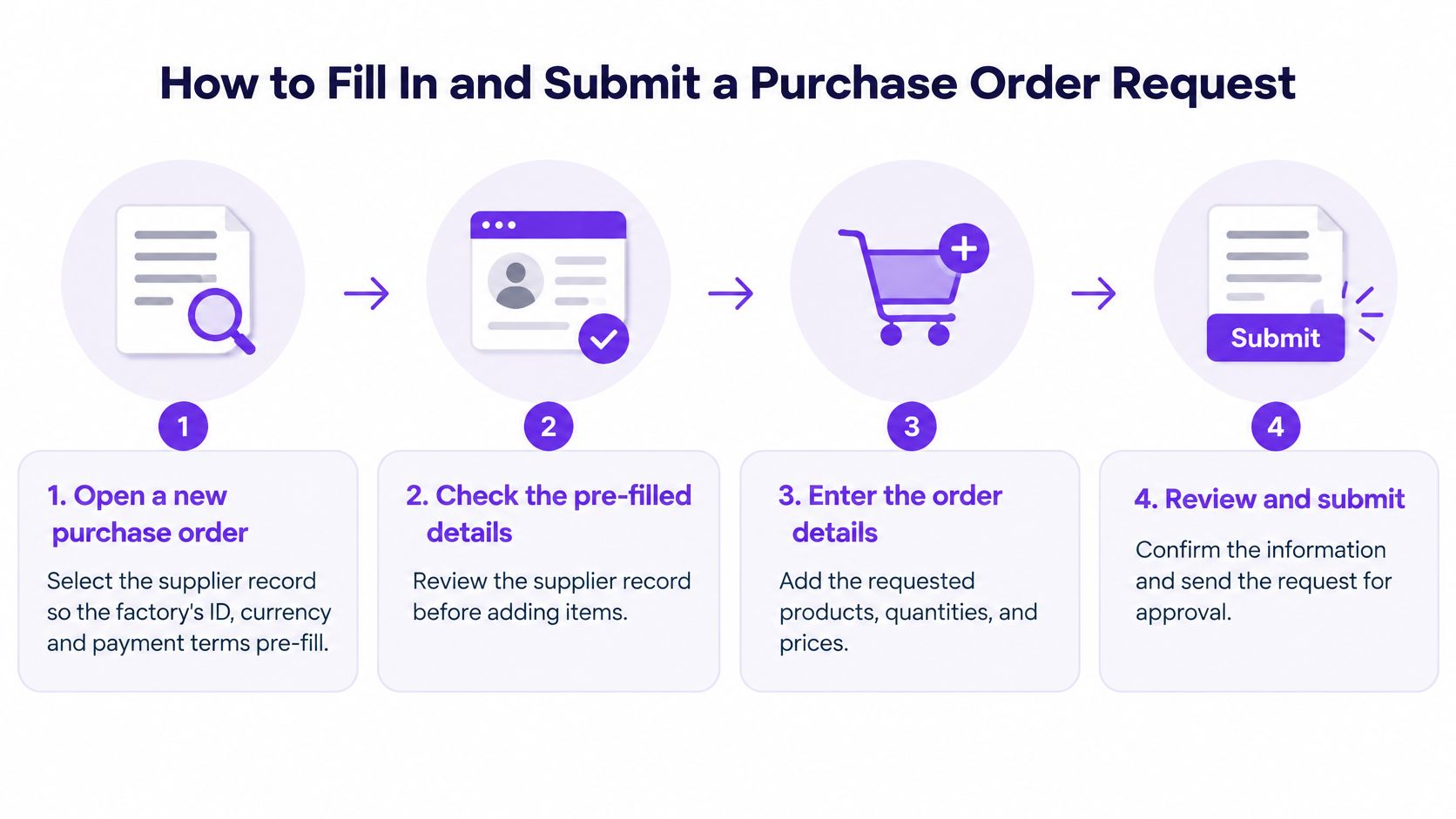
- Open a new purchase order and select the supplier record. The factory ID, currency, and payment terms should pre-fill from that record. The usual slip is creating a free-text supplier entry that later doesn't match the invoice.
- Enter line items one SKU at a time. Use the MOQ-adjusted quantity and the confirmed unit price from the latest quote. Entering an early quote price instead of the confirmed price builds a dispute into the final invoice.
- Add the ship-to address and target arrival week. For Shopify, that's the receiving warehouse. For Amazon FBA, it's the inbound destination once the shipment plan exists. Check carton count and volume against storage planned for that week before submitting.
- Attach the proforma invoice, packing list, and spec sheet. Mark each document final or draft accurately. A draft packing list with a different carton count will stall receiving even if the units are correct.
- Add a landed-cost estimate beside the PO total. Approvers need freight and duty visible before they sign, not as a later finance adjustment. Supplier management tools that show only product cost hide the number that decides margin.
- Save the PDF and send it for approval. Recalculate line totals and confirm the PDF matches the confirmed quantities. Sending a draft PDF with a different quantity than the supplier confirmed is a common, preventable stall.
Marking the Order in Shopify
Don't mark a Shopify purchase order Ordered until approval is complete, because that status starts the receiving chain. According to Shopify's purchase order guidance, after a purchase order is marked "Ordered," Shopify allows the merchant to create an inventory transfer that tracks shipment movement, receiving, and cost adjustments. The purchase order carries the commercial commitment, while the linked transfer carries receiving status such as "In progress" and "Received."
That separation matters for overseas orders arriving short, damaged, or in partial shipments. Keep ordered, shipped, received, accepted, and rejected quantities distinct at SKU level from the moment the order is submitted.
Who Approves the Request and What They Check
Approval should happen before payment, every time. A low unit price doesn't prove the order works. The photograph below shows the kind of side-by-side review that should precede sign-off.

Set tiers by order value. Below a brand's own threshold, for example $5,000, the founder or brand owner can approve alone. Above it, the finance lead or controller signs as well. Any later change to price, quantity, or delivery date reopens the request and needs fresh sign-off on the new version.
| Cost Item | Example Amount | What the Approver Verifies |
|---|---|---|
| Product cost | $12,000 for 1,000 units at $12.00 | Matches the latest confirmed quote and currency |
| Freight and duty | $3,200 | Freight quote and tariff classification are attached |
| Landed cost per unit | $15.20 | Still inside the margin target after Amazon or Shopify fees |
| Deposit and balance | Split with due dates from the payment terms | Cash is available on those dates |
The calculation is simple. Product cost of $12,000 plus $3,200 in freight and duty equals $15,200, or $15.20 per unit. If the selling price doesn't leave enough room after Amazon or Shopify fees at that cost, the request goes back before payment.
That check is getting harder to skip. In the 2025 CPO survey report from supplier.io, 91% of executives said they had adjusted or planned to adjust small-business sourcing because of recent or anticipated tariffs. Approvers should therefore verify the tariff classification, freight quote date, insurance, destination fees, and quantity assumption behind the estimate. A fuller view of that approval flow appears in the procure-to-pay process guide.
The short video below adds context on structured approval before commitment.
Record the approver's name, date, and PO version seen. Accountants, agents, factories, 3PL providers, and warehouse teams can be invited to orders in Supply Automate, with control over what each collaborator can see or edit per order. For bilingual supplier documents, teams evaluating translated specs against originals can borrow the discipline behind source-aware COMET scoring, which checks output against the source rather than trusting a polished draft.
Mistakes That Stall or Reject a Request
The most expensive mistake is filing a sales quote or proforma invoice as proof of supplier cost. That's not a filing preference. It's a rejection waiting for an appeal deadline.
According to the supplier invoice requirements summarized for sellers, Amazon requires invoices to show the supplier's name, phone number, address, and website, with a clearly displayed issue date within the 365 days before the performance notification and quantities sufficient to cover the cited ASIN's sales volume and inventory over the previous 365 days. Files must be authentic, unaltered PDF, JPG, PNG, or GIF files no larger than 10 MB. Amazon rejects sales quotes, proforma invoices, self-issued invoices, editable spreadsheets, and invoices with missing, inconsistent, or illegible details.
Internal Stalls That Look Small
- Supplier name mismatch: The PO uses a trading name while the invoice uses the legal name. Fix it in minutes by copying the invoice exactly and correcting the supplier master record.
- Price edited after approval: Someone updates the PDF without reopening approval. Lock the approved version and issue a revision instead.
- Quantity doesn't match cartons: Units were changed but carton count wasn't recalculated from the spec sheet. Recalculate before submission, not at the warehouse door.
- Approval buried in chat: A WhatsApp thumbs-up isn't attached to the PO version. Move sign-off onto the order record, where finance and receiving can find it.
Most fixes take minutes when caught before submission. A changed price, revised quantity, or new carton configuration needs a fresh supplier quote and a new approved version. Clear purchase order terms and conditions reduce disputes over which version controls.
A purchase order that can't be matched to a final invoice, an approved version, and a packing list isn't complete, even if production has already started.
Reconcile Ordered, Shipped and Sellable Quantities
Say a supplier confirms 1,000 units, ships 1,000, and the warehouse receives 1,000 but accepts only 970 after inspection. The brand doesn't have 1,000 sellable units. It has 970 accepted units and 30 rejected units requiring a claim, return, or write-off.
| Quantity State | Where It Lives | What It Tells You |
|---|---|---|
| Ordered | Purchase order | What the supplier committed to |
| Shipped | Inventory transfer, in progress | What left the factory |
| Received | Inventory transfer, received | What the warehouse counted at the door |
| Accepted | Inventory transfer after inspection | Units that can move to Available |
| Rejected | Inventory transfer after inspection | Units to claim, return or write off |
Shopify's purchase order transfer report documentation lists shipment status, expected delivery dates, destination, and shipped, received, accepted, and rejected quantities for transfers linked to purchase orders. Those fields turn reconciliation into a concrete control rather than a year-end inventory surprise.
Five Reconciliation Checks
- Confirmed versus shipped: Compare the PO quantity with the supplier's packing list before pickup.
- Shipped versus received: Check carton count and units at the warehouse door.
- Received versus accepted: Record inspection results before releasing stock.
- Accepted only to sellable: Move only accepted units to Available in Shopify. For FBA, compare accepted units with the inbound shipment before counting them sellable.
- Log every gap: Attach the date, photos, and supplier response to the original PO line.
Partial arrivals need the same discipline, as explained in this guide to tracking partial shipments from suppliers. Teams exploring automation for exception alerts may also find AI for supply chain operations useful background. Record repeated shortages in the monthly supplier scorecard so a pattern affects future orders.
Release the Deposit After Storage and Invoice Checks
Approval doesn't automatically authorize payment. Treat the deposit as a separate gate with three checks: storage capacity, arrival timing, and invoice match.
Check FBA Capacity Before Cash Moves
Amazon measures storage limits in cubic meters. Amazon's global selling guidance on IPI and storage limits recommends maintaining an IPI score above 400, and states that when the score is higher than 400, the seller has no additional storage limits beyond replenishment limits. If the score falls below Amazon's applicable threshold in both evaluation rounds, storage restrictions can apply in the following quarter.
Now put lead time against that quarter. With 45 days of production plus ocean transit, a container funded this week can arrive after new limits start. Cutting quantity or delaying the deposit is cheaper than paying to produce stock that can't be checked in. Shopify sellers face the same logic at a 3PL, where pallet space and receiving slots must exist in the arrival week.
Match the Invoice to the Signed Version
Compare the supplier's final commercial invoice with the approved purchase order total before sending the deposit. On the sample order, the approved figure is $15.20 landed per unit. If the invoice changes unit price, quantity, currency, or payment split, payment stops until a revised version is approved. The process for working through a mismatch is covered in this invoice reconciliation guide.
Supply Automate offers free tools including a purchase order creator, landed cost calculator, Amazon profit calculator, import duty calculator, freight cost estimator, MOQ calculator, lead time calculator, and dropshipping profit calculator. It also offers free downloadable templates, including a purchase order template, packing list, commercial invoice, supplier evaluation matrix, inventory tracking template, landed cost spreadsheet, lead time tracker, RFQ template, and proforma invoice template.
The immediate test is small. On one unpaid order this week, write down the current IPI score or warehouse capacity, the arrival week, and whether the final invoice matches the approved total. Then release the deposit or return the request. There's no useful middle state.
Supply Automate gives Amazon FBA and Shopify sellers one record for supplier messages, purchase order versions, documents, approvals, and SKU-level landed cost, so the checks above happen before cash leaves the account. Brands can start with its free purchase order, landed cost, duty, freight, MOQ, and lead time tools, then keep production and receiving updates attached to the same order. Visit Supply Automate to build the next purchase order request on a record suppliers, approvers, and warehouses can all work from.