If you run Shopify with factories overseas, a supply chain app is not just another storefront plugin.
Orders, supplier files, and unit costs still live in email and spreadsheets until something is late or margin disappears.
SupplyAutomate pulls those purchase orders, supplier documents, and cost details into one workflow so you can see what is late and what each unit really costs after freight and duty.
This review places SupplyAutomate next to the main Shopify supply chain app categories, then covers setup, supplier and Amazon connections, AliExpress use cases, security, and the limits you should test before you commit.
TL;DR
- SupplyAutomate fits Shopify and Amazon FBA importers who need AI document processing and landed cost on the same PO.
- Inventory planners like Prediko and Forthcast solve demand forecasting, not supplier invoice matching.
- Broader systems like Cin7 Core cover purchasing and multichannel ops, but can be more system than a small importer needs.
- Returns and 3PL tools solve one layer of the stack; they will not show true unit cost after import.
- Install carefully, map SKUs once, and test one real PO with invoices before you turn on full sync.
What SupplyAutomate Does As A Shopify Supply Chain App
SupplyAutomate is built for Amazon FBA sellers, Shopify store owners, and small to mid-sized ecommerce teams that buy from suppliers.
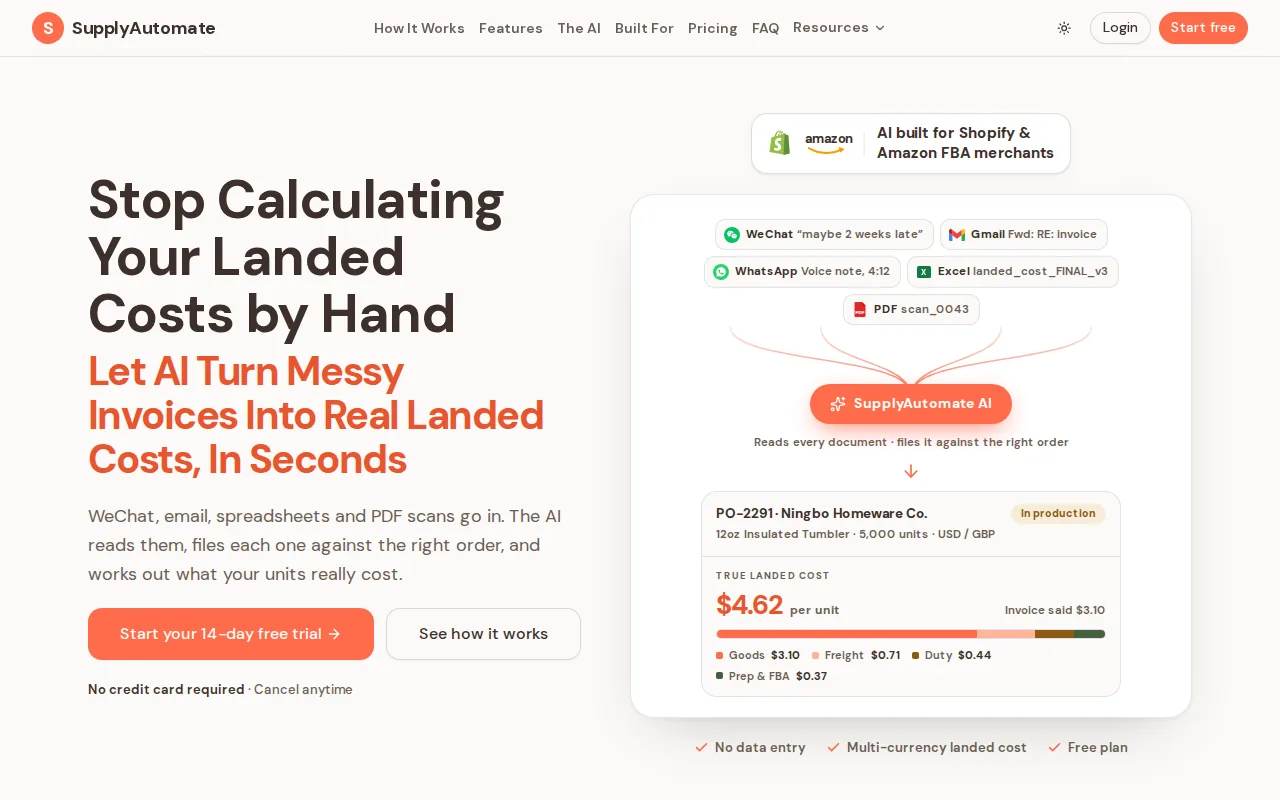
It combines AI document processing with landed-cost tracking so you can see product cost after freight, duty, and related charges.
That focus is why it sits first in this review.
Many Shopify apps handle one narrow task.
SupplyAutomate connects the work around a purchase order so supplier messages, invoices, freight bills, and shipment details stay tied to the right order.

AI reads uploaded documents and matches them to orders, which cuts manual entry when a supplier invoice or duty receipt arrives.
You can then review the cost of a SKU before setting a price or judging margin.
That matters when the factory quote looks good but freight changes the math.
A product can have a low unit price and still lose money after transport and import charges.
SupplyAutomate puts that calculation in the same operating view as the order.
The method behind it is in how to calculate landed cost for imported products and how to calculate Shopify landed cost.
For the invoice side of the workflow, see invoice processing software and invoice matching software for ecommerce sellers.
The caveat is simple.
SupplyAutomate is not meant to replace every warehouse, shipping, or marketplace system.
If your main problem is barcode scanning inside a large warehouse, you likely need a separate warehouse management tool.
If the pain is supplier paperwork and unclear unit cost, SupplyAutomate is the sharper fit.
Start with one active PO and its related files.
Ask one question: can the system show the cost of that order without another spreadsheet?
If you are still assembling those orders by hand, creating a purchase order covers the fields worth capturing first.
Shopify Supply Chain App Categories
A Shopify supply chain app usually focuses on one layer of the order flow.
The main categories are inventory planning, order management, fulfillment, multichannel sync, and returns.

Inventory apps watch stock levels and help estimate when a product needs a reorder.
Forthcast uses Shopify sales data for AI demand forecasts.
Prediko focuses on inventory management for Shopify brands and connects with channels such as Amazon, TikTok Shop, 3PL systems, and warehouse tools.
Order and fulfillment apps move an order toward the right warehouse or service.
Cin7 Core supports Shopify, Amazon, wholesale, and retail POS workflows, with purchasing, reporting, and demand forecasting in a broader product stack.
Returns tools solve a different problem.
Forthroute (part of Forthsuite) handles return authorization, shipping labels, and inventory restocking so a returned item does not sit in a queue while the stock record stays wrong.
There are also apps built for one operational view.
Forthmatch tracks 3PL performance for high-volume Shopify stores.
Assisty takes a reporting-first approach with inventory and replenishment reports for Shopify merchants.
These tools can be useful, but they do not necessarily explain the full cost of bringing goods into stock.
SupplyAutomate's benefit is different.
It serves Amazon FBA and Shopify sellers without connecting to either store. You upload supplier invoices, packing lists, freight bills, and customs entries, and it turns them into purchase order records, shipment tracking, and landed cost.
Free plans, where they exist, are usually narrow: returns, 3PL tracking, or reporting, not full import cost control.
Use the ecommerce inventory management software comparison when stock planning is your main concern, or best Stocky alternatives for Shopify if you are leaving Shopify's older buying tools.
Do not choose an inventory app by integration count alone.
Three integrations can still mean shallow data flow, while two focused channels may give you better cost control.
For a store that sells on Shopify and Amazon, the useful test is operational.
Can the app tell you which stock is available, which order is late, and what the item cost after import?
Timing is part of that answer, and the reorder point formula for importers shows how supplier lead time turns into a reorder date you can hold.
How To Install And Configure A Shopify Supply Chain App
Installing a Shopify supply chain app is quick.
Configuring it well takes more care, because wrong permissions or SKU data can spread errors through your workflow.
Read the permission screen before approving access, especially when an app can view products, orders, locations, or customer data.
- Open the Shopify admin. Go to Apps, then open the Shopify App Store. Search for the app by its exact name.
- Review the listing. Check purpose, pricing, developer, permissions, support, and recent reviews. A supply chain app that asks for data outside its job deserves extra questions.
- Install and approve access. Select Install. Shopify will show the requested permissions and any charges before approval.
- Connect the store data. Choose the sales channel, locations, suppliers, and product groups you want to manage. Start with a small set of SKUs instead of importing the whole catalog on day one.
- Set supply chain stages. Use stages such as production, transport, customs, and receiving when the app supports them. Add the data points you need at each stage, such as ship date, expected arrival, freight cost, or duty receipt.
- Test one order. Compare the app's product, order, and cost record with your source documents. Fix SKU mismatches before you turn on automatic sync.
Shopify's own App Store best practices are worth reading as part of that install review.
Ask whether the app runs mainly in the admin or adds code to the storefront.
The second case deserves a speed check after installation.
SupplyAutomate has nothing to install in Shopify, so there are no store permissions to review. Begin with your current supplier list and upload the documents for one recent purchase order.
The Amazon FBA supply chain software overview is useful context if FBA is part of the mix.
Keep admin access limited during onboarding.
Give installation rights only to the person who owns the store setup, then test team permissions before sharing the app with staff.
Export or save a copy of your current SKU and inventory data before the first sync so you can undo a bad mapping rule.
Connecting Suppliers, Amazon, AliExpress, And Other Sales Channels
Supplier connections work best when every system uses the same SKU.
If the codes differ, orders may sync while inventory stays split across two records.
Amazon Multichannel Fulfillment (MCF) is the common handoff for using Amazon inventory to fulfill Shopify orders.
Amazon's MCF Shopify integration guide walks through connecting the account, mapping Shopify products to Amazon SKUs, and setting shipping options customers can see.
Matching names can allow automatic SKU mapping.
If the Shopify SKU and Amazon SKU differ, individual mapping is usually required, and the setup effort grows with every mismatch.
Once the connection is live, Shopify sends an eligible fulfillment request to Amazon.
Amazon picks, packs, and ships the order, while tracking returns to the Shopify admin.
MCF can use a shared inventory pool across Amazon and Shopify, but you still need to decide which products belong at the Amazon fulfillment location.
AliExpress follows a different pattern.
You install a connector through the Shopify App Store, review its data access, then link the AliExpress account and select products.
The app may import product details and submit orders to the supplier, but you must still check supplier stock, shipping times, product quality, and return rules.
The same rule applies to other dropship partners.
Do not treat a connection as proof that the supply chain is under control.
Test the complete path: customer order, supplier acceptance, shipment tracking, inventory update, and return handling.
A supplier evaluation matrix gives you a way to score those partners before volume depends on them.
SupplyAutomate fits beside these channel links by keeping supplier documents and landed cost visible.
See supplier management software and best supplier management software for ecommerce brands for related purchasing workflows.
Integration breadth can mislead.
Prediko lists many sales channel connections, while Cin7 Core includes wholesale and retail POS. SupplyAutomate takes a different route and works from the supplier documents you upload.
More connections do not always mean better cost insight.
Choose the app that gives your team the data needed for its next decision.
SupplyAutomate Compared With Other Shopify Supply Chain Apps
SupplyAutomate fits import-heavy Shopify and Amazon FBA sellers who need document automation and landed-cost control.
The other named apps are useful when the job is narrower.
| App | Use When | Does Well | Does Not Cover |
|---|---|---|---|
| SupplyAutomate | Amazon FBA and Shopify importers | AI document processing with landed-cost insight | Less suited to warehouse-floor workflows |
| Prediko | Shopify brands of many sizes | AI inventory planning across several channels | Focused on stock planning rather than supplier documents |
| Cin7 Core | Growing product businesses | Purchasing, fulfillment, reporting, and demand forecasting | May be more system than a small store needs |
| Forthcast | Stores that need demand forecasts | AI forecasts based on native Shopify sales data | Focused on forecasting, not import paperwork |
| Forthroute | Stores with return volume | Return authorization, labels, and restocking | Does not cover the full import cost workflow |
| Forthmatch | High-volume Shopify operations | 3PL performance tracking | Designed around fulfillment monitoring |
| Assisty | Small stores needing reports | Inventory and replenishment reporting | Reporting is not supplier lifecycle management |
Integration counts do not tell the whole story, because the functions differ widely.
A tool with Amazon, TikTok Shop, and 3PL links may still leave you calculating freight and duty by hand.
Pricing needs the same care.
Free options may be tied to narrow tasks.
SupplyAutomate's trial and plan details change over time, so check the current pricing page before you buy.
Test the product with a real invoice set, not a clean demo file.
Choose Prediko when demand planning is the main problem.
Choose Cin7 Core when you need broader product-business operations, and read is ERP software overkill for a small Shopify store before you commit.
Choose a returns or 3PL tool when that single task is blocking your team.
Choose SupplyAutomate when you need to connect supplier paperwork with the true cost of inventory.
If you are also comparing buying tools, see best purchase order software for Shopify and Shopify order management software.
FAQ
What Is The Best Shopify Supply Chain App?
For Shopify sellers that also manage Amazon FBA inventory, supplier documents, and landed costs, start with SupplyAutomate.
It focuses on the work behind the sale: purchase orders, invoices, freight records, and supplier communication.
Stores that only need forecasting, returns, or warehouse scanning should use a narrower app.
Can Shopify Connect To Amazon FBA?
Yes, Shopify can connect to Amazon fulfillment workflows through MCF and related apps.
Amazon's MCF Shopify integration lets Shopify orders use Amazon inventory, with SKU mapping and shipping settings handled during setup.
You do not need to sell on Amazon to use MCF, but inventory must be sent to Amazon before fulfillment can begin.
Can A Shopify Supply Chain App Connect To AliExpress?
Yes, an AliExpress connector can link a Shopify store with supplier product and order data.
Review the app's permissions before installation, then test product import, order submission, stock updates, tracking, and returns.
A working connection does not remove the need to check supplier quality or delivery times.
What Does Landed Cost Mean In Ecommerce?
Landed cost is the total cost of getting a product ready for sale.
It can include the supplier price plus freight, duty, customs charges, and related fees.
A Shopify supply chain app that tracks only the supplier invoice may understate the true cost.
SupplyAutomate is built to keep those cost records with the order.
See what landed cost is and why it matters for the full definition.
Are Shopify Supply Chain Apps Secure?
Security depends on the app and the permissions it requests.
Shopify shows requested access during installation, so review it before approval.
Limit staff access, start with a test store or small SKU group when possible, and remove apps you no longer use.
Put One Real PO Through The System
If supplier follow-up, import paperwork, and unclear landed cost are the drag, try SupplyAutomate on one recent PO and compare the cost view to your books.
Warehouse scanning, demand planning, and returns still belong to a narrower app.
A Shopify connection does not replace either job.
If you need operator capacity instead of another seat of software, hire a supply chain manager or use software and the Outsourced Supply Chain Manager page cover that path.
Related Guides
- Best Purchase Order Software For Shopify In 2026
- Shopify Order Management Software
- Shopify ERP
- Is ERP Software Overkill For A Small Shopify Store?
- Amazon FBA Supply Chain Software
- What Is Landed Cost And Why It Matters
- How To Calculate Shopify Landed Cost
- Invoice Matching Software For Ecommerce Sellers
- Best Supplier Management Software For E-Commerce Brands
- Hire A Supply Chain Manager Or Use Software?